
Get all your news in one place.
100's of premium titles.
One app.
Start reading
GamesRadar
GamesRadar
Technology
Phil Hayton

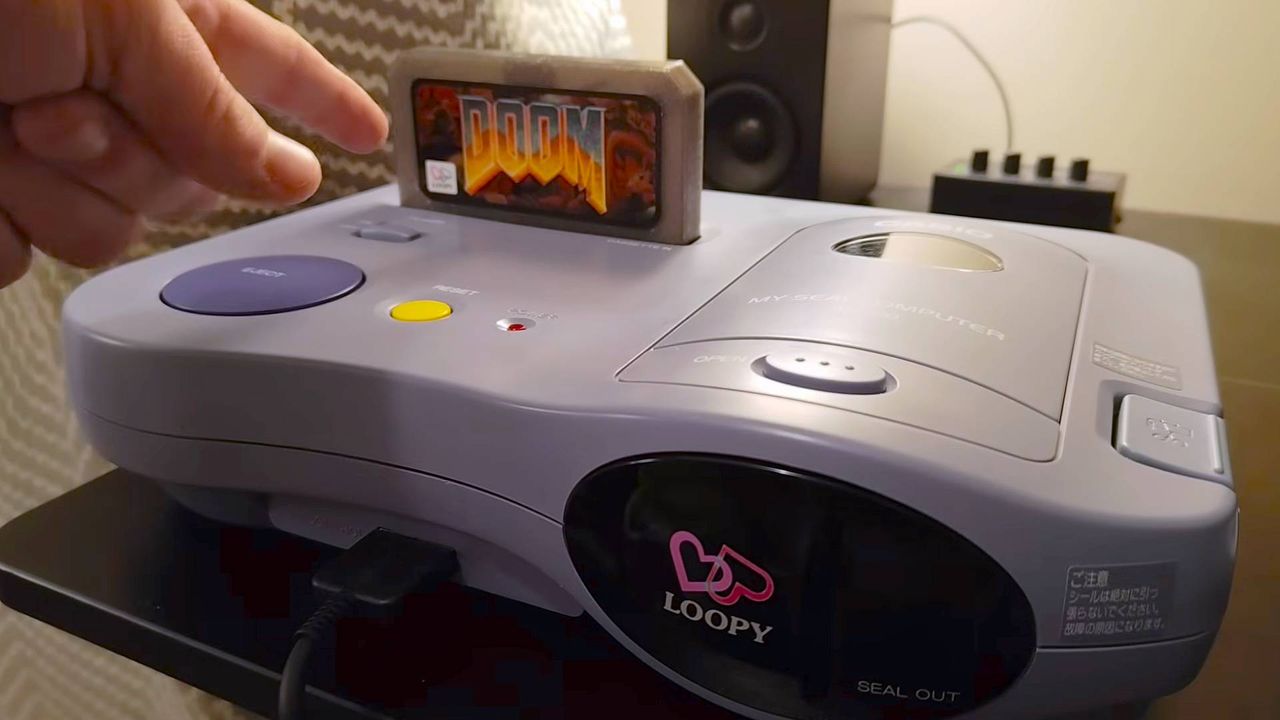
The last retro console I'd expect to run DOOM is the girly pop Casio Loopy, and yet, it can now run DOOM

Hand pointing at custom DOOM cartridge inserted into Casio Loopy console.

It's easy to see why the Casio Loopy, a Japanese console with a built-in sticker printer, didn't get an official port of DOOM. That hasn't stopped enthusiasts in the past, though, and the '90s 32-bit system that once targeted girl gamers with its lilac getup and library of "cosy" and romantic cartridges now runs id's ultra-violent boomer shooter.

I'm well used to seeing absurd DOOM ports, but the 1995 Casio Loopy wasn't on my bingo card (cheers for highlighting, Hackaday). You've got developer Throaty Mumbo to thank, as they took it upon themselves to acquire the retro console (something I've yet to do), and get the MS-DOS shooter running using a "Floopy Drive".

Yes, I snorted at the name too, but the Floopy Drive is effectively an open-source flash cart for the Casio Loopy. After trying out some other homebrews, like "Floopy Bird" and the DOOM/Wolvenstein 3D-inspired "Anarch", the dev decided to take a crack at making an actual DOOM port inspired by the SNES version of the shooter.

Throaty Mumbo sadly doesn't document the actual Casio Loopy DOOM port development, but they do show off the results. The developer started off by making a version for an emulator before trying to run it using the Floopy Drive, and while the first attempt was a bit slow and lacked MIDI audio, two days' extra work seemed to do the trick.

Of course, getting DOOM running on something like the Loopy isn't child's play. Notably, Throaty Mumbo says while the game and Casio's retro console both use MIDI, the shooter uses a different sound font (Roland SC-55), meaning drums and other layers are out of sync. To combat this, the dev seemingly went through each instrument, then narrowed things down (sadly with help from Claude AI) to pick out more appropriate tones.

The result is naturally far blockier looking than if you used an actual MS-DOS PC, but it's pretty much on par with the SNES version. That's a mean feat given the Loopy doesn't have access to a co-processor like the Super FX chip built into Nintendo's cart. What I'm more impressed with is the approach to audio, as Throaty Mumbo ends up modding the Floopy Drive to also support PCM sound effects on top of the MIDI tracks.

That in itself involves using a Raspberry Pi RP2040 board in conjunction with a PCM5102 for analogue conversion to the cartridge pins. Having previously even wrestled with my custom Windows 98 PC and Soundblaster 16 sound card regarding running both MIDI and sound effects without conflicts, I am pretty shooketh that a Casio Loopy can pull it off with a bit of modding.

As a finishing touch, the developer whips up a custom label for the DOOM cart, which really brings out the pastels of the console's shell and buttons. The ultimate cherry on top, though, is using that integrated sticker printer to make a cursed screenshot, which is then added to a scrapbook with the other more fitting girly pop shots.

(Image credit: Throaty Mumbo)

I've never been more tempted to grab a Casio Loopy, especially since it's one of the only consoles I don't already own. I reckon I may have to swing past by friend Alan at Forgotten Worlds in Stewarton, Scotland to see if he's got the oddball machine in stock, and if that happens, I'll absolutely be looking at playing DOOM and printing kawaii pictures of every Cacodemon I encounter.

Swing by the best retro handhelds for ways to play classic capers on the go.

Sign up to read this article
Read news from 100's of titles, curated specifically for you.
Already a member? Sign in here
Related Stories
Top stories on inkl right now
One subscription that gives you access to news from hundreds of sites
Already a member? Sign in here
Our Picks
Fourteen days free
Download the app
One app. One membership.
100+ trusted global sources.