Get all your news in one place.
100's of premium titles.
One app.
Start reading
Tom’s Guide
Tom’s Guide
Technology
Nikita Achanta

The IQUNIX MQ80 is one of the loveliest mechanical keyboards I’ve tested so far — here’s my honest verdict on whether it’s worth $169

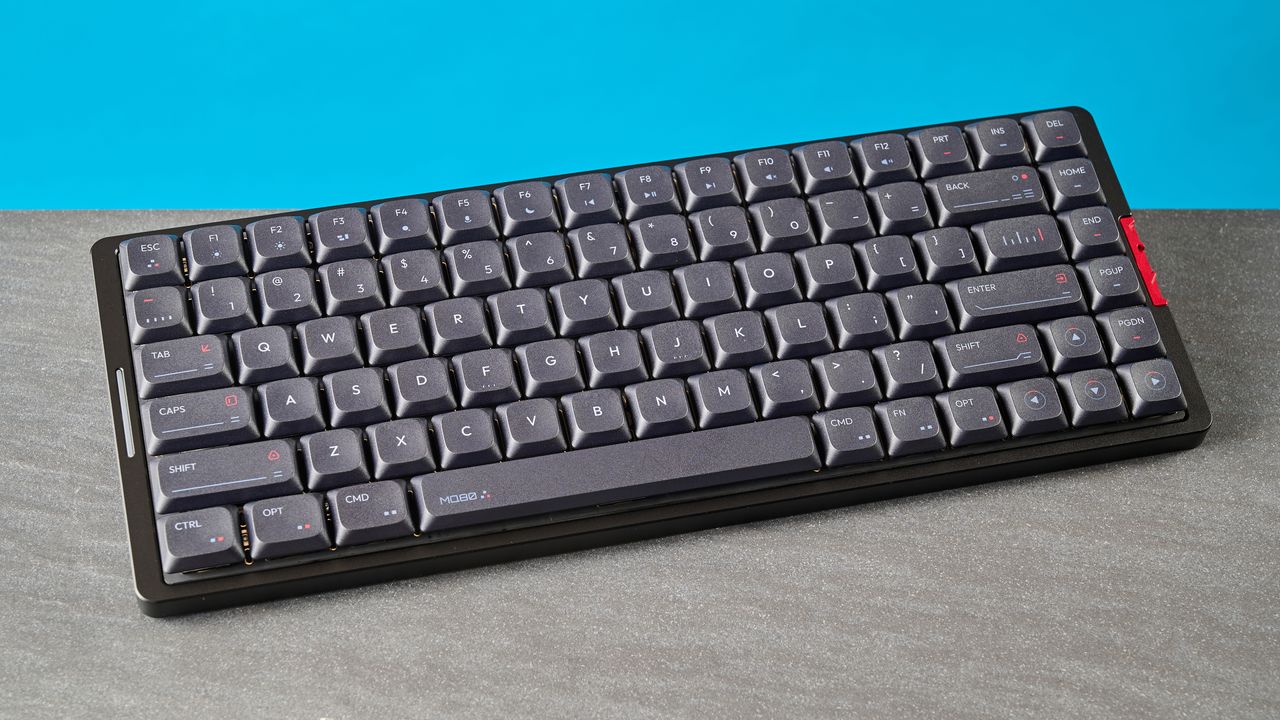
A black IQUNIX MQ80 mechanical keyboard.

The IQUNIX MQ80 is a lovely mechanical keyboard that’s an utter delight to type on. Its Kailh Gold Red linear switches are responsive and they sound deliciously creamy. As a low-profile keyboard, it’s comfortable and non-fatiguing to type on for hours on end. For casual gamers, there’s 1,000Hz polling too.

It isn’t perfect, though. As the MQ80’s case is made of aluminum, its height isn’t adjustable. There are no physical toggles on it either, which means you need to rely on finicky key combos for changing settings. However, neither of these drawbacks keep it from earning a spot amongst the best mechanical keyboards today.

But do you have nearly $170 to splash out? If yes, then this could be the keyboard for you. For the complete breakdown, read my full IQUNIX MQ80 review.

IQUNIX MQ80 review: Specs

Price

$169 / £180

Switches

Kailh Gold Red (linear) mechanical

Keycaps

Double-shot PBT

Construction

Aluminum + ABS plastic

Mount

Le-tray gasket

Layout

80%, 84 keys

Operating system

macOS, Windows

Backlighting

Per-key RGB

Polling rate

1,000Hz (wired, 2.4GHz); 125Hz (Bluetooth)

Paired devices max

3

Connectivity

Bluetooth, 2.4GHz dongle, wired

Battery

4,000mAh

Measurements

12.64 x 4.9 x 1.08 inches

Weight

2.6lbs

Colors

Shadow Black, Moonlight Silver

IQUNIX MQ80 review: Cheat sheet

  • What is it? A low-profile mechanical keyboard sporting an 80% layout
  • Who is it for? Hardcore typists who need a comfortable keyboard with responsive switches
  • How much does it cost? The IQUNIX MQ80 is available for $169 / £180
  • What do we like? The stellar aluminum build, beautiful typing experience and sound profile, low-profile design, and the web-based software
  • What don’t we like? The frustrating key combos, steep price point, and non-adjustable height

IQUNIX MQ80 review: The ups

From its sturdy build quality and comfortable low-profile design, to its outstanding typing experience and creamy sound profile, the IQUNIX MQ80 is a winner.

Stellar build quality

(Image credit: Tom's Guide)

IQUNIX is yet to let me down with its keyboards’ build quality. Both the IQUNIX Magi75 ($169) and the IQUNIX Magi65 Pro ($139) are built exceptionally well, and the IQUNIX MQ80 is no different. Similar to the Magi75, the MQ80 utilizes a CNC machined aluminum chassis as well as top-notch plastic to deliver a sturdy and robust keyboard.

The aluminum used naturally gives it a bit of heft as the MQ80 weighs 2.6lbs so it’s best suited to staying put on your desk. It’s substantially heavier than the Magi75 which weighs 2.09lbs, and other plastic keyboards, like the Hexgears Immersion A3 TKL ($129, 1.67lbs) and the NuPhy Air75 V3 ($139, 1.65lbs). But an advantage of buying the MQ80 over plastic keyboards is that the MQ80’s aluminum case is scratch-resistant which aids longevity.

(Image credit: Tom's Guide)

Because the MQ80 is enclosed in an aluminum case, there’s no flex in the body, even when you try to twist it by holding its side. This is an all-too-common occurrence with plastic keyboards but, for obvious reasons, not with aluminum ones. The MQ80 also utilizes double-shot PBT keycaps with an anti-oil coating, and they’re more resistant to wear and tear when compared to their ABS counterparts.

Also similar to the Magi75, the MQ80 features an le-tray gasket mount which features four PCB support arms and silicone rings, thereby aiding the keyboard’s structural integrity. According to IQUNIX, the le-tray gasket mount ensures a smooth, soft landing with every keystroke, “unlike other low-profile keyboards that bottom out against a hard plastic surface.” This, essentially, ensures a soft, cushioned typing feel (that you get with other gasket mounts), as well as stability for gaming (as you get with tray mounts).

Several layers of sound-dampening foam have also been added to the MQ80’s internal construction. Combined with the mount type, these give the keyboard a creamy sound profile (more on that soon).

Comfortable low-profile design

(Image credit: Tom's Guide)

If you’re after a keyboard that has ergonomic advantages but isn’t a split deck, a low-profile one is a good choice. The IQUNIX MQ80 is a low-profile keyboard that sits close to the surface it’s on, so your wrists remain in a more neutral, straight position. Wrist pain in typists is usually caused by angling your wrists upwards — a low-profile keyboard like the MQ80 eliminates that, enabling you to type for longer without feeling discomfort.

Given the keyboard’s low-profile design, the MQ80 utilizes low-profile Kailh Gold Red switches. Compared to standard-profile switches, low-profile ones are easier to activate, thanks to their reduced actuation distance. The Gold Reds require just 40g of force to activate with a pre-travel distance of 1.2mm (2.8mm before bottoming out), and as you’ll soon see, they’re extremely fun and comfortable to type on.

All in all, I’ve found the MQ80 extremely comfy to type on — I even typed this full review (and my Potensic Atom 3 drone review) on it!

Beautiful to type on and listen to

(Image credit: Tom's Guide)

The IQUNIX MQ80 offers a typing experience that’s nothing short of heavenly. If, like me, you type for a living, you’ll know the importance of a responsive and comfortable keyboard — and the MQ80 is just that. It comes fitted with pre-lubed Kailh POM Gold Red linear mechanical switches which are simply delicious.

(Image credit: Tom's Guide)

These low-profile switches are buttery smooth to type on, and throughout the testing period, I feel like my fingers have been gliding across the MQ80. As I mentioned earlier, they require just 40g of force to activate. They’re lighter than the 50g Kailh White Rains in the Hexgears Immersion A3 TKL (the keyboard I use when I work from home) and only ever-so slightly heavier (negligible, really) than the 38g Wisteria V2s in the Epomaker Glyph (which I use in the office).

The MQ80 sounds delightful too. Its sound profile can be best described as creamy, and if you’re wondering whether you should get the Magi75 or the MQ80, this could be the decider. I’d say the Magi75 sounds slightly more thocky while the MQ80 sounds more silky. I know I’d pick the latter.

Keyboard

Type test speed (WPM)

Type test accuracy

IQUNIX MQ80

95

92.8%

Epomaker Glyph

109

93.2%

Cherry KW 300 MX

94

90.4%

Keychron V1 8K

99

95.03%

Corsair Vanguard Air 99 Wireless

102

94%

IQUNIX Magi75

99

91%

Nikita’s rolling averages (all keyboards)

92.75

91.23%

Now that I’m done waxing lyrical about the MQ80’s typing experience, how does it compare to other keyboards I’ve recently tested? It performs well, as you can see from the table above. Straight out of the box, I was able to achieve 95 words per minute with 92.8% accuracy. A little lower than what I achieved on the Epomaker Glyph, but I’m a happy camper any time I get over 90WPM on a keyboard.

It’ll game, too

(Image credit: Tom's Guide)

Tom's Guide reviews gaming platform

Supplied by: MSI | Tom's Guide

CPU: AMD Ryzen 7 7700X | Graphics card: MSI RTX 5070 Ti 16GB Vanguard SOC | Motherboard: MSI B850E Gaming Plus WiFi | RAM: Kingston Fury Renegade DDR5 32GB | Cooler: Noctua NH-U12S | PSU: MSI MEG Ai1300P PCIE5 | Case: MSI MPG GUNGNIR 110R

Though the IQUNIX MQ80 is more of a productivity keyboard, it’s got a 1,000Hz polling rate for anyone who wants to play a couple rounds of Counter-Strike 2 or a few hours of Cyberpunk 2077 in their downtime. 1,000Hz polling is available over a wired and 2.4GHz connection only, and it naturally drops to 125Hz over Bluetooth.

I tested the MQ80 by playing the aforementioned games, as well as a quick lap around Silverstone in F1 25. I didn’t notice any latency issues, and all my commands were registered instantaneously. Since the linear switches don’t require a lot of force to activate and they have a short travel distance, I was able to simply tap the keys when I needed to quickly execute an action — like ducking after throwing a grenade.

Of course, if you’re a competitive gamer, I’d recommend grabbing a Hall Effect keyboard instead. The Keychron K4 HE ($134) with its per- and quad-key actuation is a superb choice. There’s also the Epomaker HE75 Mag ($99) with its 8,000Hz polling rate.

Web-based companion software

I love it when keyboards — and other gadgets — can be customized via web-based software. It saves me downloading bloatware or proprietary software onto my laptop. The IQUNIX MQ80 runs open source QMK firmware and is customizable using VIA, a web-based app.

You’ll need to download the MQ80’s JSON file and upload it to VIA through the Design tab. Once that’s done, plug in the MQ80 and you’re good to go. The app lets you remap keys, record macros, and adjust the RGB lighting’s effects and colors. VIA is easy to get a hang of, thanks to its clean, user-friendly interface. It doesn’t offer the most in-depth customization around, but that’s not as important on a mechanical deck as it is on a magnetic one — VIA does the job it needs to reliably enough.

IQUNIX MQ80 review: The downs

There isn’t a lot wrong with the IQUNIX MQ80, but the keyboard’s key combos are frustrating and the height isn’t adjustable.

Frustrating key combos for settings

(Image credit: Tom's Guide)

When I tested the IQUNIX Magi75, I found the lack of physical toggles to change settings annoying. That annoyance remains even with the IQUNIX MQ80 as the key combos required to change any of its settings are frustrating, at best. It’s good of IQUNIX to include a physical manual in the box (and a digital copy on its website too), but did the keyboard have to be this slow to register the combos?

Similar to the Magi75, it took me nearly 15 minutes to connect the MQ80 to my MacBook Air M2. For some reason, plugging the keyboard via the included USB-C cable didn’t work and only worked once I’d established a Bluetooth connection, and disconnected said wireless connection while keeping the keyboard plugged in.

(Image credit: Tom's Guide)

But pairing the MQ80 to my laptop was no mean feat. When I followed the instructions to put the keyboard into Bluetooth pairing mode — Fn + 1/2/3 — it took several minutes for the MQ80 to connect to my laptop. I thought it was a problem with my MacBook so I tried connecting the MQ80 to the Geekom GeekBook X14 Pro, and the same issue persisted.

Fitting physical toggles on an aluminum keyboard isn’t impossible, as all it requires is thinning out an area of the case’s internals, drilling a hole in it, and screwing on a toggle switch to the PCB. The likes of Keychron and NuPhy have already done it, and there’s no excuse for IQUNIX to not do the same.

In addition to that, the MQ80’s key combinations are confusing, taking ages to register, and are time-consuming. I said it before and I’ll say it again: I really hope IQUNIX fixes this with future releases, because it negatively impacts the user experience.

Non-adjustable height

(Image credit: Tom's Guide)

This isn’t a drawback per se but more of a pre-purchase consideration: the IQUNIX MQ80 doesn’t have feet on its underside so its height can’t be adjusted. This is an issue with most aluminum keyboards, as adding feet makes machining and manufacturing trickier. The Lofree Flow 2, however, does have adjustable feet, despite being made of aluminum — so it isn’t impossible to do, and it’d be nice to see more manufacturers do the same.

Other keyboards that lack adjustable height include the Epomaker Luma84 and the Keychron Q3 Ultra 8K, both of which are also made of aluminum. You’ll need to sacrifice the metal build if you want adjustable feet, and if you’re happy to do so, the Hexgears Immersion A3 TKL, the NuPhy Air75 V3, and the NuPhy Node75. All are excellent low-profile alternatives, and are made of high-quality plastic.

Expensive

(Image credit: Tom's Guide)

Last but not least, the IQUNIX MQ80’s price may have you considering other options. The MQ80 retails for $169 / £180 at Amazon. Don’t get me wrong: the MQ80 is a super fun keyboard to type on, and it’s built well too, but does it justify its price? I’m not entirely convinced, especially as it enters an already crowded market without really offering anything unique that you won’t find elsewhere.

Keyboard manufacturers like Keychron, Epomaker, and NuPhy dominate the market with decks that don’t break the bank (as well as some that, admittedly, do). If you don’t want to spend just under $170 on the MQ80, don’t fret; there are plenty of cheaper alternatives available. I’d recommend the Lofree Flow Lite84 ($109), the Epomaker Luma84 ($109), the NuPhy Air75 V3 ($139) and the Keychron K8 Max ($124) are all outstanding and have either mine or my team’s stamp of approval.

IQUNIX MQ80 review: Verdict

(Image credit: Tom's Guide)

If you type for a living and need a comfortable, low-profile keyboard to do so, the IQUNIX MQ80 is an excellent choice. Featuring Kailh Gold Red linear switches that are highly responsive, the MQ80 sounds wonderful too. It’s built extremely well, thanks to its aluminum case, and web-based VIA makes customization straightforward. Oh, and it’s got 1,000Hz polling for casual gaming.

Few things in life are perfect, though, and the MQ80 isn’t one of those. Its key combos are annoying and slow to register, and the keyboard’s height isn’t adjustable. That $169 price tag may be hard to stomach for some too.

But if you don’t mind any of those flaws, and all you care about is a beautiful typing experience, then you can’t go wrong with the MQ80.

Sign up to read this article
Read news from 100's of titles, curated specifically for you.
Already a member? Sign in here
Related Stories
Top stories on inkl right now
One subscription that gives you access to news from hundreds of sites
Already a member? Sign in here
Our Picks
Fourteen days free
Download the app
One app. One membership.
100+ trusted global sources.