Get all your news in one place.
100’s of premium titles.
One app.
Start reading
Tom’s Guide
Tom’s Guide
Technology
Olivia Powell

Proton VPN review

Proton VPN on a range of devices.

If you're looking for a privacy-focused VPN, Proton VPN is a good choice. This Swiss-based VPN is owned, surprisingly enough, by cybersecurity company Proton, which you most likely know it as the developer of the end-to-end encrypted email service Proton Mail. Thankfully, this focus on privacy has definitely carried over to its VPN offering, putting up there with some of the best VPN services around.

First off, Proton owns and operates all the servers in its (recently upgraded) server network. This means the 16,000+ servers in 127 countries are not touched by anyone but the company itself, eradicating the third-party risk that other VPNs may open themselves up to by having outsiders operate their servers.

Secondly, Proton VPN is more than just a virtual private network – it offers more privacy-focused apps in its suite to put you solely in charge of your data, including a password manager and secure cloud storage.

When it comes to price, while Proton may not be the most expensive, it's also not the cheapest. Plans generally start from around $3.59 per month, if you're looking for the cheapest VPN on the market, you'd be better off considering Surfshark or Private Internet Access (PIA) – although Proton does infrequently offer some deals that reduce the price.

Despite this, if you really wanted to you could eliminate cost altogether by going for Proton VPN's free plan. It's one of the best free VPNs available on the market right now, and while it may not be able to compete with a premium VPN, it can hold its own fairly well.

Proton VPN on paper

Number of servers

16,000+

Server countries

166 locations in 127 countries

Supported platforms

Android, iOS, Chrome, macOS, Windows, Linux, Firefox

Simultaneous connections

10

Split tunneling

Yes (Windows, Android, macOS, Linux)

Kill switch

Yes (Windows, macOS, Android, iOS, Linux)

Protocols supported

OpenVPN, WireGuard, IKEv2, Stealth

Country of registration

Switzerland

Support

Live chat, FAQ page

For a quick explanation of any VPN-related terminology, check out our VPN glossary.

Proton VPN's latest features and updates

Proton VPN has made a few changes since our last review, including:

  • Increasing its server count from 12,000 to over 16,000
  • Increasing its server countries from 117 to 127
  • New server locations added to its premium and free plans
  • Split tunneling launched on Linux

Proton VPN review: pricing (USD)

Plan length

Overall cost

Monthly cost

1 month

$9.99

$9.99

1 year

$59.88

$4.99

2 years

$107.76 ($86.16)

$4.49 (exclusive Tom's Guide price of $3.59)

Proton VPN isn't the cheapest VPN on the market, but it certainly isn't the most expensive, either.

Proton VPN's regular prices start from $3.59 per month ($86.16 in total), but this is only if you sign up for a 24-month contract, which is a significant commitment. A 12-month contract will set you back $4.99 per month ($59.88 in total), while a 1-month contract costs $9.99.

The provider is running a sale for Black Friday 2025. A two-year plan costs $2.49 per month ($59.76 up front). This is the cheapest we've ever seen Proton VPN go and undercuts both NordVPN and ExpressVPN.

(Image credit: Future)

At this price, it's worth signing up for Proton Unlimited, which starts from $9.99 per month ($119.88 for a 12-month contract). This gives you access to not only Proton VPN, but ProtonMail, Proton Calendar, Proton Drive and Proton Pass.

Proton has one of the best free VPNs on offer

Proton VPN's price of $3.59 per month puts it behind the likes of Surfshark and NordVPN, and on a par with ExpressVPN. However, Proton VPN has one plan which includes all features. Its competitors run a tiered system where plans and features vary.

Image – Tom's Guide readers get a better deal (Image credit: Future)

With all this said, Proton does have one of the best free VPNs on offer, so if you're really strapped for cash, it may be a good fit for you. Additionally, you can try it out risk-free thanks to its 30-day money-back guarantee.

If you fancy saving a little extra, Tom's Guide readers can bag a discount here – heading through from one of our links will get you a price of $3.59 per month, on a 24-month plan.

Rating: 7/10

Does Proton VPN have a free trial?

Proton may not have a free trial, but the free version of its app is one of the best free services out there. So, you can try Proton VPN out for free for as long as you want, without paying anything. With this being said, some of Proton VPN's features are only available for paying customers. However, thanks to its 30-day money-back guarantee, you can try out Proton VPN's premium offering without risking a penny.

ProtonVPN review: features

Image – Proton VPN's interface is fairly easy to navigate (Image credit: Future)

Proton VPN has a decent amount of things on offer, but it doesn't really stand out against its peers until it gets to privacy.

You get up to 10 simultaneous connections, level with ExpressVPN and NordVPN, but not as good as Surfshak or PIA's unlimited connections.

It offers split-tunneling on its Windows, Android, Mac, and Linux apps services, but not iOS. However, split tunneling on Mac is listed as "experimental" and, at the time of testing, it's not available on every Linux distro – there's support for Ubuntu but not Debian.

Its kill-switch is robust and available on all major platforms. It did not fail once even under our rigorous testing conditions. We found that Proton VPN's Windows VPN app didn't support enabling the kill switch and split tunneling at the same time – which may be a dealbreaker for more advanced users.

Proton VPN is also available across a number of VPN protocols, including OpenVPN, WireGuard and Stealth, which is finally available on Windows after two years of only being accessible on Android, iOS, Mac.

Stealth is Proton VPN's proprietary protocol designed to obfuscate your VPN traffic. It's one of Proton VPN's numerous anti-censorship features – an area it excels in.

Part of its ultra-private reputation comes from its Secure Core servers. Secure Core is essentially an ultra-private version of the multi-hop feature seen in other VPNs, first routing your connection through data centers in Switzerland, Iceland or Sweden – all countries known for their good data privacy laws – before sending you on to your chosen location. This is more than other top providers, like Surfshark and NordVPN, currently offer.

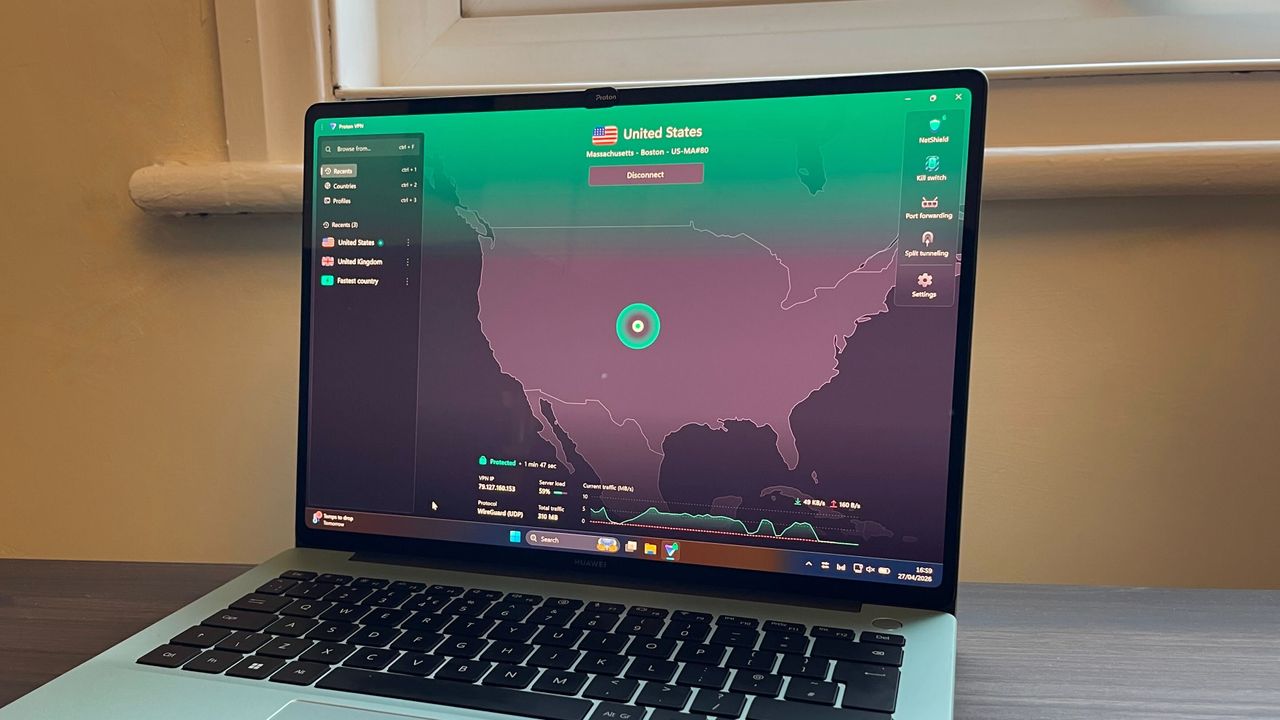
The app's layout is fairly simple, with a list of countries with servers in that you can connect to, and a big "connect" button that can get you connected to the best server for you in seconds.

If you have specific protocols and/or a server country you wish to connect to, you can set up a profile for this, allowing you to quickly connect to it once you have chosen its settings. Its map-based interface has been cleaned up but is no longer interactive. Additionally, all its apps are open-source.

Another positive is Proton VPN's expansion of its server network. Not only has it yet again increased the amount of servers it offers from 12,406 to 16,822 and increased the amount of countries it has servers in from 117 to 127.

This server count dwarfs rivals ExpressVPN, NordVPN, and Surfshark, although NordVPN boasts 168 locations in 129 countries. 28 locations are in Africa, too, which is an area many other VPN providers often overlook.

Proton has yet again increased the amount of servers it offers, and increased the amount of countries it has servers in from 117 to 127.

With all this being said, Proton does fall down a little when it comes to extra features in its apps. Despite being more expensive than the likes of NordVPN and Surfshark, it offers fewer bells and whistles. The only extra offered by Proton VPN is NetShield, a feature that blocks ads, trackers, and malware.

On paper, this is an excellent feature to have, and is similar to ad and malware blocking offered by other providers (e.g. Surfshark's CleanWeb or NordVPN's Threat Protection Pro). However we found its performance varied.

In our testing, NetShield blocked 88% of phishing sites and 88% of ads. When it came to malware however, it blocked 0%. In comparison, NordVPN's Threat Protection Pro blocked 90% of phishing sites, 51% of ads, and 52% of malware. NetShield did outperform the equivalent threat protections offered by Surfshark and ExpressVPN.

As mentioned before, Proton VPN is fairly average in terms of pricing, but it does have an edge over some of the competition thanks to its excellent free plan. While even the most well-featured free VPNs can't stand up to premium VPNs, if you're looking for a VPN for infrequent use, Proton's free plan is a great option to consider.

Rating: 8/10

Proton VPN review: server network

At time of writing, Proton VPN's server count is a whopping 16,000+ servers across 127 countries, making it more extensive than that of NordVPN, Surfshark, and ExpressVPN.

An interesting thing about Proton is that it has dedicated servers in a good amount of African countries, a region often overlooked by other VPN providers. This optimized server spread makes it one of the best travel VPNs.

Proton VPN's location breakdown as of November 2025:

  • North America: 32
  • South America: 7
  • Europe: 49
  • Asia: 44
  • Oceania: 6
  • Africa: 28

Another thing that's important to note is that Proton VPN has eliminated all third-party risk when it comes to its servers by owning and operating all of them. This is Proton's dedication to user privacy and security coming out to play, and its a welcome addition.

Image – Proton VPN boasts over 16,000 servers worldwide (Image credit: Future)

With all this being said, it's not the number of servers a VPN offers, it's the quality. An extensive server network does not necessarily equal excellent privacy and performance, but in Proton VPN's case, it does.

All the servers in Proton's network are "bare metal," which means they are all physical, not virtual. This means that the servers physically exist rather than being operated in The Cloud like virtual servers. This gives Proton VPN more control over its servers, while also removing the slight security risk posed by virtual servers.

This is pretty rare in the VPN world, with Proton's major competitors offering mixed fleet server networks of both virtual and physical. With this being said, while all of Proton's servers are physical, it doesn't mean that all of the servers are based in the countries Proton VPN offers servers in. This is because Proton VPN uses Smart Routing to offer servers in countries where it is difficult to have physical servers in due to VPN restrictions, for example India.

By having physical servers, Proton can stay in complete control of all of them, further strengthening its commitment to user privacy and cementing its position as one of the most private VPNs.

Overall, Proton VPN has one of the strongest server networks around.

Rating: 10/10

Proton VPN review: streaming and unblocking

Proton VPN is known as one of the best streaming VPNs on the market, and for good reason. When testing we try to be as real-world as possible. To do this we connect to servers in the countries we want to test and attempt to watch content only available in that region, just like a real-life user of the VPN would do.

When I tested Proton's ability to unblock Netflix content from Japan, Australia, Canada, the UK and the US, I was pleased to see that it unblocked everything without an issue. Its streaming support like this which makes it one of the best Netflix VPNs.

Beyond Netflix, Proton VPN unblocked every streaming service we tested it with, including Amazon Prime and Disney+. It was also able to unblock regional streaming services too, including BBC iPlayer, ITV Play and Channel 4, as well as 9Now and 10 Play.

(Image credit: Future)

All of its servers appear to work with all streaming sites, meaning that Proton VPN will allow you to access whatever streaming service you like, from wherever you are.

While this isn't unique to Proton VPN – NordVPN, Surfshark and ExpressVPN all unblocked everything we tested them with – it's still a great achievement. There are dozens of VPNs we test which don't perform as well as this in unblocking tests, for example Mullvad VPN.

Proton VPN also is one of the best torrenting VPNs, and supports P2P sharing in all but two server locations – Myanmar and North Macedonia – which is rare for a VPN service.

Its important to note, however, that Proton VPN does not offer port forwarding on iOS, but it's now available on Mac. This means so you can torrent to your heart's content, wherever you are, without being worried that you'll run out of bandwidth.

Rating: 10/10

Proton VPN review: connection speed

When it comes to speed, ProtonVPN performs very well, and is up there with some of the very fastest VPNs.

VPN connection speeds are an undoubtedly important part of our VPN reviews, but it is important to remember how difficult it is to accurately test a VPN's speed without constantly monitoring its performance while connected.

We can't do this, so instead we try our best to offer an accurate representation of a VPN's speeds by looking at snapshots in time. Your own experience and results may vary, but we have tested all the VPNs we review in the same way and our figures should give you a very good idea of what a VPN is capable of.

We also went further than we usually do in our speed testing, and check Proton VPN's latency and jitter out, to get an even more accurate representation of how fast the VPN will feel. This is due to the fact that most people's base connections will be as fast as the VPN, meaning that latency will have more of an impact on your connection overall.

Proton VPN's latency was lower than both NordVPN and Surfshark.

In our latest round of testing, Proton VPN achieved peak WireGuard speeds of 871 Mbps. This is a drop off from the 1,000+ Mbps speeds we saw in our previous round of speed testing but still more than fast enough for your average user.

To put it in perspective, you only need speeds of 25 Mbps to stream Netflix in 4K, so you definitely won't be stuck watching a buffer wheel. While these speeds won't increase your device's maximum potential speed or the allowed bandwidth from your internet provider, it does mean that the VPN won't slow you down.

For UK to US testing, however, it fell behind with an average speed of 436Mbps. While these speeds should still be more than fast enough for your average user, it is still something to be aware of.

Overall, this means that Proton will have more than fast enough speeds to keep you covered, however you may notice that it slows down when connecting to overseas servers.

Proton VPN is 25 times faster than you need to stream 4K, and much faster than a domestic base connection is likely to be capable of.

At best, ProtonVPN's servers had latency of 20.8 milliseconds, and a jitter of 5.2 ms. Latency especially will make a difference in your everyday browsing, as it measures the time for your request to be processed. Anything below 30 ms is excellent, so Proton VPN won't cause your games to lag out, or make your emails take minutes to load.

In short, in most situations, Proton VPN is one of the fastest providers out there.

Rating: 9.5/10

Proton VPN review: privacy and security

Proton uses either AES-256 (supported by OpenVPN) or ChaCha20 encryption (supported by WireGuard) to protect your data, both of which are rock-solid. It supports a range of protocols, including OpenVPN, WireGuard, IKEv2, Stealth. These secure encryption protocols ensure that your data is kept private.

In testing, we work a VPN's kill switch to its limits to make sure you stay 100% protected, 100% of the time. In our testing, Proton's was rock-solid, not failing once. It also has a fully-functioning kill switch, meaning that if the VPN connection fails, your internet connection will be blocked, protecting your identity in the process.

Image – A selection of Proton's Secure Core locations (Image credit: Future)

You'll also get access to Proton's Secure Core servers, which further protect you by allowing you to multi-hop to any location. These Secure Core servers route your traffic through hardened servers in Switzerland, Iceland, and Sweden, all countries with strong privacy laws to keep your data safe.

This is similar to both NordVPN and Surfshark's Double VPN feature, however with ProtonVPN your data is guaranteed to be routed through these extra-secure servers to ensure your data stays as private as possible.

This increases security as your connection is sent through multiple VPN servers, meaning even if one of them is compromised, your IP address and online traffic remains secure.

Image – Proton's privacy policy is robust, and has been independently audited (Image credit: Future)

Proton also claims to have DNS leak protection, and in testing via DNSLeakTest.com on both mobile and desktop, we discovered that it holds true on this promise, with no DNS leaks detected.

When it comes to logging, Proton says on its website: "ProtonVPN is a no logs VPN service. We do not track or record your internet activity, and therefore, we are unable to disclose this information to third parties."

Proton barely logs anything, with the only thing recorded being the timestamp of the last successful login attempt.

Proton stays true to this ethos by barely logging anything, with the only thing recorded being the timestamp of the last successful login attempt. While you do have to provide an email address when you sign up for an account, you have the option to create a one-time use email or a proxy, or use Proton's email service ProtonMail for an even more anonymous option.

Additionally, in September 2025, Proton passed its fourth independent no-logging audit which verified that the service doesn't log any data that can be used to track what you do online, including session data (e.g. servers accessed or connection times) and user activity.

Proton also does not have any tracking cookies on its website, further proving its dedication to its user's privacy.

Rating: 10/10

(Image credit: Future)

Proton VPN review: apps

Proton VPN is available across a range of different platforms and devices, including Android, iOS, Chrome, macOS, Windows, Linux and Firefox. It also offers Android TV and Fire Stick VPN apps, allowing its unblocking abilities to be used on smart TVs as well as desktop and phones.

The apps are easy to use thanks to quick-connect and a handy list of countries that you can connect to. It has a map-based interface that used to be functional, but is now for aesthetics more than anything else.

(Image credit: Future)

This change is part of a major redesign Proton VPN has undergone, with the rollout across its iOS, Android and Windows apps.

This redesign also got rid of one of my major gripes from the last time I reviewed Proton VPN. The mobile apps used to have a central "disconnect" button exactly where the "home" button would be on other apps, which could lead to accidental disconnections if you were working off muscle memory when navigating the app for the first time. Now, there's no more button, so this isn't an issue anymore.

(Image credit: Future)

Speaking of its mobile apps, they're both powerful, but its Android VPN is more so than its iPhone VPN app. It's still a perfectly good app, but it does lack the split tunneling feature that is available on its other platforms.

That being said, there are some features that the iOS Proton VPN app offers that the Android one doesn't. This includes having always-on features that Android users have to toggle on, including Always-On VPN, kill switch and NetShield.

Proton VPN's redesign also got rid of one of my major gripes from the last time I reviewed it.

While its apps are simple, it does have options for more advanced users. If you like to have complete control over your VPN connection, Proton VPN allows you to fully configure it, including what country it connects to, what server it uses within this country, what encryption protocol is uses and even if it uses a Secure Core server. You can even name and save these configurations to a profile after they are set up, allowing you to connect to them in just one click.

Overall, with its new app redesign in mind, its clear that Proton VPN is putting real effort into making its apps as streamlined as possible and easy to use for beginners, as well as including some more advanced features for more technically-minded users.

Rating: 8/10

Proton VPN review: ease of use

When researching for this review, I used Proton VPN basically every day for 4 weeks. In my opinion it's a good mix of simple and technical – it's easy to get set up and started, with more complex features easily available. So, it has options for those more familiar with VPNs but shouldn't be too intimidating for VPN newbies.

Installing Proton is quick and simple, with every platform it supports available to download via its download page. Plus, once you're all set up, you can get started in a single click thanks to ProtonVPN's "quick connect" feature. This will automatically connect you to the fastest server for you.

If you want to connect to a specific server, this is simple too. You can just scroll through the list of countries available, and just click on the country you want to connect to. The default view for Proton's servers used to be a pretty cluttered map-based interface, but its recent app overhaul has got rid of this, making it a lot less overwhelming to look at.

If you're more technically minded, and want to configure your own VPN settings, Proton has made this easy by including a "Profiles" feature. When you set up a profile, you can select the features, protocol, country and server you want to use, and even give it a name. This profile will then appear on your homepage, and you can connect to it by clicking the "connect" button.

Proton VPN provides a huge amount of detailed and comprehensive support articles via its site to help users troubleshoot common issues. While this is overall a great thing to offer, especially as they are helpfully sorted into categories based on common issues, many of the articles are very technical and may be confusing to users that are less experienced with VPNs.

One great feature is Proton VPN's "report an issue" tab on its apps, as it allows users to quickly and easily fix their problems. Plus, if these fixes don't work, you can get more direct help from Proton VPN thanks to a "contact us" form.

Rating: 7/10

Proton VPN review: customer support

Proton VPN has a decent amount of options when it comes to customer service. For those who prefer to troubleshoot themselves, there is Proton's extensive library of support articles. With this being said, these articles do tend to be quite technical, so they may be a little alienating to VPN newbies.

For issues that crop up while using their apps, Proton includes a handy "report an issue" tab, which takes you to a series of troubleshooting tips to help solve the issue. If these are unsuccessful, you can just click the "contact us" button which takes you directly to a form which allows users to report their issue directly.

For issues that crop up while using their apps, Proton includes a handy "report an issue" tab.

Proton does have a live chat, but I personally found this more difficult to find than other support avenues, as it's only accessible from the website. This support option is great, but it should be easier to get to for those who want to speak with a customer service agent about their problem.

In independent, customer-posted reviews, many users complain of slow response times from Proton's customer service agents. However, I personally did not experience this.

Overall, there's plenty of help on offer from Proton, but when compared with some providers – ExpressVPN comes to mind – it could be a little smoother, and help for real beginners is a little thin on the ground.

Rating: 8/10

Proton VPN review: history and the future

Proton is most well-known for its fully encrypted mail service, which is often praised for being one of the most secure email services. With this in mind, it stands to reason that their VPN would have a similarly high reputation for privacy.

With that being said, one of the most frequent complaints made about Proton VPN is that its customer service response time is slow. This could be a problem if you do have any issues with the service. With this being said, I did not have any issues with their customer service, so take these negative reviews with a grain of salt.

Rating: 8/10

Proton VPN review: final verdict

Subscribe if:

✅ VPN security is of upmost importance. Proton VPN offers top-of-the-line VPN security and privacy, routing your data through hardened servers in data centers located in countries known for their data provacy laws.
✅ Streaming and Netflix is your top priority. Proton VPN is excellent at unblocking Netflix libraries, and is capable of getting access to almost every other streaming site in the world.
✅ You want to use a VPN for torrenting. Proton VPN supports torrenting on all of its servers, allowing you to torrent to your heart's content.

Don't subscribe if:

❌ You want to use split tunneling on iOS. Proton VPN does not offer split tunneling in macOS or iOS.
❌ You want the cheapest VPN. Proton VPN may not be the most expensive VPN on the market, but there are cheaper options out there.

Alternatives to Proton VPN

If you feel that Proton VPN doesn't quite offer exactly what you want, have no fear. There are plenty of other excellent VPN services on the market that might be perfect for you.

Proton VPN review: FAQ

How to cancel Proton VPN

Cancelling Proton VPN is fairly easy. Either you can downgrade your account on your account settings Proton's free VPN, or you can simply fill in a form via Proton VPN's Support page. You can also cancel your subscription during Proton's 30-day money-back guarantee period.

Does Proton VPN work in China?

Proton VPN does not work in China, as the Chinese government blocks access to it. If you're looking for the best China VPN, check out NordVPN.

Who owns Proton VPN?

Proton VPN is owned by Swiss-based Proton AG. Proton itself was founded in 2014 by a group of scientists who met at the European Center for Nuclear Research (CERN). These scientists would go on to create the encrypted email service, ProtonMail.

Proton VPN test results

Feature

Comments

Rating

Design

Interface may seem a little crowded but list of countries is useful

⭐⭐⭐1/2

Ease of use

Quick-connect feature makes getting started incredibly easy

⭐⭐⭐1/2

Performance

Not the fastest VPN on the market, but still decent speeds

⭐⭐⭐⭐1/2

Unblocking

Unblocks most content streaming platforms with ease

⭐⭐⭐⭐⭐

Security and privacy

Excellent encryption and Secure Core help keep your data private

⭐⭐⭐⭐⭐

Customer support

Good amount of articles, but they can be a little complex for VPN novices

⭐⭐⭐⭐

Price

Decent value for money, but more expensive than other, better VPNs

⭐⭐⭐

How we test VPNs

We put the VPNs we review through a series of tests to ensure that we have looked at every feature they offer, no matter how. Understanding how our experts conduct these tests is important, as it lets you know that we go above and beyond just doing a rundown of the specs available on the VPN provider's website.

With this being said, we do check provider's websites, and take note of any useful information provided, including the variety of operating systems a VPN runs on, the number of servers and locations, whether you can use every server for P2P, what encryption protocols it supports and more. We also check the VPN's pricing.

This helps us understand what claims the VPN service is making so we can verify them during our tests, as well as getting an overall picture of what the VPN offers.

After this, we get into the nitty gritty of the VPN's privacy policy. While privacy policies are important for any company, for VPNs it's imperative that they're completely sound. We also check out the provider's no-logging or zero-logging policy to look for any discrepancies or gaps. We'll also check independent audits of the VPN service.

All apps the VPN offers are tested on how easy they are to download, install and get up and running. During this process, we check to see if any data collection options are clearly outlined to users. Then, the default configuration is checked to see what features are available as standard, and which ones you need to 'opt in' for. Then, we look at any additional features available and check them out, for example ExpressVPN’s server speed test or NordVPN’s Double VPN.

Then comes the fun bit – trying to break them.

We'll connect to oddly configured networks, kill processes to see if we can get the VPN to stop without activating its kill switch, and more to really take the VPN to its limit.

We'll also check out the support the VPN has available, to make sure its support team are helpful and any support pages it has are up to scratch. We'll also check out its streaming and unblocking capabilities to make sure it is able to access geo-blocked content. We'll also run a series of speed tests over a few days and nights so you get an idea of what kind of connection speeds the VPN is capable of.

We test and review VPN services in the context of legal recreational uses. For example:1. Accessing a service from another country (subject to the terms and conditions of that service).2. Protecting your online security and strengthening your online privacy when abroad.We do not support or condone the illegal or malicious use of VPN services. Consuming pirated content that is paid-for is neither endorsed nor approved by Future Publishing.

Sign up to read this article
Read news from 100’s of titles, curated specifically for you.
Already a member? Sign in here
Related Stories
Top stories on inkl right now
One subscription that gives you access to news from hundreds of sites
Already a member? Sign in here
Our Picks
Fourteen days free
Download the app
One app. One membership.
100+ trusted global sources.