Get all your news in one place.
100's of premium titles.
One app.
Start reading
Digital Camera World
Wendy Evans

Photoshop's Generative AI turned this photo into a work of art –I'm impressed!

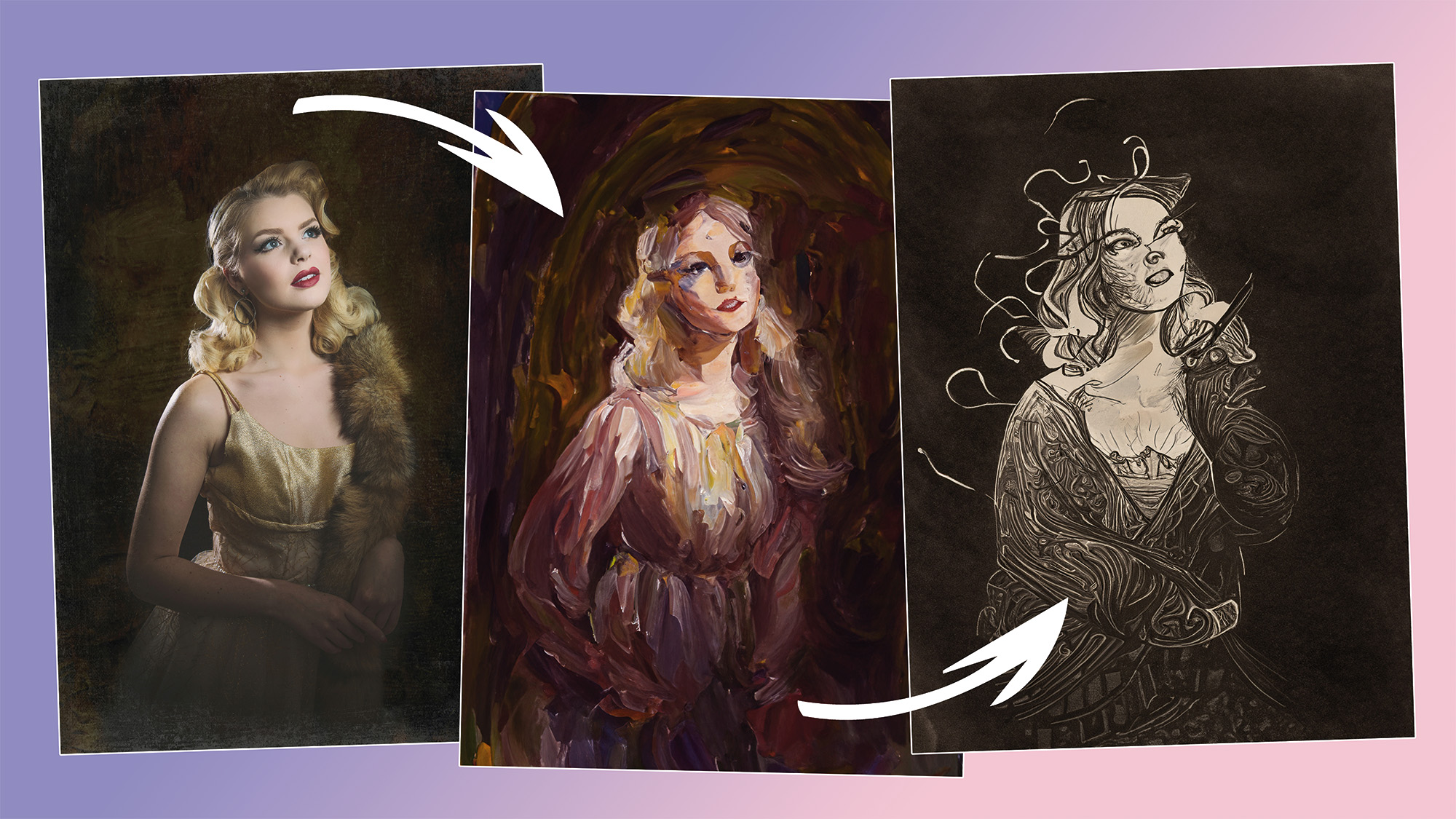
A Hollywood-style portrait (left), turned into two AI-generated artworks, a painting (middle) and graphic pencil drawing (right).

I've found that Adobe Photoshop's Generative Fill can create a variety of convincing artwork styles, in addition to replacing elements and creating entirely new ones. This seems to work best when there’s a central subject, rather than an entire scene, so I'd suggest working with portraits and still-life images where the subject is isolated.

The key is getting the artwork to be based on the photo, rather than something completely random. If the result is too abstract, try changing the Blending Mode to Lighten, Overlay or Luminosity.

Sign up to read this article
Read news from 100's of titles, curated specifically for you.
Already a member? Sign in here
Related Stories
Top stories on inkl right now
One subscription that gives you access to news from hundreds of sites
Already a member? Sign in here
Our Picks
Fourteen days free
Download the app
One app. One membership.
100+ trusted global sources.