Get all your news in one place.
100's of premium titles.
One app.
Start reading
T3
T3
Technology
Lizzie Wilmot

Philips Hue Bridge Pro review: The ultimate upgrade for Hue users

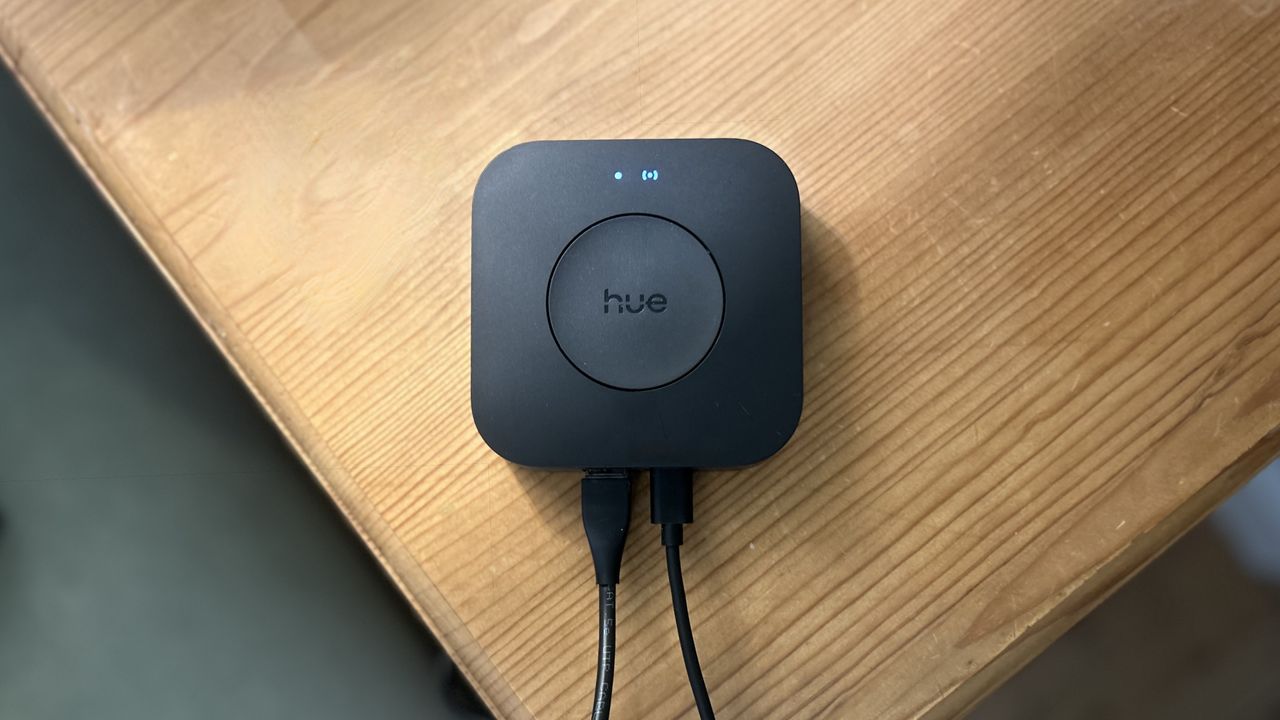
Philips Hue Bridge Pro.

It was a pretty big moment when the Philips Hue Bridge Pro was finally unveiled at IFA last year after months of rumours – and thankfully, it turned out to be far more impressive than anyone expected.

Not only did Philips Hue give the hub a physical redesign, but it also massively upgraded what it can do behind the scenes. With support for up to 150 lights and 50 accessories, alongside entirely new features like MotionAware technology, it immediately felt like one of the biggest Hue launches in years.

I’ve already rounded up the five things to know before switching to the Hue Bridge Pro, but now that I’ve had the chance to properly put it through its paces, my full verdict is finally in.

Price and availability

The Bridge Pro has an RRP of £79.99/$98.99 via Philips Hue's website, which is almost double the price of the original Hue Bridge. That sounds steep at first, but it does make a lot of sense.

Philips Hue fans will also know that the Bridge Pro is available in a number of starter kits too, which can actually work out far better value if you’re planning to expand your setup or start fresh entirely.

Unboxing and set up

Inside the box, you’ll find the Bridge Pro itself, a power adapter, an Ethernet cable and the usual quick start paperwork. Setup is very simple, especially now that the Bridge Pro supports both Ethernet and Wi-Fi connectivity. That means you can still hardwire it directly to your router for the most stable connection, but you’re no longer forced to keep the hub right next to it.

Once powered on, you simply download the Philips Hue app, scan the QR code on the Bridge Pro, and follow the guided setup process. The app walks you through connecting the hub, updating firmware, and adding lights, accessories, entertainment zones or automations.

(Image credit: Lizzie Wilmot / T3)

If you’re upgrading from the older Philips Hue Bridge, the migration process is also much easier than it used to be, and existing lights, scenes and automations can now transfer directly through the app.

Design and features

Compared to its predecessor, the Bridge Pro feels much more focused on larger smart homes, faster performance, and more advanced automations. It’s powered by Philips Hue’s new 'Hue Chip Pro', which significantly boosts both processing speed and overall capacity.

The Pro version also supports over 150 lights and more than 50 accessories, making it far better suited to bigger setups. Philips Hue also claims it’s up to five times faster than the standard Bridge, whilst supporting up to 500 saved scenes at once.

Visually, it still keeps the clean, minimalist design, but the switch to a sleeker black finish instantly helps it feel more modern. The compact square design is also subtle enough to hide away on a shelf or media unit without drawing attention to itself.

One of the biggest new additions exclusive to the Bridge Pro is MotionAware technology. Instead of relying entirely on dedicated motion sensors, the system can now use compatible Hue lights themselves to help detect movement throughout a room. By combining data across multiple lights, the Bridge Pro can then create virtual motion zones that automatically trigger scenes or lighting changes when somebody enters a space.

The Hue Bridge Pro also brings a new SpatialAware feature, designed to map your room and light positions using augmented reality and your phone's camera. Instead of treating each bulb as a standalone light, this spatial understanding intelligently distributes light scenes so colours and gradients transition naturally across your entire space.

(Image credit: Lizzie Wilmot / T3)

Philips Hue has also pushed much harder into immersive entertainment lighting with the Bridge Pro. It unlocks more advanced Hue Sync features for TVs, music and gaming setups, whilst newer features like SpatialAware can map out room layouts and adjust lighting effects based on where lights are physically positioned in the room.

Security has also received an upgrade thanks to Zigbee Trust Centre encryption, which adds stronger protection against unauthorised access across the entire smart lighting network. That’s especially important now that Philips Hue is expanding further into connected home security with cameras, sensors and video doorbells alongside its lighting products.

Performance

Incorporating the new Hue Bridge Pro into my existing Philips Hue setup was far easier than I expected, so much so that a lot of my earlier concerns about upgrading were completely disproven by my own experience. It honestly couldn’t have been much simpler.

One of the biggest improvements is the addition of both Ethernet and Wi-Fi connectivity, making installation far more flexible than before. I personally opted for Ethernet since I already had a spare port available and planned to keep the bridge close to my router anyway, but knowing I can switch to Wi-Fi in the future is reassuring.

(Image credit: Lizzie Wilmot / T3)

As mentioned, the setup process took around five minutes in total, including a quick firmware update that only lasted a minute or two. The whole experience felt incredibly seamless, and after dealing with frustrating setup processes from rival smart home brands in the past, it served as another reminder of just how reliable the Philips Hue ecosystem has become.

Once everything was set up, the Bridge Pro immediately prompted me to create the new spatial lighting map to get the most out of the upgraded hub. This feature is designed to enhance lighting effects and room awareness, particularly for entertainment setups around a TV, and it was nice seeing the app proactively guide me through the process instead of forcing me to dig through menus to find it myself.

The various automations were also laid out very clearly within the app, although it’s worth noting that many of these features were already available on the previous Hue Bridge. One of the newer additions is Motion Zones, which are easy to configure but do require at least three or four lights positioned throughout a room to work effectively.

(Image credit: Lizzie Wilmot / T3)

Of course, I didn’t come anywhere near the new 150-light limit during testing, and even the previous bridge’s 50-accessory cap was never something I personally struggled with. Still, having that extra headroom makes the Bridge Pro feel significantly more future-proof for anyone planning to expand their setup over time.

As the Hue Bridge Pro also supports Matter, I was able to connect it to my Amazon Echo Show 8 without any issues. Voice commands through Amazon Alexa felt noticeably quicker too, with lights responding almost instantly in some cases.

Verdict

The Philips Hue Bridge Pro is exactly the kind of upgrade smart home enthusiasts were hoping for. Between the effortless setup, expanded device support, Matter integration and useful new features, it feels like a significant step forward for the Hue ecosystem. Whilst casual users may be perfectly happy sticking with the standard bridge, anyone serious about smart lighting will appreciate just how seamless and future-proof the Bridge Pro really is.

Alternatives to consider

There’s still nothing quite like the Philips Hue Bridge Pro on the market, mainly because the wider Philips Hue ecosystem remains one of the best smart lighting systems around. That said, there are a couple of strong alternatives worth considering.

The Aqara Panel Hub S1 Plus is a great option if you want something that feels more like a smart home command centre, thanks to its large touchscreen display for controlling devices, viewing cameras and managing automations.

Meanwhile, the Homey Pro or Homey Pro Mini is ideal for mixed-brand smart homes. Unlike the Hue Bridge Pro, it supports a huge range of protocols including Zigbee, Z-Wave, Matter, Thread, Wi-Fi, Bluetooth and infrared, making it one of the most flexible smart home hubs available.

Sign up to read this article
Read news from 100's of titles, curated specifically for you.
Already a member? Sign in here
Related Stories
Top stories on inkl right now
One subscription that gives you access to news from hundreds of sites
Already a member? Sign in here
Our Picks
Fourteen days free
Download the app
One app. One membership.
100+ trusted global sources.