Get all your news in one place.
100’s of premium titles.
One app.
Start reading
Windows Central
Windows Central
Technology
Mauro Huculak

Notepad on Windows 11 can now make Markdown tables — here's how to master it

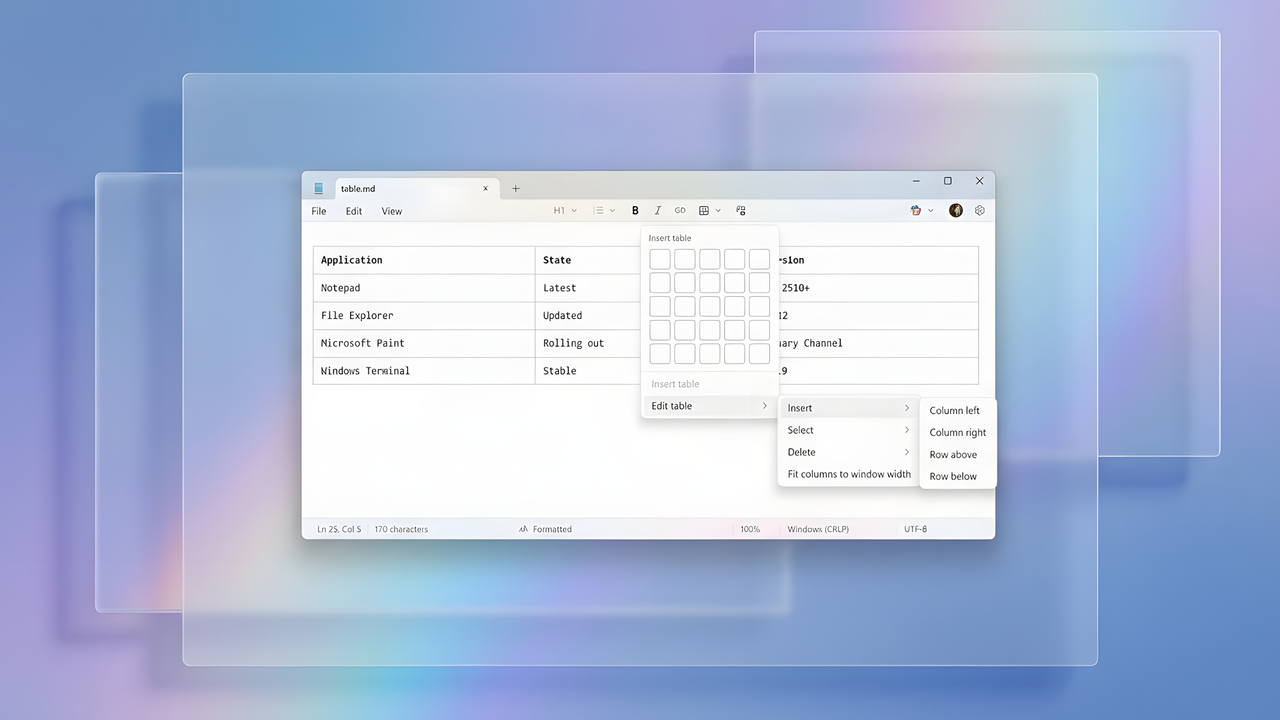
Generating a Markdown table in Notepad on Windows 11.

On Windows 11, Notepad has evolved far beyond its origins as a basic text editor. It now integrates writing assistance powered by AI and offers lightweight Markdown capabilities designed for developers, creators, and anyone who writes regularly.

Beginning with version 11.2510.6.0 for devices enrolled in the Windows Insider Program, Microsoft is introducing table support in Notepad as part of its expanding Markdown feature set. This addition doesn't turn Notepad into an Excel-style spreadsheet tool. Instead, it delivers simple, Word-like table creation so you can structure information without leaving the editor.

In this how-to guide, I'll show you the steps to use the new table functionality available in the updated Notepad app for Windows 11.

This feature is still in preview through for devices enrolled in the Dev and Canary Channels of the Windows Insider Program. However, the company may not take too long to bring this new update to the Stable Channel.

How to use tables in Notepad

In the latest version of Notepad, you can create tables through the user interface or syntax, and you can use the available tools to modify an existing table.

Create a table in Notepad

To create tables in the latest update of Notepad, use these steps:

  1. Open Notepad.
  2. Click the Table option from the toolbar.
  3. (Option 1) Select the number of columns and rows using the mouse to create a table.
(Image credit: Mauro Huculak)
  1. (Option 2) Click on Insert table.
  2. Confirm the number of columns and rows to create a table.
(Image credit: Mauro Huculak)
  1. Click the Insert button.

Once you complete the steps, the table will appear in the Notepad canvas.

Create a table with Markdown syntax

You can also create tables using the Markdown syntax by switching to this experience from View > Markdown > Syntax. However, the options are limited compared to the capabilities available with the full version of Markdown.

|Header 1||||-|-|-||Row 1||||Row 1|||
(Image credit: Mauro Huculak)

This code will create a table with three columns and three rows.

Edit a table in Notepad

To edit a table in Notepad, use these steps:

  1. Open Notepad.
  2. Click on the table you want to modify.
  3. Click the Table option from the toolbar.
  4. Select the Edit table menu and choose options, including Insert, Select, Delete, and "Fit columns to window view."
(Image credit: Mauro Huculak)

The options are self-explanatory. You can use the "Insert" to add more columns and rows. The "Select" option performs different types of table selection, and the "Delete" option lets you delete parts or the entire table.

The "Fit columns to window view" allows you to do just that, but the view won't be saved.

Are you planning to use tables in Notepad? Also, what are your thoughts on all the recent updates for Notepad? Let me know in the comments.

FAQs about table support in Notepad

These are common questions about the table support for Notepad.

Can I create tables in Notepad without using Markdown syntax?

Yes. The updated Notepad app includes a built-in Table menu that lets you insert tables visually. You can choose the number of columns and rows directly from the interface without writing any Markdown.

Which Notepad version adds table support?

Table functionality is available starting with Notepad version 11.2510.6.0 for devices enrolled in the Windows Insider Program. Stable releases will receive it later as Microsoft rolls it out.

Is Notepad becoming a spreadsheet app like Excel?

No. The table feature is meant for lightweight structuring. It lets you organize information in a Word-style grid, not perform calculations, formulas, or advanced formatting.

How do I switch to Markdown syntax in Notepad?

Open the View menu, go to Markdown, and select "Syntax." This mode allows creating tables using Markdown code instead of the visual interface.

Can I use full Markdown table features?

Notepad supports a simplified Markdown syntax. You can create basic tables, but advanced Markdown table features.

How do I add more rows or columns to an existing table?

Click inside the table, open the "Table" menu, choose "Edit table," then use the "Insert" options to add rows or columns.

Can I delete a table or specific cells?

Under "Edit table," the "Delete" menu lets you remove selected rows, columns, or the entire table.

More resources

Explore more in-depth how-to guides, troubleshooting advice, and essential tips to get the most out of Windows 11 and 10. Start browsing here:

Follow Windows Central on Google News to keep our latest news, insights, and features at the top of your feeds!

Sign up to read this article
Read news from 100’s of titles, curated specifically for you.
Already a member? Sign in here
Related Stories
Top stories on inkl right now
One subscription that gives you access to news from hundreds of sites
Already a member? Sign in here
Our Picks
Fourteen days free
Download the app
One app. One membership.
100+ trusted global sources.