Get all your news in one place.
100’s of premium titles.
One app.
Start reading
The Independent UK
The Independent UK
Alex Lee

NordVPN review 2026: Still the best VPN I’ve tested for reliable speeds while travelling abroad

I put the VPN through a series of tests to assess its reliability - (The Independent)

If you’ve listened to a podcast or watched a YouTube video over the past decade, chances are you’ve heard of NordVPN. The brand’s marketing team seems to be placing ads everywhere, but look past all the aggressive sponsorships and you’ll find that NordVPN is one of the best VPNs around.

After years spent testing almost every privacy tool on the market, it remains my top pick, offering fast speeds, top-notch security and ease of use. What started life in 2012 as a small VPN service has grown into a global giant, with a network of more than 9,000 servers spread across 130 countries. It’s also expanded well beyond its VPN roots, adding a built-in password manager, encrypted cloud storage and malware protection. It’s essentially become a full security suite for your devices.

Based in Panama – a country with no mandatory data-retention laws – NordVPN says it operates under a strict no-logs policy, something it has supported with several independent audits. But with stronger competition than ever in 2026, including former top pick ExpressVPN, Proton VPN and Nord Security stablemate Surfshark, I wanted to see whether it still lives up to its reputation as one of the best. I’ve revisited NordVPN to see whether it still delivers the goods in 2026.

NordVPN review in short

NordVPN is honestly one of the best VPN services you can get in 2026. It’s fast, reliable and crammed full with a growing list of security tools and features, including malware-blocking and a handy Meshnet feature. While it isn’t the cheapest option around, the speeds, privacy and growing feature set make it a joy to use. NordVPN has also just added a neat call-screening feature on Android. Below, you can read my full review, including how it performed during my speed tests, how well it works with streaming services and whether it’s worth the price.

Read more: Best VPNs for iPhone and iPad

The best NordVPN deals

  • NordVPN basic, 24-month plan: Was £9.69, now £2.59, Nordvpn.com
  • NordVPN plus, 24-month plan: Was £11.39, now £2.89, Nordvpn.com
  • NordVPN ultimate, 24-month plan: Was £16.19, now £5.19, Nordvpn.com

How I tested

I tested NordVPN on a range of devices (Alex Lee/The Independent)

To see how NordVPN stacks up, I ran it through a series of tests, to check its speed, security and overall usability across a number of devices. I looked at streaming, extra privacy settings and tools, as well as pricing and customer support. You can read my full testing methodology at the end of this article. You can also read the full guide on how we test VPNs at The Independent.

Read more: The best VPNs in 2026

NordVPN

Rating: 5/5

Number of servers: More than 9,000

Number of server countries: 130

Number of devices supported: Up to 10

Devices supported: Windows, MacOS, Linux, iOS, Android, Fire TV Stick and more

Why we love it

  • Fast and reliable
  • Really great cybersecurity features
  • Meshnet is a useful addition
  • Strong on privacy
  • Works well with streaming

Take note

  • Ran into some issues when split tunnelling
  • User interface is a bit clunky

NordVPN: Pricing and plans

NordVPN isn’t the cheapest VPN out there, but it’s far from the most expensive. It’s about £1 more per month than Surfshark, but cheaper than ExpressVPN – and for what you’re getting, I’d say it’s worth it. The features, security, and the fact you can connect up to 10 devices make it one of the best VPNs available. Plus, there’s a 30-day money-back guarantee, so if it’s not for you, you can cancel within a month for a full refund. No strings attached.

A word of advice: if you go for a two-year plan, set a reminder to cancel it before it renews. Once those initial two years are up, you’ll be charged a steep fee for another two years.

Prices do fluctuate due to various promotions. NordVPN offers three subscription tiers – basic, plus and ultimate – so you can pick the plan that suits your needs (and budget). There’s also the option to add a dedicated IP address, which is ideal for corporate users. It costs an extra £3.19 per month, but like the rest of the subscriptions, the price can vary.

NordVPN basic

This is the most affordable option, giving you access to all the core VPN features. At the time of writing, the cheapest plan is the two-year subscription at £62.16 up front (about £2.59 per month).

The one-year plan costs £45.48 (about £3.79 a month), while the monthly plan is £10.09 per month.

NordVPN plus

If you want a bit more than the basics, the plus tier adds extras such as threat protection pro (which blocks malware, trackers and ads) and a password manager.

A one-month plan is £10.79 per month; a one-year plan costs £55.08 (about £4.59 per month), and the two-year plan comes in at £81.36 (roughly £3.39 per month).

NordVPN ultimate

This is the full VPN and cybersecurity suite. Along with the VPN, threat protection pro and password manager, you also get 1TB of encrypted cloud storage and cyber insurance. If you’re scammed or defrauded online, you could be covered up to £5,000.

Right now, the monthly plan is £12.79; the one-year subscription costs £77.87 (£6.49 per month); and the two-year subscription is £126.96 (£5.29 per month).

NordVPN: Privacy and features

NordVPN has all the security features you’d expect from a good VPN provider. It uses RAM-based servers, meaning that data isn’t stored on hard drives, and information is wiped with every server reboot, giving me confidence that data can’t be saved or recovered. It also uses AES-256-bit encryption, a gold-standard encryption method used by militaries and banks.

It supports connections over NordLynx (NordVPN’s WireGuard-based protocol) and OpenVPN. These are basically high-security protocols that create an encrypted tunnel between the VPN client and the server. By default, NordVPN uses NordLynx – it’s lightning fast, so I didn’t see much need to change it. But you can switch it in the settings if you want. You can also install the VPN on your router.

NordVPN has also been rolling out post-quantum encryption across its apps, designed to protect VPN traffic against potential future threats from quantum computing. It’s currently available when using the NordLynx protocol.

NordVPN now has a more streamlined user interface (Alex Lee/The Independent)

There’s also a built-in kill switch that’s turned on by default. If your VPN connection drops, it cuts off internet access altogether, so your data doesn’t leak. The split tunnelling feature is there, too, letting you exclude certain websites, handy for things such as online banking.

While those are all pretty standard these days, NordVPN also offers more advanced features that help it stand out. I really like the double VPN setting, it routes your traffic through two VPN servers instead of one, encrypting your data twice. That makes it even harder for anyone to trace your activity. It’s especially useful for journalists or people in countries with heavy surveillance.

If you want to take things even further, NordVPN lets you route your traffic through the Onion network, without needing to download the Tor browser.

There are dedicated servers for P2P torrenting, something that not all VPNs offer. When I tested them, download speeds were the same as on regular servers.

One underrated feature (that ExpressVPN and others still don’t have) is the pause button. If you’re as forgetful as I am, you’ve probably left your VPN on by mistake and ended up seeing odd Google results or landing on Amazon’s German site. With NordVPN, you can pause your connection for up to an hour and have it turn back on automatically.

NordVPN also introduced Meshnet in 2023, which lets you create a private network over the internet. It’s great for securely sharing files with specific people, or for gamers who want to play together on a private connection.

Meshnet is a unique feature that let me share files on a private network (Alex Lee)

Those are the core features, but if you opt for the plus or ultimate plans, you get some extra cybersecurity tools. Not all of them are essential – you could replicate a lot of it with free browser extensions – but it’s nice to have the option.

Threat Protection Pro blocks malicious websites and trackers, scans files for malware, and checks your apps for vulnerabilities. Yes, free antivirus software can do this, too, but it’s convenient having it all in one place. There’s also a dark web monitor that scans for leaked login credentials and lets you know if your data’s been exposed.

The password manager is a nice bonus if you don’t want to pay for something like 1Password separately. The ultimate tier is probably only worth it for business users. The extra perks are the cyber insurance and 1TB of cloud storage.

NordVPN: Logging

If you’re worried about your internet traffic being tracked, you shouldn’t be. NordVPN was the first major provider to undergo an independent no-logs audit. The first one was in 2018, and it’s completed four more since then.

In 2018, PricewaterhouseCoopers found that NordVPN didn’t keep logs of your connection data or browsing activity. That means your IP addresses, VPN usage, websites visited, and files downloaded were all kept private. A second audit in 2020 confirmed the same thing.

After that, NordVPN switched to Deloitte for future audits. In 2022, Deloitte interviewed staff, checked server configurations, and examined technical logs. Again, no user activity data was stored. In late 2023, Deloitte audited its infrastructure again, including obfuscated, double VPN, Tor and P2P servers, and found no evidence of logging.

Most recently, in early 2026, NordVPN completed a sixth independent no-logs assurance engagement with Deloitte, again confirming that its servers were not storing user activity or connection data.

NordVPN: Performance and speed 

In mid-2025, NordVPN finally replaced its clunky map-based interface with a cleaner, dashboard-style layout on both Windows and Mac. While some people liked the map for picking out countries visually, I always found it a bit overcrowded. The new layout is much easier to use.

You now get a list of recent, specialty and standard servers on the right, with pause and quick connect buttons up top. The middle section gives you access to settings for Threat Protection, Meshnet and the Dark Web Monitor. Things such as the kill switch are already enabled, so you don’t have to mess around with advanced settings unless you want to. One downside: it now takes a few more clicks to reach specific city-level servers. You’ll need to pick a country, click the options button, then choose your city. It’s not as quick as before.

Split tunnelling is still only available on Windows. Even then, it’s not flawless. I had a few issues where streaming services didn’t recognise that they were whitelisted and thought I was still using the VPN. A bit of a letdown, considering how polished the rest of the experience is.

As for speed? NordVPN is seriously fast. It’s one of the quickest VPNs I’ve tested. Using the quick connect UK server, I only saw a 4 per cent drop on my 67 Mbps broadband. Connecting to the US server resulted in about a 9 per cent slowdown. Still pretty snappy.

NordVPN: iOS and Android apps

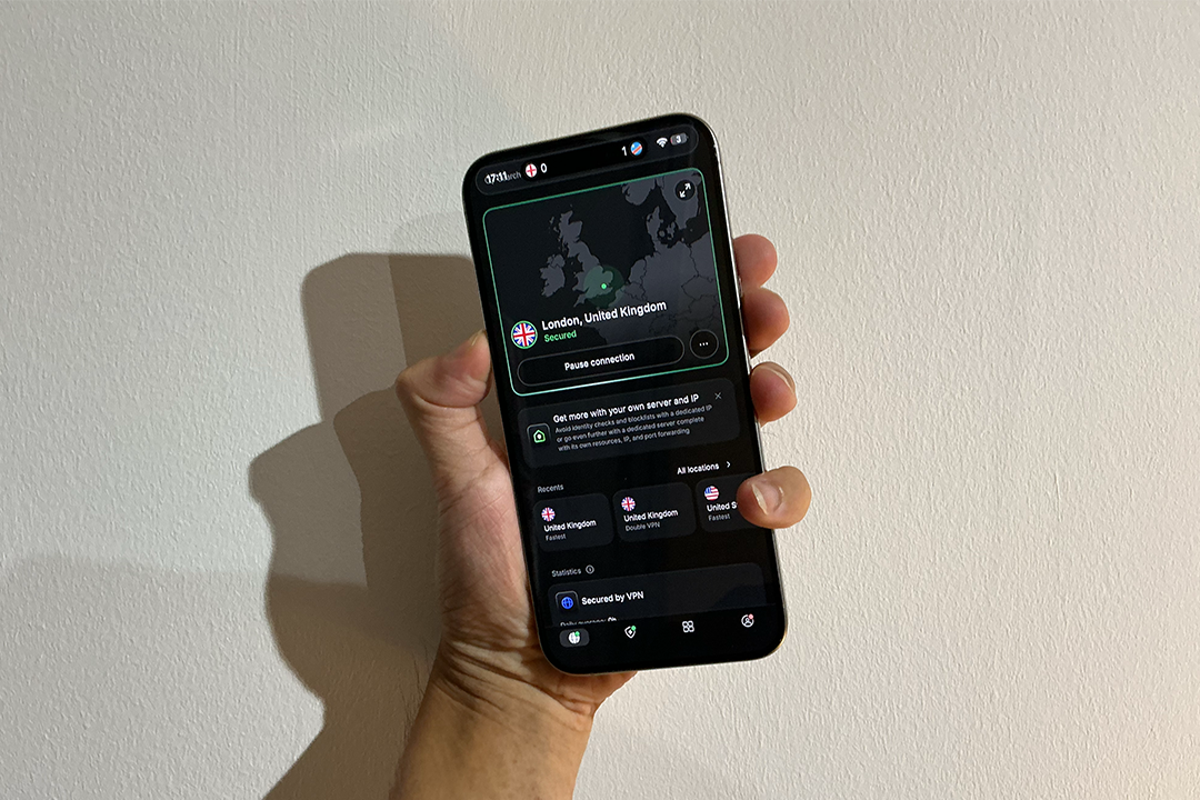
In February 2026, the dashboard view finally came to iOS and Android as well, completing the roll-out on NordVPN’s main platforms. Like the dashboard on PC, it’s much easier to navigate now. While both apps still include a map and server list, the latest redesign makes the interface much nicer to use on a small screen, with quicker access to connection controls and security features.

The mobile interface has also had a glow-up (Alex Lee/The Independent)

That said, the Android app has a couple of key advantages. It supports split tunnelling, letting you choose which apps use the VPN and which bypass it – something iOS doesn’t offer, mainly due to Apple’s restrictions. The Android app also provides more granular controls, such as the ability to set custom DNS servers and access obfuscated servers. NordVPN has also added features such as scam-call protection for Android users, which can flag suspected spam or fraud calls before you answer.

Still, they both deliver a really good level of performance, speed and reliability on both Android and iOS.

NordVPN for streaming

If you’re travelling abroad and want to stream your favourite shows or catch up on sports from back home in the UK, a VPN can make that possible. While it isn’t technically illegal to use a VPN to stream geo-restricted content on platforms such as Netflix or BBC iPlayer, it does violate most streaming services’ terms of service, so proceed with caution.

I tried NordVPN on a few different devices and with various different streaming services and it performed admirably. I was able to watch ITVX, Channel 4, Sky Go and Prime Video without any issues on my iPhone, Mac and Windows laptop. Speeds were still fast, without any annoying buffering. 

Overall, streaming worked like a charm, and I didn’t have to jump servers trying to find one that would work with my streaming service of choice. Speeds were decent, too – I didn’t experience any issues with buffering on my various devices.

NordVPN Support

NordVPN has 24-hour live chat support, which can be accessed through the provider’s website. There is no live chat in the mobile app, but I was able to send a message through the ‘contact us’ button located inside the app settings.

NordVPN’s support staff were extremely responsive. It took me just 10 seconds to get connected to a human agent, and you can ask to speak to a person at any point during your conversation with the chatbot. That said, I probably didn’t even need the agent’s help – the chatbot is surprisingly thorough, answering almost every question I threw at it. Chances are, you’ll figure out what you need just by talking to the bot.

Buy now £2.59, NordVPN.com

Your questions on NordVPN answered

Should you download NordVPN?

NordVPN is one of the most feature-packed VPNs on the market right now – you get all the regular encryption and security features but also some more advanced settings, such as access to The Onion Network, Double VPN, Meshnet and lots more. The threat protection and password manager are really useful additions for plus-tier users, putting it a notch above the competition. I particularly liked the presets on the Mac application. NordVPN has also finally ditched that big map interface across Mac, Windows, iOS and Android, and useful features such as quick search and auto-enabled kill switch mean you rarely need to dig through settings, unless you want to.

TrustPilot user reviews echo much of what I found in my testing. A lot of the reviews praise the service’s speed and ease of use, especially when streaming. Customer support also gets a lot of positive attention on TrustPilot, with reviewers frequently name-checking agents for being friendly and fast at responding. Even users who decided to cancel said the refund process was smooth and hassle-free.

While NordVPN might not be the cheapest platform, it offers much more than ExpressVPN, which costs more and has more features than Surfshark, as well as better speeds. It’s fast, connections are quick and it just does what it says on the tin. It’s well-rounded and will serve any type of user well.

Is NordVPN legal in the UK?

Absolutely. Like all VPNs, NordVPN is legal to use in the UK, as long as you're not doing anything illegal while connected to the service. There are no plans to ban VPNs in the UK either, so you're safe to use one.

What’s the downside of NordVPN?

It’s not perfect. Split tunnelling only works on Windows and Android, not macOS or iOS, which is a bit annoying. I also ran into the odd streaming issue when certain apps didn’t recognise I’d whitelisted them. It’s also a touch more expensive than Surfshark, but you do get more features for your money.

Can I use NordVPN for free in the UK?

Not exactly. There’s no free tier, but NordVPN does have a 30-day money-back guarantee. So you can sign up, try it out, and get a full refund if you change your mind within a month.

How much does NordVPN cost?

It depends on the plan you go for. The cheapest option is the two-year basic plan at around £2.59 a month. If you’d rather go monthly, that’ll cost you more (about £10 a month). The plus and ultimate tiers cost a bit more but come with extra features such as threat protection, a password manager and cloud storage.

NordVPN vs Surfshark: Which is better?

Both are fantastic VPN services. Surfshark’s cheaper and lets you connect unlimited devices, which is great for families. But NordVPN has better security features, faster speeds, and a longer track record when it comes to privacy audits. I’d go for NordVPN if you want the most polished experience, but Surfshark is a great shout if you’re on a budget.

How I tested NordVPN in full

Why you can trust IndyBest reviews

Alex Lee is a technology journalist with more than eight years of experience writing about cybersecurity, digital privacy and technology. Since 2020, Alex has rigorously researched, tested and reviewed VPNs, including NordVPN, ExpressVPN and Surfshark, keeping up with every new feature release and development from all the leading providers.

Read more: CyberGhost VPN review

Sign up to read this article
Read news from 100’s of titles, curated specifically for you.
Already a member? Sign in here
Related Stories
Top stories on inkl right now
One subscription that gives you access to news from hundreds of sites
Already a member? Sign in here
Our Picks
Fourteen days free
Download the app
One app. One membership.
100+ trusted global sources.