Get all your news in one place.
100’s of premium titles.
One app.
Start reading
Digital Camera World
Hillary K. Grigonis

Luma AI Ray3 Modify: This new AI works with real cameras and actors to reimagine scenes, instead of starting from text

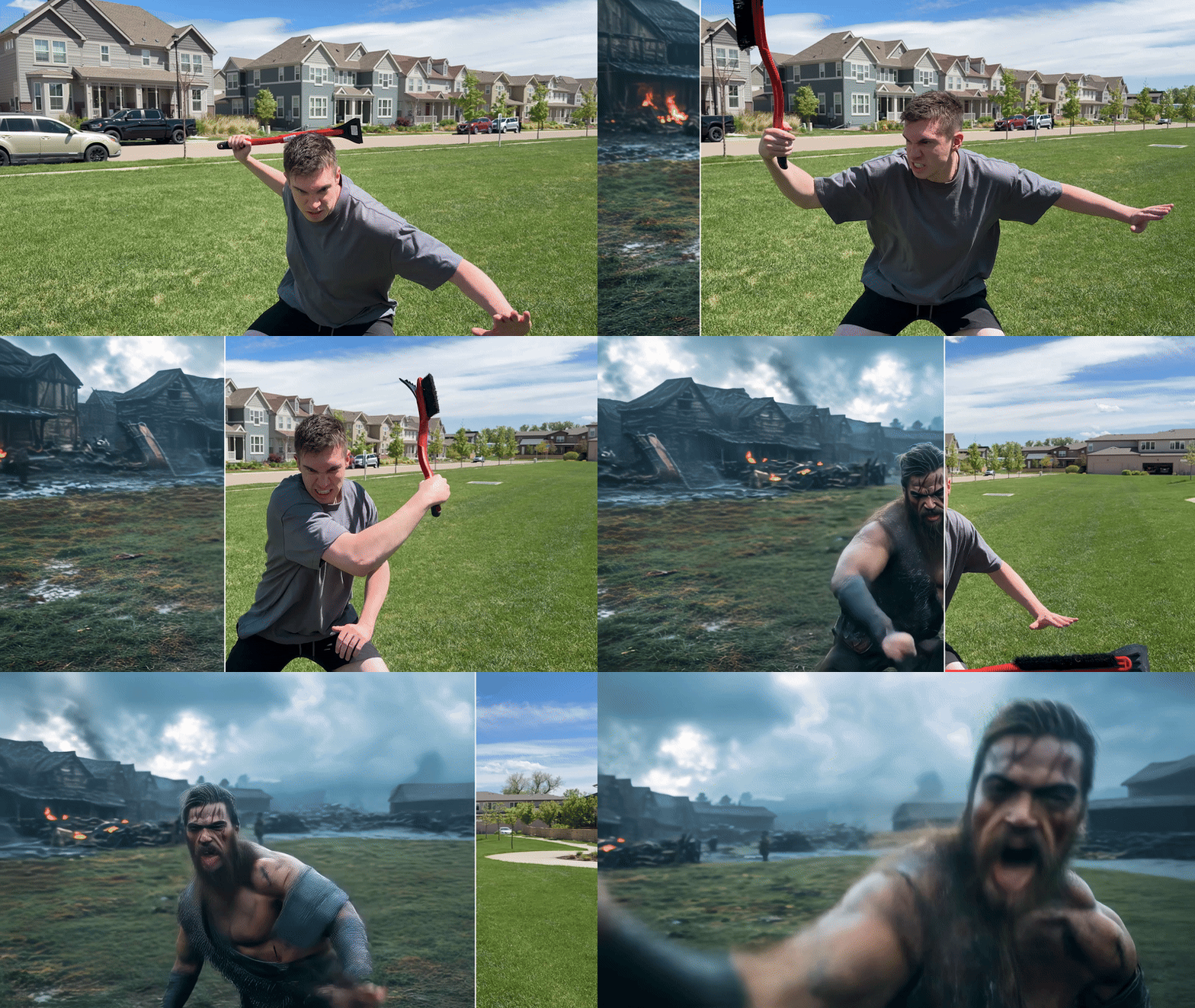
Luma AI Ray3 Modify being used to transform a man wielding an icescraper into a barbarian warrior wielding an axe in a desolate cityscape.

Generative video typically starts from a text prompt, but one AI company is launching a hybrid workflow that uses both real cameras and real actors enhanced with artificial intelligence. Luma AI Ray3 Modify is an AI video generator that relies on real human performances, but then uses AI to create fantasy characters, add special effects, change the lighting, and more.

Announced on December 18, Ray3 Modify is designed to work around one of the biggest struggles of generative AI video: getting accurate human motion and emotion. Text-based generative video AI typically struggles with complex movements (as this hilarious video of an AI gymnast demonstrates).

Ray3 Modify instead takes real, camera-recorded footage and enhances it with AI. The company says that creative teams can use the platform to change the actor into a fantasy character, swap wardrobes, add makeup, alter the background, and more.

Above: see Luma AI sizzle reel

Character Reference is a tool that places a custom character over a real actor’s performance, using AI to create the character, but the actor leads the motion and facial expressions. Luma AI says that the tool is designed to lock in the likeness, customer, and identity continuity for the full shot.

The company says the AI is also designed with performance preservation, which means the actor’s original motion, timing, eye line, and delivery remain consistent despite the AI changes.

Ray3 Modify can edit original camera-shot video in other ways too, including swapping out the background, changing the lighting, or altering the weather. The AI also supports start and end frames, allowing users to create a reference image for the start of the clip and a second for the end to dictate the camera movement and the character’s changes in between.

(Image credit: Luma AI / Modified by generative AI)

The example clips suggest that Ray3 Modify could also be used to add special effects to low-budget shoots or “travel” to multiple shoot locations without a travel budget.

“Generative video models are incredibly expressive but also hard to control. Today, we are excited to introduce Ray3 Modify that blends the real-world with the expressivity of AI while giving full control to creatives,” Amit Jain, CEO and co-founder of Luma AI, said. “This means creative teams can capture performances with a camera and then immediately modify it to be in any location imaginable, change costumes, or even go back and reshoot the scene with AI, without recreating the physical shoot.”

The company notes a few limitations of the AI, recommending that users play with the “modify Strength Levels” tool to adjust how much (or how little) of the scene the AI reimagines. Uploading a video with an aspect ratio not yet in the AI can also degrade the quality.

Ray3 Modify builds on the previously launched Ray3 and is available to try inside of Luma AI’s Dream Machine. Free tier users can create up to eight videos in draft mode for non-commercial use. The cheapest option with 4K output for non-commercial users costs $9.99 a month, while commercial subscriptions start at $29.99 a month.

You may also like

Browse the best video cameras or the best video editing software.

Sign up to read this article
Read news from 100’s of titles, curated specifically for you.
Already a member? Sign in here
Related Stories
Top stories on inkl right now
One subscription that gives you access to news from hundreds of sites
Already a member? Sign in here
Our Picks
Fourteen days free
Download the app
One app. One membership.
100+ trusted global sources.