Get all your news in one place.
100's of premium titles.
One app.
Start reading
Tom’s Guide
Tom’s Guide
Technology
Anthony Spadafora

Forget overpriced OLEDs — this 40-inch ultrawide monitor is down to $359 for Prime Day

The Innocn 40C1R ultrawide monitor playing a music video with a 21:9 aspect ratio.

When people think about upgrading to a big, immersive display, the latest 5K2K monitors from LG and Samsung are usually the first that come to mind. However, while they’re certainly some of the best monitors you can buy, they come with premium price tags of at least $1,000.

Fortunately, if you want more screen real estate but don’t want to pay as much as you would for a high-end graphics card, there are more affordable alternatives. A few months back, I tried out the 5K2K Innocn 401CU and it certainly fits the bill. While it has a list price of $999, I’ve seen it as low as $600 during major sales events.

After looking through the comments on that story though, I was surprised to see how many Tom’s Guide readers thought even that sale price was too expensive for a monitor, with many suggesting buying a budget 4K TV instead. To see if I could find a gem in the rough, I decided to try out Innocn’s even more affordable sibling: the 401CR ultrawide monitor.

At full price, it’s just under $500, but I’ve seen it go for as low as $350 while on sale. At that price, it’s a steal for a flat, 40-inch ultrawide with single-cable USB-C connectivity. Given Prime Day starts today, I expect it to see a deep discount.

If you need massive screen space for productivity and more immersive gaming, this underdog might just be the perfect upgrade for your desk setup.

Flat, wide and fully-specced

(Image credit: Tom's Guide)

At 37.1 x 16.5 x 2.2 inches, the 40C1R is anything but a small display, and at roughly 20 pounds without the stand, it’s on the heavier side, too. Thankfully, Innocn includes a fairly heavy-duty stand with a thick metal baseplate and a plastic vertical arm that’s reinforced with a sturdy metal core.

Having unboxed my fair share of monitors over the years, I really like how Innocn includes a high-speed USB-C to USB-C video cable and a DisplayPort cable right in the box. You don’t get an HDMI cable though, but you likely have several of those laying around anyway. Likewise, you probably won’t want to use an HDMI connection with this display as your refresh rate will be capped at 100 Hz versus the full 144 Hz you get over DisplayPort.

(Image credit: Tom's Guide)

With the monitor lying face down on my desk, you get a clear look at its overall structural design. Right off the bat, I love how Innocn uses standard, square 100 x 100 VESA mounting holes instead of those silly circular 75 x 75 ones you see on a lot of other gaming monitors. This makes it incredibly easy to swap out the stand for any of the best monitor arms since you won’t need to hunt for a proprietary adapter.

Looking at the back of the panel, the connectivity is split cleanly. The power port sits entirely on its own side, which highlights one of my favorite features: a built-in power supply. Just like the more expensive 40C1U, there is no bulky power brick to hide under your desk — just a single standard power cable. On the opposite side of the rear cutout, you'll find the main selection of ports, while the monitor’s physical OSD navigation buttons line the corresponding outer edge.

(Image credit: Tom's Guide)

As for those ports, you get a great selection of connection options, including dual HDMI 2.0 inputs, DisplayPort 1.4, USB-C, and a 3.5mm audio jack. While the 40C1R drops the built-in USB-A hub found on the premium 40C1U to save on cost, it oddly beats its more expensive sibling in utility: its USB-C port delivers a massive 90W of power delivery as opposed to just 60W.

After unboxing the 40C1R, I installed the included stand using a single built-in thumb screw. With the monitor securely set up and plugged in, it was finally time to see how it performs.

Laptop power with gaming PC framerates

(Image credit: Tom's Guide)

In order to test the 40C1R and make sure it was working properly, I first hooked it up to a MacBook Pro M5 I borrowed from work for another monitor review. Although 90W of power delivery is a bit less than the 140W provided by Apple's included charger, it is still more than enough juice to keep a 16-inch MacBook fully topped off even during heavy workloads. For the rest of the best laptops, 90W will be plenty to fast charge them while connected to this massive display.

With the MacBook Pro plugged into the 40C1R, the monitor’s IPS panel looked vibrant and crisp, with no dead pixels to speak of. While the 40C1R does come equipped with dual 5W built-in speakers, I ended up switching back to the ones on the MacBook Pro after a bit. Still, they are nice to have in a pinch, and they do sound much less tinny than the bottom-tier 2W speakers you find on a lot of other budget monitors.

(Image credit: Tom's Guide)

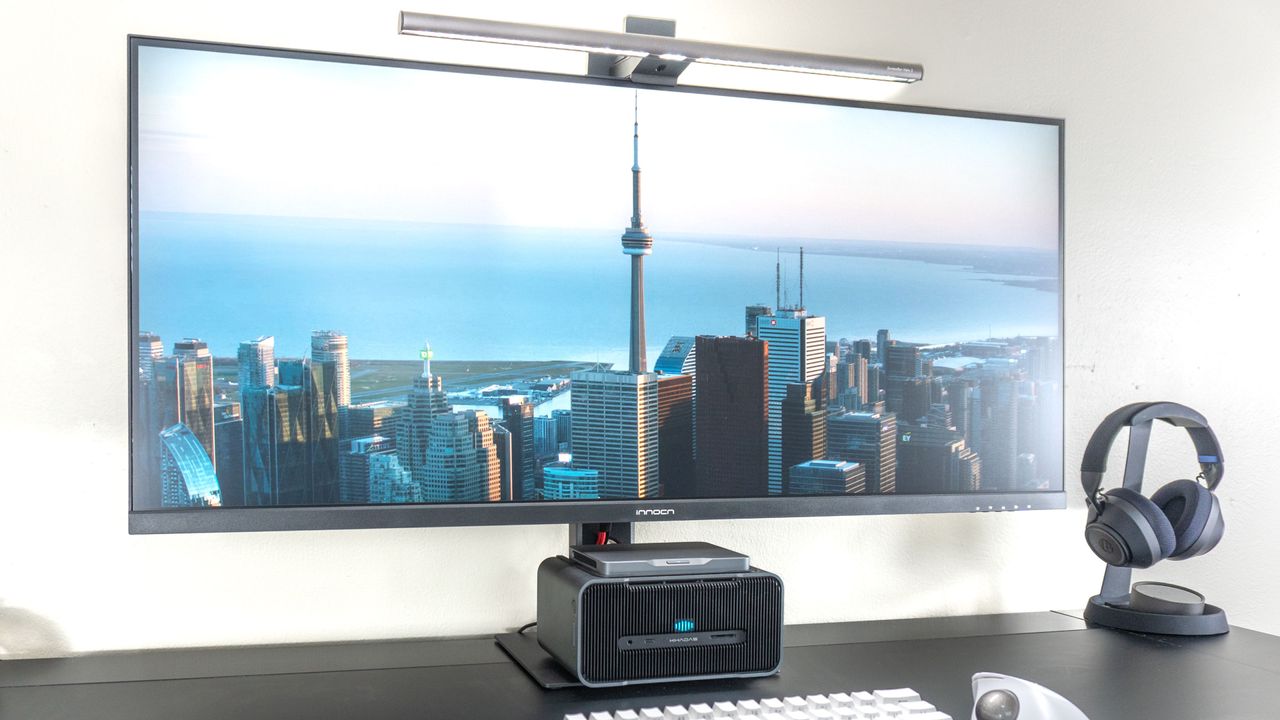
Sadly, I no longer own a big, bulky gaming desktop anymore (as I’ve been using one of the best mini PCs for both work and play for the past few years) but fortunately, my favorite pocketable mini PC — the Khadas Mind 2S — can be instantly upgraded with an NVIDIA GeForce RTX 5060 Ti desktop GPU just by dropping it onto Khadas’ Mind Graphics 2 dock.

Now, I know what you might be thinking when looking at a compact setup like this: airflow. I too was worried about putting this docked mini PC directly underneath the 40C1R at first. However, after pushing the hardware and running a few demanding games on it, I didn’t run into any thermal throttling or heating issues at all. I chalk this up to Khadas' excellent internal cooling design and the fact that the dock's entire outer shell is machined from aluminum, which acts as a giant heatsink.

With the 40C1R confirmed to be fully operational and paired with a surprisingly powerful eGPU dock, it was time to see how this budget-friendly 40-inch ultrawide handles real-world productivity and immersive gaming.

Big screen on a budget

(Image credit: Tom's Guide)

Back when I tried out Innocn’s more premium 40-inch ultrawide, I did play a few games on it. However, with a massive resolution of 5120 x 2160, the Framework Desktop I was using at the time struggled to push smooth frame rates. With a lower — yet still reasonably high — resolution of 3440 x 1440, I knew that my mini PC with its desktop-grade RTX 5060 Ti would have a much easier time keeping up. Likewise, given this is an outright gaming monitor instead of a productivity-first screen like the 40C1U, it actually features a much higher 144 Hz refresh rate.

For the past few months, I’ve been making my way through Death Stranding 2, and on an ultrawide display like this one with a 21:9 aspect ratio, it’s been an absolute joy to play. Not only was the game’s world wider than it was on my PS5 Pro, but I could crank the framerate past 60 fps all the way up to a buttery-smooth 144 fps. In fact, if you’re coming from a console and are playing on an ultrawide, you might end up double-dipping on a few titles just to experience them at full width without any distracting black bars on the sides.

In addition to Death Stranding 2, I also really enjoyed playing my go-to skateboarding game Session and Ratchet and Clank: Rift Apart on this wider display. It also helps that the monitor comes equipped with AMD’s FreeSync Premium, so you can turn on VRR (variable refresh rate) for a tear-free experience. The 40C1R does have HDR support, but I preferred leaving it off since it's an HDR400 panel that tops out around 400 to 500 nits of brightness. Without local dimming, SDR content actually looks a lot punchier.

(Image credit: Tom's Guide)

With an ultrawide display like the 40C1R, streaming content online can be awesome, too... if you find the right video. While most TV shows are locked to standard 16:9, you can find plenty of movies and even some music videos — like Drake’s "2 Hard 4 The Radio" pictured above — that are natively available with a cinematic 21:9 aspect ratio. After upgrading to an ultrawide, I highly recommend going to YouTube, searching for 21:9 trailers, and turning the resolution all the way up. You won’t be disappointed.

Overall, I’m quite impressed with the 40C1R, especially given the fact that it’s a four-year-old monitor design. While you might think you need the latest and greatest OLED display to upgrade your desk setup or battlestation, my experience with this monitor proves you definitely don’t.

One for work, one for play

(Image credit: Tom's Guide)

I’ll admit, I was lucky enough to experience Innocn’s latest and greatest 40-inch ultrawide before tying out this more budget-friendly model. However, after thoroughly testing both of them, they each clearly have their place depending on your use case and how much you’re willing to spend.

With its higher resolution and built-in USB hub, the Innocn 40C1U is a fantastic productivity monitor. You can see substantially more on the screen at the same time, and if you want to switch between two computers — say a Mac and a Windows machine like I’m doing here — you won’t need to buy a separate KVM switch. However, for gaming at that native 5K2K resolution, you’re going to need a really beefy graphics card with frame generation turned on for your favorite titles to truly shine.

Given its higher refresh rate and lower price, the Innocn 40C1R stands out as a fantastic ultrawide monitor for gaming, even if the underlying panel design is several years old now. While it comes equipped with legacy HDMI 2.0 ports instead of newer HDMI 2.1 ones, that won’t be a problem since you’re going to want to use a DisplayPort cable anyway to make full use of its faster 144 Hz refresh rate. Although a built-in USB-A hub would have been nice to see, I’m sure most people would rather have the massive 90W of power delivery over USB-C so they can fast charge a laptop and utilize it to its fullest potential at the same time.

Now, would I recommend either of these monitors for gaming on a console? Absolutely not, since even the more powerful PS5 Pro is still strictly locked to a standard 16:9 aspect ratio. That could very well change down the road with the PS6 and Xbox’s upcoming Project Helix, but for now, if you want to experience a wider, more immersive field of view while gaming, PC is your best and only option.

At the moment, I have the Innocn 40C1U set up as my dedicated work machine powered by the ultra-powerful Geekom A9 Max 2026 Edition, and I’m using the Innocn 40C1R right alongside it for gaming. If I was on a strict budget and had to pick one over the other, the 40C1R would easily be my choice because you’re getting a flat, massive 40-inch ultrawide with a high refresh rate and better power delivery over a single USB-C cable. That’s not to say the 40C1U is a bad monitor by any means, but at 100 Hz with a demanding 5K2K resolution, it’s simply much better suited for spreadsheets and content creation than it is for high-framerate gaming.

More from Tom's Guide

Sign up to read this article
Read news from 100's of titles, curated specifically for you.
Already a member? Sign in here
Related Stories
Top stories on inkl right now
One subscription that gives you access to news from hundreds of sites
Already a member? Sign in here
Our Picks
Fourteen days free
Download the app
One app. One membership.
100+ trusted global sources.