I recently had surgery on a critical part of my body required for sitting. The recovery process required me to be on my backside for no more than two hours at a time, which meant I'd need to either stop working for long periods or get one of the best standing desks.
Space constraints made the standing desk option challenging, but it seemed preferable to missing a bunch more work. So I set out to find a small standing desk that would let me get work done without eating too much of my tiny office.

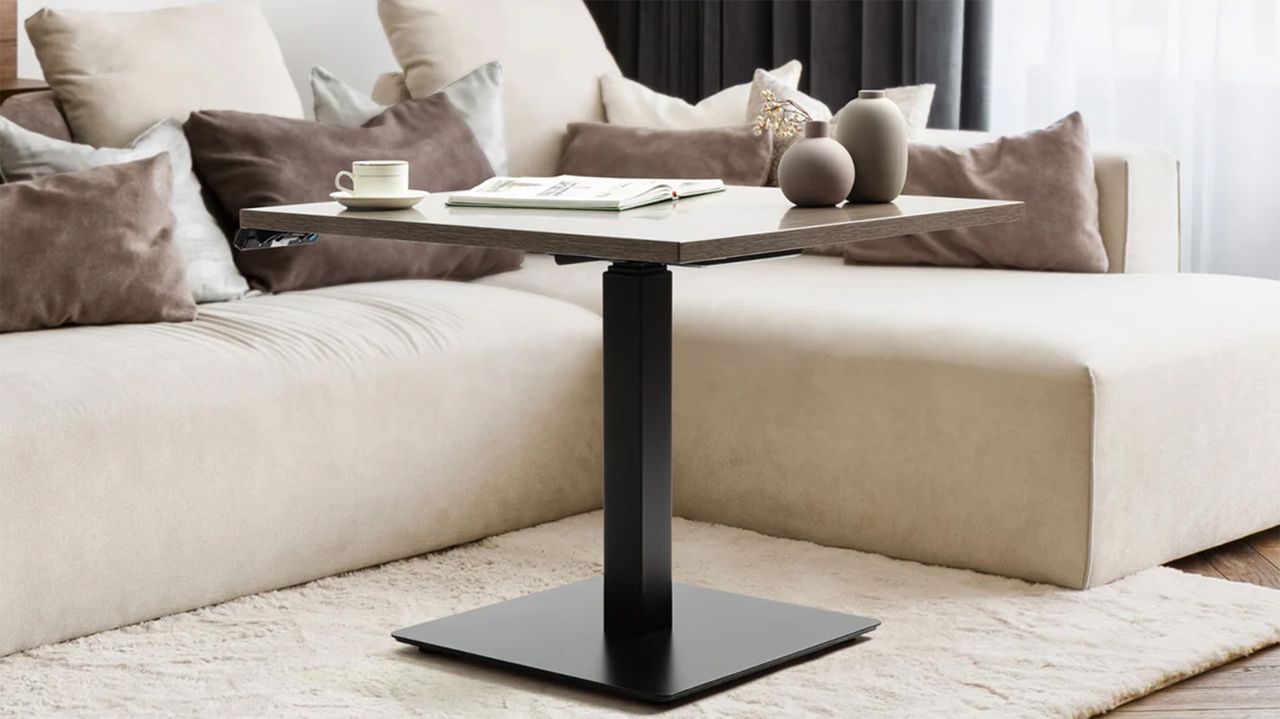
This led me to the Progressive Mini Ryzer Standing Desk, which has one of the smallest footprints and the lowest price point of any I could find. At $315, it won't break the bank , but it still has a single electric motor that makes bringing the desk up and down quick and easy, perfect when you're in a compromised physical state post-operation.
Progressive Mini Ryzer Standing Desk: Cheat Sheet
- What is it? The Progressive Mini Ryzer Standing Desk is a single-motor, compact standing desk designed to work in all kinds of spaces. It's affordable enough to serve as a secondary desk, but large enough to be the primary if needed.
- Who is it for? Anyone who needs an electric standing desk and doesn't have room for the bigger options on the market will benefit from the Progressive Mini Ryzer Standing Desk.
- What does it cost? The MSRP is $393, but you can typically order the Progressive Mini Ryzer Standing Desk from the company's website for $315 .
- What do we like? I love that the setup process doesn't take too long and can be done with only one person (though the single leg is quite heavy). I'm a big fan of the desktop's multiple finishes, so it'll match any space, and I'm happy with how easy the controls are to use.
- What don’t we like? I wish it were available in a rectangular shape, as the depth makes this desk less than ideal for really small spaces. It fits in my office, but it's a little tighter than I'd like. I also feel the single leg makes the desk less stable, but the large floor stand counteracts that.
Progressive Mini Ryzer Standing Desk: Specs
Progressive Mini Ryzer Standing Desk (as tested) |
|
|---|---|
Desktop size |
30 X 30 in. |
Leg colors |
Black or White |
Min/max height |
23 - 49 in. |
Max supported weight |
180 pounds |
Electric |
Yes |
Noise level |
50dB |
Memory presets |
4 |
Cable management |
Available as an add-on |
Warranty |
8 years |
Progressive Mini Ryzer Standing Desk: The ups
There's a lot to love about this desk, especially when you consider the relatively low price point. Electric standing desks typically come at a premium, so being able to get one in your home for a little more than $300 is great. And if you're not as space-concerned, the larger tabletop might be perfect for your needs.
Straightforward assembly
I hate building furniture, appliances and other similar things. I dread these sorts of tasks more than anything.
Which is why I didn't mind putting together the Progressive Mini Ryzer Standing Desk. It took almost no time and there were only a few short steps. I did it with no help, which is always nice, as I don't want to drag anyone else into the process unless absolutely necessary. The single leg does make it a little on the heavy side, but it was manageable.
Running the wires was a quick and painless process, too. The only part that took a little thought and effort was mounting the controller to the bottom of the desk, as there aren't pre-drilled holes. Instead, it's up to you to decide where to mount it.
Smart controls
In terms of controls, it has all the key functions you'd expect from an electric sit/stand desk. You can raise and lower the desk with the arrows, and set specific heights as presets so you can quickly return to them. There's nothing worse than dialing in the perfect height and then not remembering the exact number to reproduce it.
I have tested other sit/stand desks with wireless connectivity to control the desk from a smartphone or other device. I do find this to be a cool feature, but it also feels a little gimmicky. It also made those desks a lot more expensive, so I can't help but question how worthwhile smart features actually are in a desk.
It does have anti-collision technology, so if something (or someone) goes under the desk while it's lowering, it won't crush them. This feature is fairly common on sit/stand desks, but I tested it, and it worked as advertised.
Overall, between the four presets and the standard arrow controls, you get exactly what you need to use the desk without issue. Add in collision detection and the overall speed at which the desk goes up and down, and you have a well-rounded desk.
Lots of colors to choose from
One of the most underrated aspects of purchasing any piece of furniture is the color options. Sure, you can make a desk with good functionality, but you want it to match your space. That's especially true with a space-saving desk like this, as the kind of person who needs a small desk probably will need it to serve multiple functions and possibly even have it in their living room.
In this case, you can snag the desk in six different tabletop colors and two frame options. You can choose from warm white, bright beech, gray oak, dark cherry, roasted walnut and ebony oak for the table. The frame comes in white or black, and you can pair either color with any of the tabletops to best match your space.
Progressive Mini Ryzer Standing Desk: The downs
The Progressive Mini Ryzer Standing Desk isn't perfect and it has a couple small flaws, though none of them are severe enough for me to say you shouldn't get one, they're just things to be aware of.
Not the best shape for small spaces
My biggest gripe with the Progressive Mini Ryzer is the shape of the tabletop. It being a square means it sticks out a lot further than a rectangle with the same width, and a lot of the space at the back of the desk is out of reach anyway. It means you're giving up precious floor space for something that probably won't benefit your day-to-day work too much.
For me, I'd rather have it two feet deep to save that extra foot of floor space, and I have to assume the target market of a small desk would be in a similar situation.
Obviously, this is just a matter of preference and space. If you know you have enough room for the extra depth and think you could benefit from some more workspace, then this will be a non-issue for you.
Single leg doesn't feel as stable
Due to its square shape, Progressive is able to use a single leg to support the desk instead of two legs. It has a big, wide base on the bottom to keep it in place and stable, but I think I'd prefer two legs with a smaller ground footprint and a little extra stability.
Now, I never had a problem with the desk falling over or tipping, so it's really just a matter of perceived stability versus actual stability. I have no evidence to suggest the desk will tip over, I just feel like with kids running around and animals being animals, I'd feel safer with two legs.
Progressive Mini Ryzer Standing Desk: Verdict
Overall, I'm very happy with this sit/stand desk from Progressive. It has some design aspects I might change, but at the end of the day, it does two crucial things: takes up a relatively small amount of space and is affordable.
After having surgery that stopped me from sitting, it came in clutch to allow me to keep working, which is really all I can ask for.
If you're in the market for a budget-friendly sit/stand desk that doesn't skimp on quality and you have enough room for the square shape, I can wholeheartedly recommend the Progressive Mini Ryzer desk.