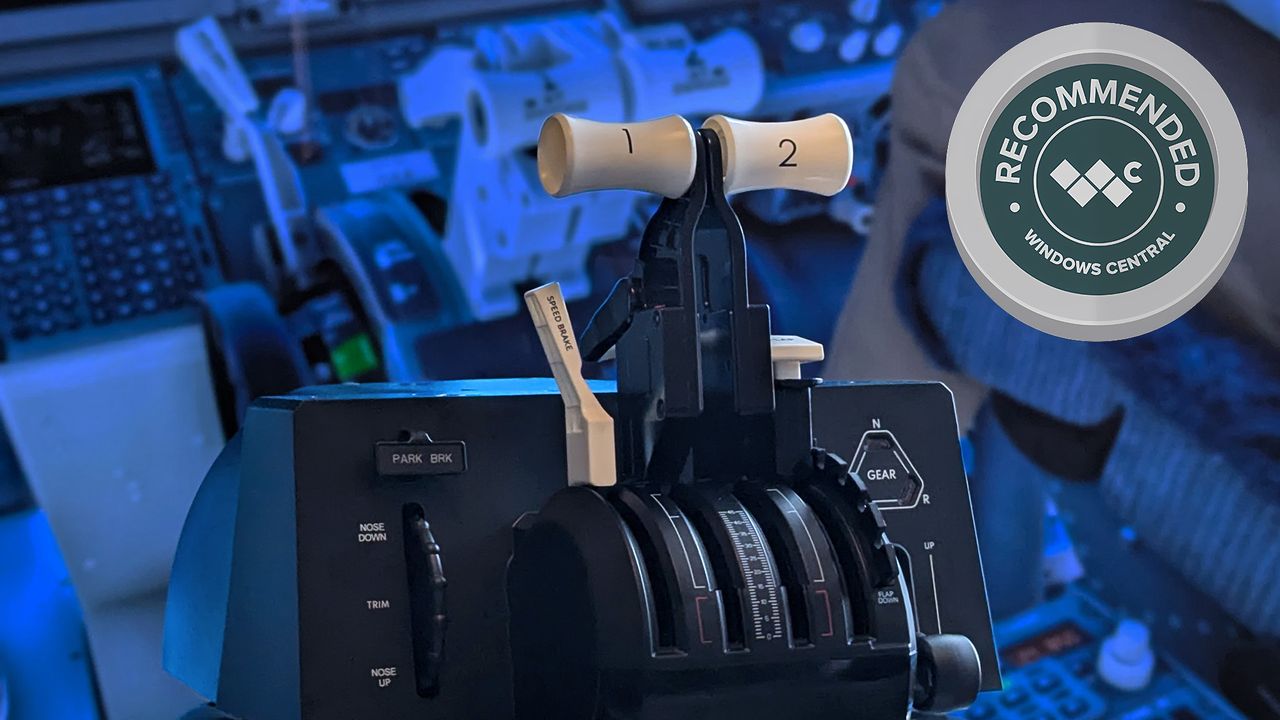
Honeycomb Aeronautical recently switched up its corporate workings, but its products clearly still strive for the same quality. That much was clear when I met with the team to see prototypes of new hardware, including the Bravo Lite, in the second half of 2025. If you're familiar with the excellent Alpha Yoke and Bravo Throttle, then this Lite variant should look extremely familiar.
They're a combination of simplification and a push towards affordability that can help newcomers and intermediates pick up a sturdy peripheral that promotes simulator immersion, whether that's in Microsoft Flight Simulator or otherwise. In the same vein as Honeycomb's Foxtrot flight stick that won my highest praise, I knew I'd feel similarly about the Bravo Lite when I got it home.

Where can you buy the Bravo Lite?

As with all of its hardware, you can normally buy the Bravo Throttle Quadrant Lite for $199.99 from Honeycomb's official store when it's in stock, or find it on a few third-party listings on worldwide storefronts.
Price (MSRP): $199 at Best Buy
Platform: Windows PC
Model: HC003790
Connection: USB-A to USB-C
Material: Metal, plastics
Dimensions: 40 x 13 x 27 cm
Weight: 3.2 kg (7.05 lbs)
Then again, while Amazon.com lists the Bravo Lite, there wasn't any availability at the time of writing, but it was previously priced at $199.99.
Alternatively, Best Buy has the Bravo Lite for $199.99, available for pickup at select stores and shipping to others, which is even better.
In the United Kingdom, where I am, a converted Amazon.co.uk listing for the Bravo Lite comes to £179.99.
Searching Honeycomb's approved UK resellers, Argos.co.uk and Scan.co.uk, comes up short, so US-based sim fans have better options right now. For everyone else, we can rely on imports or register for stock alerts at Honeycomb's website.
Is the Bravo Lite a good throttle quadrant?

If the Bravo Lite is to appeal over its full-fat Bravo predecessor, it'll need to hit a few checkmarks; chiefly simplicity. After all, Honeycomb doesn't want to deter any intrigued flight simmers eager to dig into the more complex peripherals. Thankfully, setting this up on a desk is easy with an included mounting plate; one that's mostly plastic but uses metal at its most critical parts, like the clamps.
Without any attachments, including levers and the desk mount, the partially hollow main body of the Bravo Lite is true to its namesake and feels lightweight at 1.92 kg (4.23 lbs). For a setup like mine with dual displays clamped onto a heavy-duty multi-monitor mount, I'm always wary of adding bulky peripherals, but this barely makes a difference.

The analog levers are what matter most, and the internals don't have even a hint of compromise — besides the obvious downgrade from the six axes of the original Bravo (XPC) to four on the Lite — but again, this is Honeycomb's way of offering us the essential controls while saving some cash. If I don't like the lever resistance, I can adjust it with the tension dial on the right side, while interchangeable detents handle the furthest-right lever for replicating flaps.
If I don't like the lever resistance, I can adjust it with the tension dial on the right side.
Those detents are the easiest to swap out with a top-mounted release, and give me the same kind of satisfying 'thunk' as the other levers do when they reach their rock-solid, built-in detent at the bottom. I set my resistance quite high from the start, and it still feels great. The same goes for the gear lever — sturdy with satisfying feedback. It's a little strange that the trim wheel is technically detected as buttons rather than an axis, but it works well enough.
Does the Bravo Lite have any issues?

While the Bravo Lite is a well-built alternative to its original Bravo, it has some of the same gripes. The interchangeable handles still exhibit noticeably weaker, glossy plastic that bends under pressure. That, and I found it difficult to remove them from the levers themselves, particularly when I had a full set of four attached.
I rarely felt the urge to switch away from the Boeing-style white handles once I'd finished testing this sample, but it's worth mentioning for enthusiasts who like to fly a varied range of aircraft and would regularly want to switch them out. A firm pull works, and perhaps it's more of a confirmation that they wouldn't slip off by accident.
The pull-and-twist parking brake is the only other concern, mostly because of its tiny size and ever-so-slightly lesser quality feel compared to the rest of the built-in controls. On the other hand, its spring-loaded feedback is decent, and it's a part I only need once or twice per virtual flight — but it is a little fiddly, and there seems to be enough space around its shell to have warranted a bigger version.
Should you buy the Bravo Lite?

You should buy this if ...
✅ You're a flight sim novice or curious newcomer
✅ You want an affordable quadrant without going overboard
You should not buy this if ...
❌ You're a seasoned sim enthusiast — choose the original Bravo
❌ You want to play on Xbox (PC only, for now)
Ironically, Honeycomb's biggest competitor for the Lite variant comes from itself, as this affordable alternative wrestles with the appeal of its full-size Bravo Throttle Quadrant more than much of anything else. In that, it's fantastically easy to recommend the Bravo Lite to newcomers and anyone who has mostly dabbled in combined HOTAS sets, as it delivers a supremely realistic experience with larger virtual aircraft.
Otherwise, if flight simulators are already your favorite hobby, you'd likely find more long-lasting satisfaction in the original Bravo by spending the extra cash. It's a technical success for Honeycomb Aeronautical, which literally describes the Bravo Lite as "entry level" on its packaging, and it delivers the right balance alongside the best flight sticks for MSFS without inviting excessive scrutiny.
Straightforward with no frills but no compromise either, the entry-level Bravo Lite is perfect for beginners playing MSFS on PC.

Join us on Reddit at r/WindowsCentral to share your insights and discuss our latest news, reviews, and more.