Get all your news in one place.
100’s of premium titles.
One app.
Start reading
Tom’s Guide
Tom’s Guide
Technology
Lloyd Coombes

I switched from my laptop to the iPad Pro M5 — and it's now a tablet I can finally work on

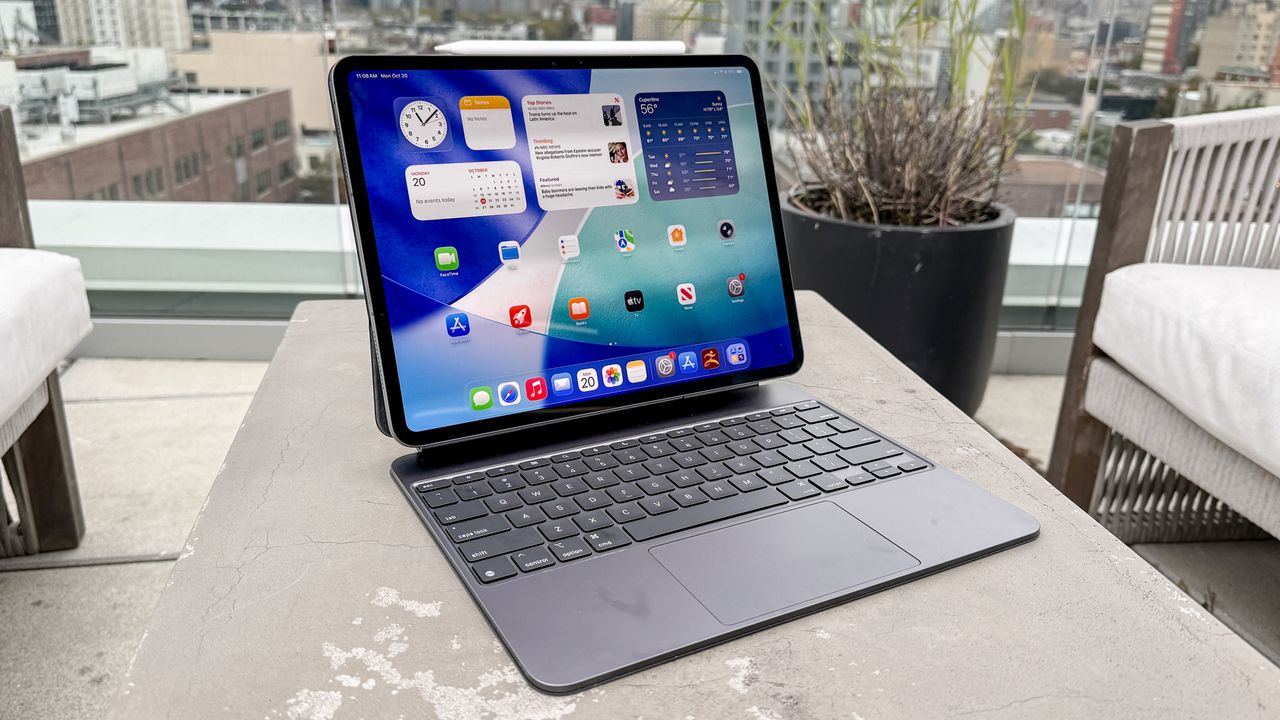
IPad Pro M5.

Ever since I got my first iPad back in 2011, I’ve loved the hardware. I’ve used Apple’s tablets for reading, watching movies, checking emails, and much more in the almost decade and a half since, but I’ve also always kept a Mac handy.

That’s because while I’ve always loved the hardware, the software has been a bit of a problem child for Apple and consumers alike. Don’t get me wrong, the iPad is no longer just a “big iPhone”, but after multiple multitasking paradigms that have come and gone, I didn’t think it’d ever be a serious device to do work on.

After upgrading to the iPad Pro M5, though, I think we’re closer than ever. And, with my own workload, I think it’s where it needs to be.

Chip and Ship

With Black Friday here, don’t expect any big discounts on the new M5 iPad Pro model (the one above is the closest you'll get). But you can expect reasonable savings on the iPad Pro M4.

I mention this because I upgraded from an M2, and there are big benefits to both the M4 and M5 versions since they share the same physical design — and one is now a fair amount cheaper than the other.

The big draw is the M5 chip this time around, but coming from the M2, I was struck by just how svelte the latest model is. While the M2 iPad Pro from yesteryear hardly ever felt bulky (only with the Magic Keyboard attached), this is something quite spectacular.

That’s to say nothing of the tandem OLED panel, and while these aren’t things that are new this year, the iPad Pro M4 is perhaps even more compelling now that it’s discounted.

(Image credit: Tom's Guide)

While I was a little miffed that my Apple Pencil no longer works with the new tablet, I’ve been much more enamored with the new keyboard. The inclusion of a function row is great, and having seen the last version get pretty grubby over time because of the material choices Apple made, this one feels like it’ll last much, much longer.

I’m also particularly impressed by the battery life. While batteries naturally degrade over time, and my iPad Pro M2 may have just been suffering from having been used for two years or so, the M5 model is always ready to go. That makes me more likely to reach for it than I would on my Mac.

iPadOS has made a huge difference

(Image credit: Tom's Guide)

As a writer, my workload involves an awful lot of emailing, firing off invoices, signing documents, and, of course, writing. And all of that has been pretty possible on the iPad before, if you’re happy to put up with some quirks.

Now, though, iPadOS 26 has made a huge difference. The ‘traffic light’ buttons mean it’s easier than ever to move windows around and minimize things to the dock, while having Preview on the iPad means viewing PDFs and signing things is much smoother than it ever has been.

The dock itself is a revelation, with key folders set to expand bringing the previously anonymous Files app front and center.

If all of this sounds familiar, it’s because these are things the Mac has been doing since before the iPad was born, but Apple finally found a sort of happy medium between the complexity of one and the touchscreen nature of the other.

The best part? The iPad can still be just an iPad, and while that sounds like damning with faint praise (especially to the tune of well over a $1000 when you factor in the keyboard), I can’t detach my MacBook Air’s display to, say, read a comic book or flick through a digital magazine.

A Professional iPad

(Image credit: Tom's Guide)

Between hardware and software, this is the most excited I’ve been about an iPad in a long time — probably since the 2018 iPad Pro revision.

It really does feel as if Apple took a long hard look at its tablet lineup last year and checked off as many features as it could that iPad users have been asking for. Background tasks, folders in the Dock, Preview, and more aren’t necessarily features that will get everyone excited, but they feel like an olive branch to users of a platform that has felt widely ignored for far too long.

There’s more to be done, of course. The iPad Pro M5 supports high refresh rate monitors, but there’s still no option to have it run in clamshell mode. If Apple can make that happen, we could live in a world where your tablet becomes a desktop with a single cable and some Bluetooth accessories.

Still, for the first time in a long time, it feels as though Apple is listening. Even SlideOver, which was removed as part of the new windowing system, was added in iPadOS updates in recent weeks.

If you’re working on video or photo editing, recording audio, or doing anything else that requires more than just writing, your mileage may vary with the iPad Pro. As for me, though, I’m going to start using it as my traveling work machine.

Follow Tom's Guide on Google News and add us as a preferred source to get our up-to-date news, analysis, and reviews in your feeds.

More from Tom's Guide

Sign up to read this article
Read news from 100’s of titles, curated specifically for you.
Already a member? Sign in here
Related Stories
Top stories on inkl right now
One subscription that gives you access to news from hundreds of sites
Already a member? Sign in here
Our Picks
Fourteen days free
Download the app
One app. One membership.
100+ trusted global sources.