Get all your news in one place.
100's of premium titles.
One app.
Start reading
Tom’s Guide
Tom’s Guide
Technology
John Velasco

I just tried the new Samsung DeX on the Galaxy Z Fold 8 — and it has one huge upgrade

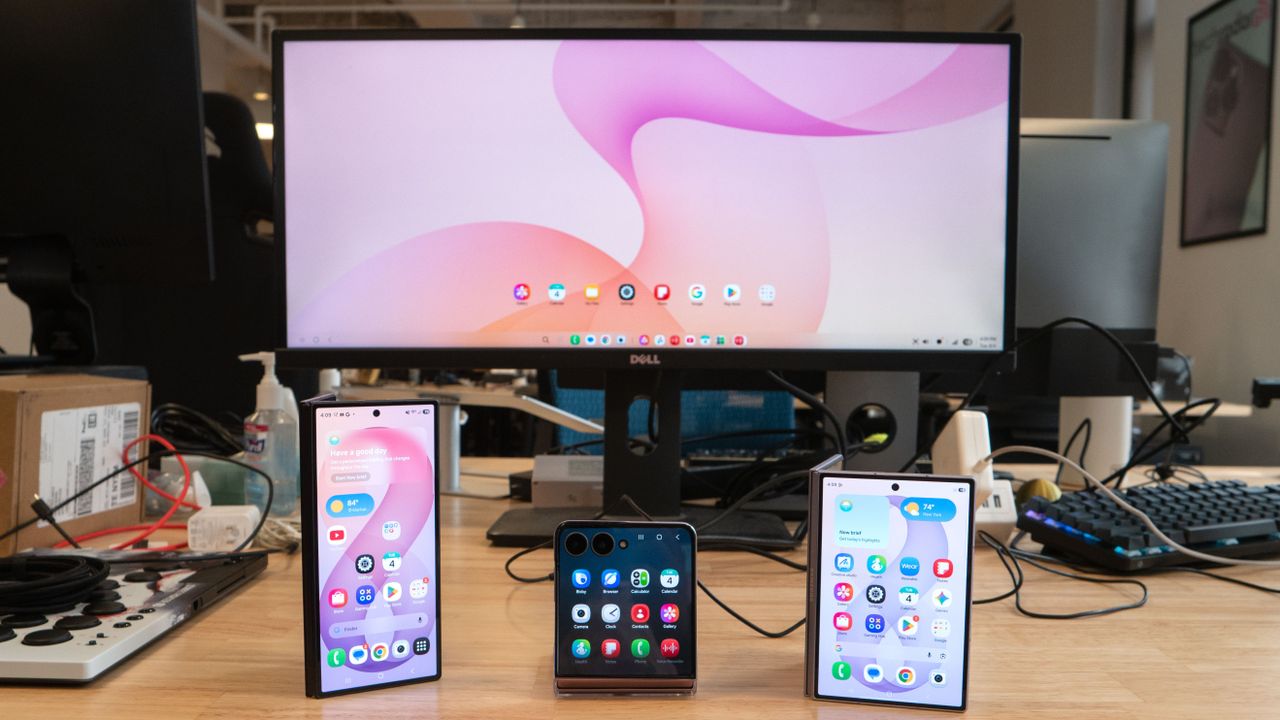
Samsung DeX on Galaxy Z Flip 8.

Samsung’s new foldable phones are almost here, and if you’re planning to get any of them, you should know about their most underrated feature in my opinion: Samsung DeX. This year’s lineup consists of three new foldables — the Galaxy Z Flip 8, Z Fold 8, and Z Fold 8 Ultra — which all come with the latest version of Samsung’s desktop interface.

Just as before, you can easily access DeX by plugging them directly into a monitor, whether via USB-C, an HDMI port using a USB hub, or even wirelessly on a supported display or TV. I’ve been testing this new Samsung DeX for the past week, and it gains one specific feature that makes it more useful for productivity.

In fact, this new Samsung DeX is exactly like the one I tested on the Galaxy S26 from earlier this year — which inherited it from the now-discontinued Galaxy Z TriFold.

Samsung DeX on Fold 8 and Flip 8: What's new

(Image credit: John Velasco / Tom's Guide)

The only new addition to this year’s Samsung DeX is the ability to create up to four workspaces. Each desktop can support up to five apps, which means I can run 20 different apps simultaneously.

While I don’t need to actively use that many apps at once, having them organized makes a huge difference. For instance, I’ve set up one workspace strictly for work-related apps I frequently access — like Slack, Gmail, Chrome, Google Docs, and Messages. In another, I have my social networking apps, while a third is dedicated to editing apps I use consistently, such as CapCut, PhotoDirector, and PowerDirector.

By clicking the icon with the three vertical lines in the lower-left corner of the interface, I can easily jump to the workspace I need — which functions very similarly to how Windows 11 handles multiple desktops. With access to more workspaces, I can keep my apps organized and stay much more productive.

Samsung DeX on Fold 8 and Flip 8: What’s missing

(Image credit: John Velasco / Tom's Guide)

Apart from that, this version of Samsung DeX is no different from the past few iterations. For example, I like being able to run two apps side-by-side and automatically resize them by adjusting the slider between them. That way, I can make Chrome take up more of the desktop while leaving a smaller window for Slack.

However, there are still a few improvements that could elevate the experience. First and foremost, I’d love to see DeX copy Windows 11’s “Snap” feature, which lets you arrange apps in preset layouts for better organization. While DeX still offers side-by-side multitasking, I want that extended to four apps at once — where each app occupies a quadrant of the display.

Secondly, I would love for Samsung to bring back support for multiple user profiles. Many of the best Android phones offer this feature, but Samsung has left it out for several generations now. It’s a crucial addition because it would allow users to separate work and personal accounts cleanly. For example, I have bookmarks specifically tied to my work account that I can't access in DeX because Chrome is locked to my personal profile.

Samsung DeX on Z Flip 8, Z Fold 8, and Z Fold 8 Ultra: Bottom line

(Image credit: John Velasco / Tom's Guide)

I can’t deny that I rely on Samsung DeX on these new foldables when I’m in a pinch and forget my laptop. In fact, I can accomplish nearly 90% of my daily workload using DeX alone — though that missing 10% could easily be bridged if Samsung adds the features I mentioned.

DeX is also invaluable to me because I can pair it with my Xreal smart glasses, a wireless mouse, and a Bluetooth keyboard. It makes for the ultimate portable desktop experience, projecting the interface directly in front of me with optional semi-transparency so I can stay aware of my surroundings.

And considering Samsung’s ongoing developments in wearable displays and smart glasses, I’m genuinely excited to see where Samsung DeX goes next.

More from Tom’s Guide

Sign up to read this article
Read news from 100's of titles, curated specifically for you.
Already a member? Sign in here
Related Stories
Top stories on inkl right now
One subscription that gives you access to news from hundreds of sites
Already a member? Sign in here
Our Picks
Fourteen days free
Download the app
One app. One membership.
100+ trusted global sources.