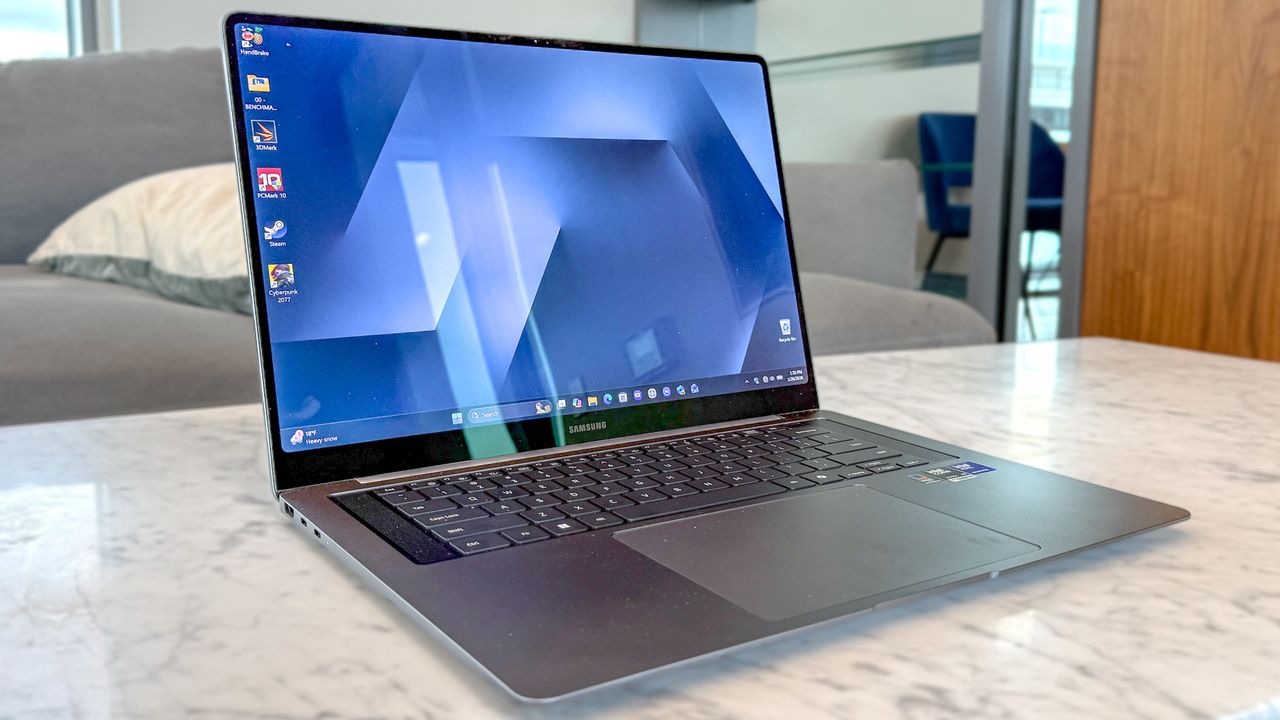
The Samsung Galaxy Book 6 Pro is the first “Panther Lake” laptop I’ve tested, and it sets a high bar for others to follow. The performance and efficiency of Intel’s Core Ultra Series 3 is astonishing, but when paired with the Galaxy Book 6 Pro’s ultraportable design and beautiful OLED panel, you have what’s already one of the best Windows laptops of 2026.
I can’t understate how impressed I am by the Galaxy Book 6 Pro’s performance. It can easily handle everyday tasks like web surfing and streaming videos, making it a perfect work companion. But the real magic is that this is a “regular” laptop that can run graphically demanding games at high frame rates. It seriously puts budget gaming laptops on notice.

Then we have the other star of the show, namely, the 16-inch 2,880×1,800 AMOLED touch display. Thanks to that screen size, sharp resolution, and stunning contrasts, you’ll have a great time viewing your favorite shows or YouTube videos. This model’s panel can actually lower its refresh rate to 30Hz, which conserves battery life when you’re viewing websites. Of course, the refresh rate can hit 120Hz to keep things running smoothly when necessary.
Though this year’s Galaxy Book 6 Pro retains the series’ signature thin and light profile, Samsung has delivered some meaningful updates. The main one is a centered keyboard and a larger touchpad. The keyboard is now flanked by a new quad speaker system, which delivers fuller sound than previous models. Sure, the design isn’t a radical departure, but I appreciate the upgrades.
The Galaxy Book 6 Pro isn’t perfect, especially if you’re like me and don’t own one of the best Samsung phones to take advantage of the laptop’s interoperability with the company's devices. But even if you never use the slew of Samsung apps or the built-in AI features, you’ll still have one of the finest Windows laptops out there. Find out more in my full review of the Samsung Galaxy Book 6 Pro!
Samsung Galaxy Book 6 Pro review: Cheat sheet
- What is it? A premium Windows laptop featuring a 16-inch AMOLED touch display, an Intel Core Ultra “Panther Lake” CPU, and Samsung AI features.
- Who is it for? Anyone who wants a svelte laptop with an OLED panel that’s adept for everyday work and even high-end gaming.
- What does it cost? On sale in South Korea, but US pre-orders are expected in “early spring.” We should see exact pricing then.
- What do we like? Elegant thin design, vivid OLED display, strong performance, and long-lasting battery life.
- What don’t we like? Unless you’re married to the Samsung ecosystem, you won’t care for the built-in Samsung apps and AI features.
Samsung Galaxy Book 6 Pro review: Specs
Samsung Galaxy Book 6 Pro (starting) |
Samsung Galaxy Book 6 Pro (tested) |
|
Price |
TBD |
TDB |
Display |
16.0-inch Touch Dynamic AMOLED 2X (2,880×1,800) | 120Hz (30~120Hz) |
CPU |
Intel Core Ultra 5 |
Intel Core Ultra X7 358H |
GPU |
Intel Arc Graphics (3rd Gen) |
RAM |
16GB (LPDDR5X) |
32GB (LPDDR5X) |
Storage |
256GB |
1TB |
Ports |
2x Thunderbolt 4, 1x USB-A, 1x HDMI 2.1 (8K@60), 1x 3.5mm jack |
Size |
14.05 x 9.76 x 0.47 inches |
Weight |
3.50 pounds |
3.50 pounds |
Samsung Galaxy Book 6 Pro review: The ups
The Samsung Galaxy Book 6 Pro delivers the goods thanks to its lightweight design, vibrant OLED panel, impressive Panther Lake performance, and more than all-day battery life.
Minimalist design

Samsung didn’t radically redesign the Galaxy Book 6 Pro. Measuring 14.05 x 9.76 x 0.47 inches and weighing 3.5 pounds, this laptop is as thin and light as its predecessors. It’s also sturdy, thanks to its smooth aluminum chassis. While you could say the design is bland, I’d say the Silver notebook I reviewed was practical.

The biggest change is with the keyboard deck, which ditches the number pad to allow for a centralized keyboard that’s easier to type on for long stretches. The keyboard is now flanked by a new quad speaker system, which delivers fuller sound than previous models. I also appreciate the two-tone finish that isolates the board. The haptic touchpad is much larger than before, but just as responsive as ever.

You get most of the same ports here as you did on the previous model. On the left side, there are a pair of USB-C ports and an HDMI port, while on the right, you’ll find a headphone jack and a USB-A port. There’s no microSD card slot on this model, so keep that in mind if you need it.
Beautiful OLED panel

The 16-inch 2880 x 1800 AMOLED panel is a stunner. I watched the latest trailer for The Super Mario Galaxy Movie and was impressed by how vivid everything appeared. This is especially true when Yoshi shows up, as we get treated to a myriad of colors.
As I mentioned in the intro, the refresh rate can now scale from 120Hz all the way down to 30Hz. I didn’t even notice the frame rate differences when switching between watching a movie trailer and scrolling through Tom’s Guide, which is a good thing. If you’re just reading text or looking at static images, the laptop won't use more power than it needs to.
Samsung Galaxy Book 6 Pro |
MacBook Pro M5 |
Samsung Galaxy Book 5 Pro |
|
Nits (brightness) |
457 (SDR) | 570 (HDR) |
558 (SDR) | 1,109 (HDR) |
381 (SDR) | 515 (HDR) |
sRGB |
119.4% |
115.4% |
117.5% |
DCI-P3 |
84.6% |
81.7% |
83.3% |
Delta-E |
0.20 |
0.20 |
0.32 |
Our lab tests confirm what my eyes saw. The sRGB coverage is well over the 100% target, and while the DCI-P3 color gamut doesn’t hit the full mark, the colors look rich without feeling oversaturated. The Delta-E score is what you’d normally see in other laptops.
The anti-reflective coating on the Gorilla Glass with DXC also does a great job of dealing with the overhead lights in my apartment, though it's not as adept as the nano-texture display on the MacBook Pro M5.
Speaking of Apple’s notebook, you can see that its color reproduction (sRGB and DCI-P3) and color accuracy (Delta-E) are basically on par with the Book 6 Pro. However, the MacBook Pro’s display can get much brighter with SDR and HDR content.
Panther Lake has claws

My review unit is a productivity monster thanks to the Intel Core Ultra X7 358H processor and 32GB of RAM. It deftly handled my average workload, which usually consists of 20 to 30 Chrome tabs and the occasional YouTube video. During my time using the laptop, it has never slowed down or stuttered.
Galaxy Book 6 Pro (Intel Core Ultra X7 358H) |
MacBook Pro 14-inch (Apple M5) |
Galaxy Book5 Pro (Intel Core Ultra 7 256V) |
|
Geekbench 6 (single-core) |
2938 |
4,288 |
2,760 |
Geekbench 6 (multi-core) |
17162 |
17,986 |
11,115 |
Handbrake (video transcode) |
4:04 (mins:secs) |
3:31 |
6:16 |
Samsung’s notebook performed admirably on the Geekbench 6 CPU test, pulling in solid numbers in single- and multi-core tasks. The new Galaxy Book 6 Pro’s performance also ran circles around its Lunar Lake-powered predecessor, the Samsung Galaxy Book 5 Pro, especially in the multi-core test. It also did well in the Handbrake video transcoding test.
But how does Intel’s Panther Lake stack up against Apple’s M5? As I detailed in my Panther Lake vs Apple M5 benchmarks piece, Panther Lake holds its own against the M5 chip in the multi-core portion of the test. However, the M5 absolutely crushed Intel’s chips in single-core performance. For daily tasks like browsing the web or opening Word, that high single-core score on the M5 chip makes everything feel just a bit snappier. But for heavy-duty multitasking, Intel is in the same league as Apple.

Samsung Galaxy Book 6 Pro |
MacBook Pro M5 |
Acer Nitro V 16 AI |
|
Assassin’s Creed Shadows |
40 |
25 |
29 |
Cyberpunk 2077 |
80 |
43 |
28 |
Shadow of the Tomb Raider |
107 |
57 |
102 |
The real shocker here is that this thing can game! I fired up the graphically demanding Cyberpunk 2077, with the resolution set to 1800p, graphics to "Ray Tracing Low," and XeSS (Intel’s frame-boosting tech) enabled. At those settings, it hovered between 55 and 65 fps. Seeing those numbers on integrated graphics is bonkers! Mind you, this was before the release of XeSS 3!
Using each title’s respective in-game benchmark tools, we saw great performance across the board thanks to Panther Lake. At high graphics settings, 1080p resolution, and XeSS 3 enabled, even the system-crushing Cyberpunk 2077 went well above the desired 60 fps. These are incredible results for a non-gaming laptop.
For your reference, I also added benchmark results for the MacBook Pro M5 and the Acer Nitro V 16 AI, which is a proper gaming laptop. These results aren’t apples-to-apples since we didn’t use frame generation when benchmarking games on these rival systems. However, it’s another demonstration of how well games run on the Panther Lake-powered Galaxy Book 6 Pro.
All-day (and then some) battery life

In our battery test, which involves continuous web surfing over Wi-Fi with the display set to 150 nits of brightness, the Samsung Galaxy Book 6 Pro lasted for an astonishing 15 hours and 17 minutes! That’s almost two entire work days' worth of battery life.
Time (hours:mins) |
|
Samsung Galaxy Book 6 Pro |
15:17 |
MacBook Pro 14-inch M5 |
18:00 |
Galaxy Book5 Pro |
12:25 |
When you consider that OLED panels are traditionally power-hungry, a laptop that lasts over 15 hours is a major win for Intel’s new architecture. It puts this Windows machine squarely in the same conversation as the MacBook Air for all-day endurance. You can safely leave your charger at home without a care when you’re out and about with this notebook.
Samsung Galaxy Book 6 Pro review: The downs
Though the Samsung Galaxy Book 6 Pro is a brilliant Windows laptop, it’s got some shortcomings. I don’t consider these deal-breakers, but they’re worth keeping in mind.
Samsung bloatware

If you’ve read any of my past Galaxy Book reviews, here’s the part where I complain about the slew of pre-installed Samsung apps and features. You’ll certainly get some use from them if you’re already invested in the Samsung ecosystem with Samsung phones and the best Samsung tablets. However, if you’re like me and don’t own any Samsung devices, all of this stuff is effectively bloatware.
To be fair, these apps aren’t very intrusive. In fact, you can forget they exist most of the time. That said, the occasional reminder to update certain Samsung apps isn’t fun. Unless you’re willing to uninstall each app one at a time, you’ll probably just learn to live with them on this laptop.
Better AI, but still superfluous

Samsung is leaning heavily into its "Galaxy AI" branding. The standout additions are AI Select and AI Cutout, which bring smartphone-style ease to the laptop. You can use the touchscreen to highlight any text for instant info or cut out a background from a photo to drop it into a slide. There’s also a new natural-language search feature that lets you find files by describing them.
The rest of the suite, like Note Assist and Multi Control, remains the best reason to own a Samsung phone. You can drag your cursor off the laptop screen onto your Galaxy tablet or edit photos from your phone as if they were saved locally.
I commend Samsung, as these AI features are more useful than ever. However, while I appreciate the updates, these aren't features I personally see myself using daily, especially since I don’t own Samsung devices, as I said before. These features are great to have in your back pocket, but they won't fundamentally change how you work.
Samsung Galaxy Book 6 Pro review: Verdict
I’ve always been a fan of Samsung’s laptops, and the Galaxy Book 6 Pro is the best Pro model yet. It retains the lovely design and even lovelier OLED panel, but tosses in some excellent design updates. It’s made all the better thanks to the inclusion of the Panther Lake chip, which effectively turns this into a stealth gaming laptop.
The main downside at the moment is availability. If you don’t want to wait for an "early spring" release date, the $1,649 Galaxy Book 5 Pro is still great —though it currently costs more due to the ongoing RAM crisis. Alternatively, the $1,599 14-inch MacBook Pro M5 is another strong option. But if you’re willing to wait for the Book 6 Pro, I promise you’ll be very happy with your purchase.

Follow Tom's Guide on Google News and add us as a preferred source to get our up-to-date news, analysis, and reviews in your feeds.