Get all your news in one place.
100’s of premium titles.
One app.
Start reading
Tom’s Guide
Tom’s Guide
Technology
Tony Polanco

I just tested the Kindle Scribe — and it will be hard going back to the Paperwhite

Kindle Scribe (2025).

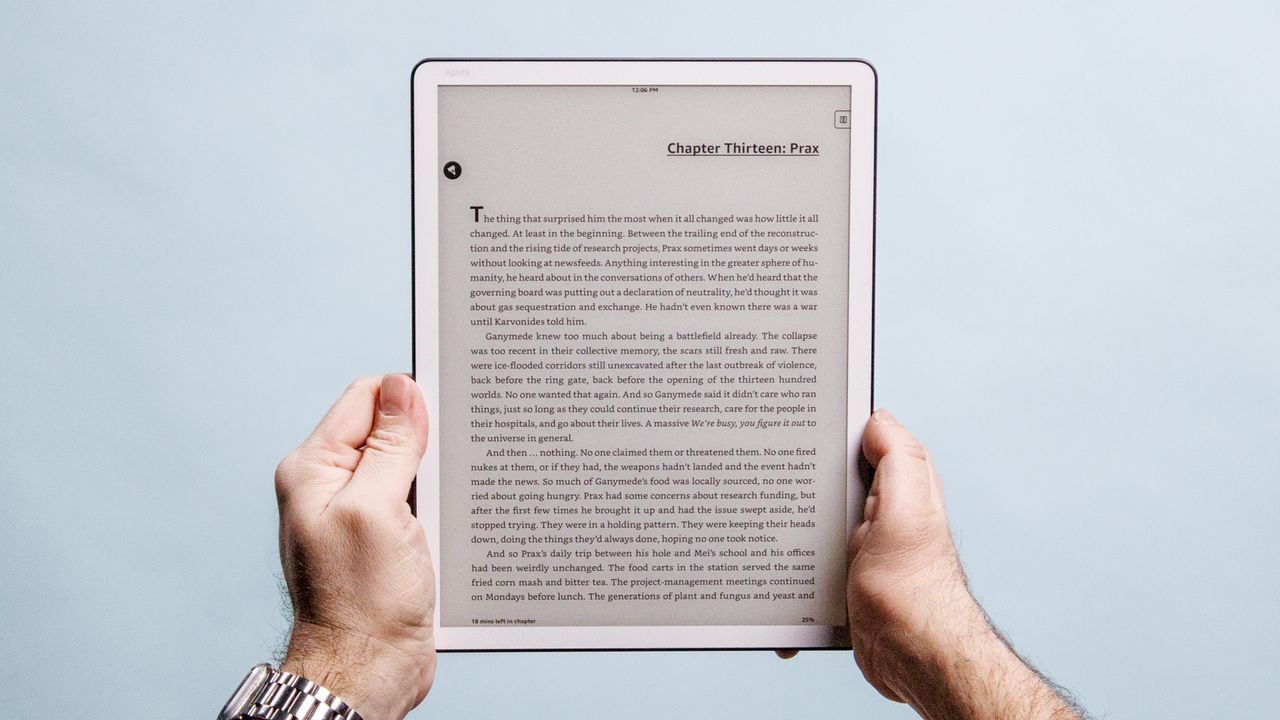
I’ve used the best Kindles for years, with the Kindle Paperwhite being my go-to tablet for reading my favorite novels. That’s going to change, as I’ve fallen in love with the new Kindle Scribe after using and testing it for the better part of a week. Though I won’t completely abandon the Paperwhite, the Kindle Scribe is now the main Kindle I’ll use, both for reading novels and black and white comics.

What’s so great about Amazon’s latest e-reader? While it doesn’t have a color e-paper display like the Kindle Scribe Colorsoft, the new standard Scribe features a more streamlined design than its predecessors. The tablet’s lightweight design makes it comfortable to hold for long periods of time. The 11-inch display and its auto-brightness feature also enable me to read without much (if any) eye strain.

You can read my full Kindle Scribe (2025) review for more details, but here are some thoughts on why the new Scribe is now my favorite Kindle model — and why my Kindle Paperwhite might not get as much attention as usual.

Easier reading

(Image credit: Tom's Guide)

With the right font size and spacing, you can reasonably approximate the experience of reading a mass-market paperback on a Kindle Paperwhite. It reminds me of the days when I used to buy these small (and cheap) novels from the local pharmacy.

I don't read physical books as much as I used to, but when I do, I now tend toward the larger paperback or hardcovers since they’re easier to read than mass-market paperbacks. Going back to the comparatively smaller Kindle Paperwhite can be jarring.

This is no longer an issue with the Kindle Scribe, since its screen is either as large or larger than that of a standard paperback or hardcover. And like I said in my Kindle Scribe review, the default font size and line spacing make for comfortable reading out of the box. Don’t get me wrong, I fiddled with the settings to see what I preferred (since I always do this with a new Kindle). In the end, I just settled for default since it’s practically perfect.

I almost always turn off the front lights on a Kindle since I like reading near a light source the same way I would when reading a real book. I mostly do this on the Kindle Scribe, though I sometimes switch its front lights on so that the display matches the white bezels surrounding it. I actually wish the bezels were black, but that’s a minor complaint. Regardless, whether it's with the display’s front lights on or off, the Kindle isn’t scorching my eyes as the display on something like an iPad Pro M5 would.

Comfortable to hold

(Image credit: Tom's Guide)

The Kindle Scribe’s aluminum body makes it feel more premium than the Paperwhite, which has a plastic chassis. I don’t dislike the latter, especially since its rubbery backside makes it comfortable to hold, but I just like the Scribe’s smooth and sturdy chassis more. It’s also very light to hold, and is actually a tad lighter than an 11-inch iPad Air M3 (14.1 ounces vs 16.2 ounces, respectively).

I mostly hold the Kindle Paperwhite with two hands as I would a real book, but I do occasionally prefer holding it in one hand. Though it’s not hard to hold the Scribe this way, I can only comfortably hold it for so long before my arm and wrist get tired. This is one of the few downsides when reading, but it’s not a deal-breaker since I generally use two hands anyway.

Another minor complaint is that the Scribe’s aluminum chassis can get pretty cold now that winter is approaching. Obviously, the Scribe’s back warms up as I hold it, but initially picking it up in between sessions isn’t always fun for my fingers. I’m considering purchasing the Amazon Kindle Scribe Folio Cover to alleviate this issue.

Versatility

(Image credit: Tom's Guide)

Kindles are fantastic for reading books, but they’re not so great for comics since their screens are smaller than a comic’s page. Manga (black and white Japanese comics) aren’t as bad to read on a Kindle Paperwhite, but I enjoy reading this kind of book more on an iPad mini since the screen is larger and there’s better contrast between the white pages and black ink. Things are different on a Kindle Scribe, however.

The Scribe’s 11-inch e-paper display is roughly the same size as a standard American comic book page. That size, combined with the screen’s sharp 300ppi resolution and paper-like appearance, makes for an enjoyable comic book reading experience. Naturally, manga also looks fantastic on the Kindle Scribe. Of course, the main downside here is that all comics are in black and white. If you want color, you’ll need the Kindle Scribe Colorsoft.

I appreciate that the Kindle Scribe has expanded my reading options since it can expertly handle novels and black and white comics. It’ll be more convenient than always switching between a Kindle and an iPad to accommodate the kind of book I’m reading at the moment.

Read on!

The Kindle Scribe's main selling point is that it's a Kindle you can write or draw on. While that aspect works as intended, that's actually the least interesting feature since I don't like writing by hand. If that's what you're looking for with the Kindle Scribe, then you won't be disappointed when taking notes or doodling. For me, however, it's all about the reading experience, and the Scribe excels at that.

I was smitten the instant I unboxed the Kindle Scribe, and that feeling hasn’t diminished over the subsequent days. I’m still fond of the Kindle Paperwhite, and will no doubt use it when I’m on a cramped airplane ride to CES next month. But aside from specific situations, the Kindle Scribe will now be my go-to Kindle for novels and black and white comics.

More from Tom's Guide

Follow Tom's Guide on Google News and add us as a preferred source to get our up-to-date news, analysis, and reviews in your feeds.

Sign up to read this article
Read news from 100’s of titles, curated specifically for you.
Already a member? Sign in here
Related Stories
Top stories on inkl right now
Our Picks
Fourteen days free
Download the app
One app. One membership.
100+ trusted global sources.