Get all your news in one place.
100's of premium titles.
One app.
Start reading
Tom’s Guide
Tom’s Guide
Technology
Rami Tabari

I just tested Lenovo’s Legion OLED 4K 240Hz gaming monitor — and it’s just a step away from being perfect

Lenovo Legion Pro 32UD 4K 240Hz.

I love OLED gaming monitors, but not all OLED devices are created equal, so I put on my critical glasses when eyeing Lenovo’s Legion Pro 32UD-10 4K 240Hz monitor. My assessing eye quickly turned to ogling.

At 31.5 inches, the Legion Pro 32UD-10 is a decently large display that delivers a vivid array of colors, making gaming far more immersive than with almost all IPS or VA monitors I’ve played on. Compared with other OLED gaming monitors, the Legion Pro 32UD is quite solid on that front.

Of course, it trips up on one key aspect: its brightness. It’s a common issue with OLED gaming monitors, but the Legion Pro 32UD-10 is especially dim out of the box. It makes up for it with its crisp 4K resolution and smooth 240Hz refresh rate.

At the current $879, it’s one of the best gaming monitors, but unless you want something very specific from the Legion Pro 32UD-10, you’re likely to find a brighter gaming monitor for a similar price.

Lenovo Legion Pro 32UD-10 4K 240Hz review: Cheat sheet

  • What is it? The Lenovo Legion Pro 32UD-10 is a standard 16:9 OLED gaming monitor.
  • Who is it for? Gamers seeking a large OLED gaming monitor for under $1,000 (on sale).
  • How much does it cost? The Lenovo Legion Pro 32UD-10 is typically $1,099, but it's currently on sale at Best Buy and Lenovo for $819.
  • What do we like? The Lenovo Legion Pro 32UD-10 offers a colorful panel with sharp resolution and a high refresh rate, all packed into an elegant design.
  • What don’t we like? The display looks dim out of the box, and while you can set it to a brighter mode, it’s still dimmer than some competitors.

Lenovo Legion Pro 32UD 4K 240Hz review: Specs

Lenovo Legion Pro 32UD-10 4K 240Hz

Price

$1,099

Display

31.5 inches

Resolution

3840 x 2160

Aspect ratio

16:9

Refresh rate

240Hz

Response time

0.03ms

Panel type

OLED

Ports

1x DisplayPort, 2x HDMI, 3x USB-A, 1x USB-C

Dimensions

28.30 x 16.35 x 2.02 inches (without stand)

Weight

18.7 pounds (with stand)

Lenovo Legion Pro 32UD-10 4K 240Hz review: The ups

The Lenovo Legion Pro 32UD-10 is packed with good looks both inside and out, including a sleek design, pretty display, and excellent performance.

Sleek design

(Image credit: Tom's Guide)

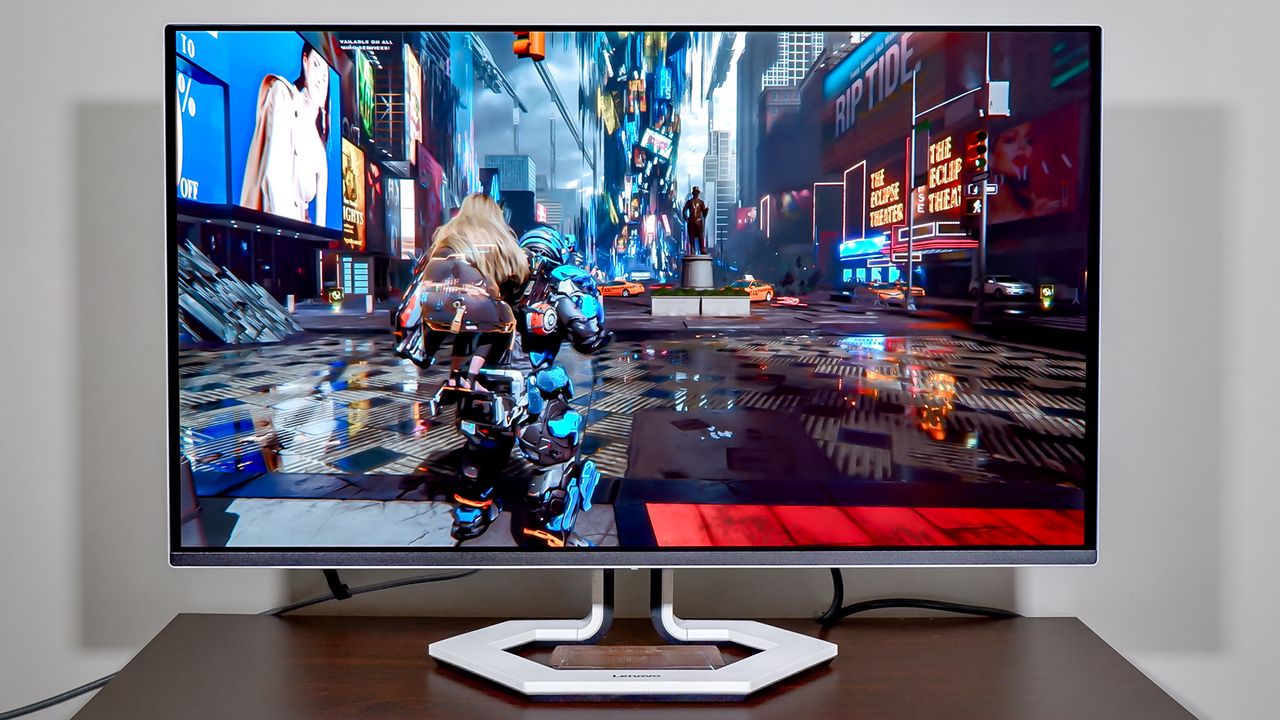
For a gaming monitor, the Lenovo Legion Pro 32UD-10 is surprisingly elegant, with its white hexagonal base, thin panel, and slim neck.

The panel measures 28.30 x 16.35 x 2.02 inches, which isn’t too big. However, you’ll need to work around its hexagonal base — it looks good but isn’t practical, as it blocks space you could use to slide in any accessories you usually keep on your desk. The stand has a hole for easy cable management. There’s also a clear plastic piece with no defined purpose, but you might be able to slot your phone into it (my Pixel 9 just hits the display).

As for movement, you can raise or lower the monitor by 5.3 inches and tilt it back by 5 degrees or forward by 22 degrees. The swivel range is 45 degrees to the left and right. Adjusting the swivel feels smooth, while the tilt is stiff but secure.

There’s an array of ports on the back, including a single DisplayPort, two HDMI 2.1 slots, three USB-A ports, and a single USB-C port. There’s no USB-B slot, but I don’t think anyone will miss it. Below the ports, in the center, are the joystick and buttons for navigating the display settings, along with the power button.

While this is technically a gaming monitor, it’s nice not to be blasted with crazy RGB lighting. And the white colorway is a refreshing break from the homogeneous black-and-gray gaming tech.

Vivid display

(Image credit: Tom's Guide)

The Lenovo Legion Pro 32UD-10 4K 240Hz is a stunning OLED display that captures every detail you never knew you wanted to see, all in a blast of color.

I jumped into space-dad simulator (Pragmata) and took in the gorgeous, twisted landscape of New York City. Everything from the neon signs to the yellow taxi cabs popped on screen. The blue tanks on the creepy baby creatures were vividly clear, especially when they turned red after being shot.

Display benchmarks

Lenovo Legion Pro 32UD

Alienware AW3426DW

MSI MPG 321URXW QD-OLED

sRGB

186.2%

187.6%

198.3%

DCI-P3

131.9%

132.9%

140.5%

Delta-E

0.35

0.20

0.28

Our lab results matched my hands-on testing. In Standard mode, the Lenovo Legion Pro 32UD-10 delivers strong colors across both sRGB and DCI-P3 color gamuts. It keeps pace with the $799 Alienware AW3426DW but is slightly duller than the $859 MSI MPG 321URXW. The Legion’s color accuracy (Delta-E) is slightly higher (worse) than its competitors’, but it wouldn’t be noticeable to the human eye.

There are 7 display modes to choose from, including Standard, FPS (two), Racing, RTS, and Game (two) modes. I highly recommend setting the monitor to Game mode, as it’s the most general-purpose option and it’s brighter than the Standard mode (I’ll get into brightness later).

Smooth performance

(Image credit: Tom's Guide)

With a 240Hz refresh rate and 0.03ms response time, the Lenovo Legion Pro 32UD-10 has been nothing but smooth sailing. The monitor supports AMD FreeSync Premium Pro, which eliminates screen tearing, stuttering, and ghosting. Although I couldn’t find it on Lenovo’s website, the monitor is also compatible with Nvidia G-Sync.

I tested the Lenovo Legion Pro 32UD-10 with my custom desktop, outfitted with an AMD Ryzen 7 5800X CPU, an Nvidia RTX 5080 GPU, and 32GB of RAM. It was enough to push the monitor to its limits in some games, especially at 4K resolution and 240Hz. You technically don’t need a high-end gaming rig to enjoy this display, but if you want to make full use of it, you need power.

In a graphically demanding game like Pragmata, I couldn’t push it to its limits, but the high refresh rate made dashing around enemies feel smooth, and I had all the refresh rate I needed for faster reactions at high frame rates. With a sharp panel like this, capturing the intricate details of my enemy’s armor while I’m fighting made the experience feel more present.

For those used to curved monitors, as I am, going back to a flat screen is quite jarring because the sides of the screen appear farther away than they should. Something to keep in mind for those switching from a curved display.

Solid UI

(Image credit: Tom's Guide)

The interface is simple. The UI uses black and gray with blue backgrounds and white text. There’s nothing offensive here. It’s not particularly intuitive, but it's not terrible to navigate.

The joystick is the primary navigation method, but there are two other buttons: one for inputs and the other for display modes. Unfortunately, the buttons don’t open a dedicated screen to adjust their settings quickly; they simply take you to their tab in the main interface. As for overall navigation, I do wish the buttons and joystick were lower and more pronounced on the body.

Lenovo Legion Pro 32UD-10 4K 240Hz review: The downs

You might be used to lower brightness on OLED gaming monitors, but the Lenovo Legion Pro 32UD is dim even by that scale. It was also a pain to put together.

On the dimmer side

While OLED monitors can land a bit dim, the Lenovo Legion Pro 32UD 4K 240Hz is especially on the dimmer side right out of the box.

Walking the streets of a corrupted New York City in Pragmata, I found the dark alleys and shadowy areas didn’t fill out as much as they should have, so I couldn't make out the details of the garbage truck that was right next to me. I felt like I needed to turn off the lights in my room to get the full experience.

HDR benchmarks

Lenovo Legion Pro 32UD

Alienware AW3426DW

MSI MPG 321URXW QD-OLED

Nits (brightness)

193 (243 in Game mode)

298

235

The $859 MSI MPG 321URXW, which we consider dim, wasn’t that bad out of the box. However, setting the Lenovo Legion Pro 32UD-10 to Game mode gave the monitor a notable brightness boost. But even with that boost, it can’t keep up with the $799 Alienware AW3426DW.

In HDR, the Lenovo Legion Pro 32UD-10 reached up to 419 nits of brightness on 10% of the display in Standard mode. That’s pretty solid, and it would be great to experience that level of brightness if you use HDR mode.

Unfortunately, Windows HDR sucks. That’s because it balances brightness across applications, so everything looks darker unless you’re explicitly playing HDR content.

Simple yet frustrating build

(Image credit: Tom's Guide)

The Lenovo Legion Pro 32UD-10 comes in three pieces. Unlike its competitors, it does not click together easily. Instead, there are four screws for the base and four for the monitor. That’s fine; you’ll only be doing this once. However, I ran into a few issues while building this.

When connecting the monitor to the base, the screws were close enough to the neck that if you screw them in lengthwise with the included screwdriver, you’ll scratch the monitor’s paint. In the end, I couldn’t get the screws to sit flush with the mount. Then, when attempting to adjust it further, a piece of the screwdriver’s head snapped off — to be clear, I was not using any more force than normal.

This could all be a series of unfortunate events exclusive to me, so I’m not weighing it too heavily, but it was nevertheless frustrating.

Lenovo Legion Pro 32UD-10 4K 240Hz review: Verdict

The Lenovo Legion Pro 32UD-10 can easily be a go-to gaming monitor for many folks. It’s got the elegant design paired with elite specs — a 4K resolution and 240Hz refresh rate will carry you a long way with most high-performance rigs. On top of that, you get those deep blacks and bold colors that OLED is famous for. The one hang-up is that it’s relatively dim.

I didn’t have a major issue with the dimness during my testing. Yes, there are brighter panels out there, but my eyes did eventually adjust, and if you’re playing in a dark room, games like Pragmata are still going to pop. If you’re looking for the best, however, this isn’t it.

For $80 less, you could go with the Alienware AW3426DW, which gets you a curved ultrawide screen and a brighter overall display. But if you’re looking for a standard, non-curved display, then the Lenovo Legion Pro 32UD is still a solid choice.

Sign up to read this article
Read news from 100's of titles, curated specifically for you.
Already a member? Sign in here
Related Stories
Top stories on inkl right now
One subscription that gives you access to news from hundreds of sites
Already a member? Sign in here
Our Picks
Fourteen days free
Download the app
One app. One membership.
100+ trusted global sources.