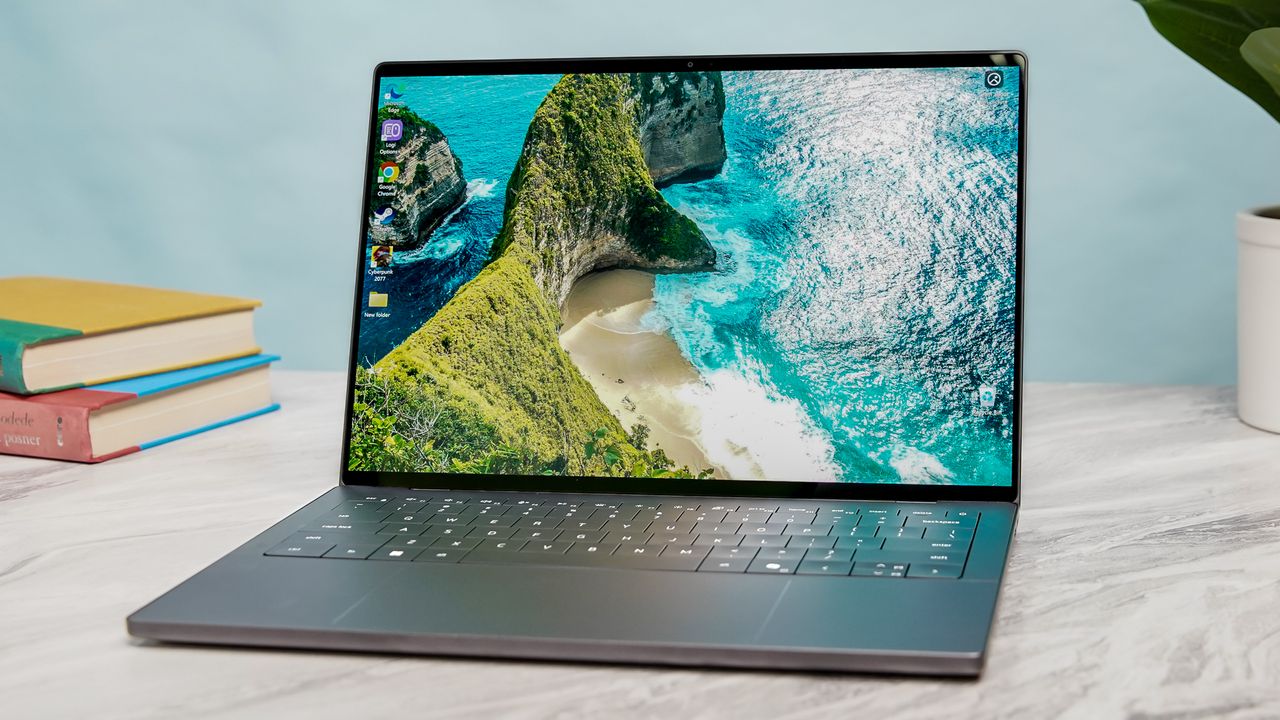
The Dell XPS is officially back! Like many others, I wasn’t exactly enthused when the company decided to rebrand its iconic laptop line as “Dell Premium.” I even had bets going with my colleagues on how long it would take for Dell to return to the XPS name. I gave the company at least two years, but thankfully, I was wrong. XPS has returned, and it’s arguably better than ever.
We recently received two XPS 14 models — one with a lower-end Panther Lake chip and an LCD panel, and a more premium model with a Core Ultra X7 chip and a tandem OLED screen. I’ve spent the past 24 hours with the latter, and let me tell you, it’s impressive so far. Not only is it fast and efficient, but the design finally gets back to basics. I’ll have a full XPS 14 review for you soon, but for now, here are my initial impressions of this sleek (and refreshingly retro) laptop.

Dell XPS 14: Specs (as tested)
Dell XPS 14 (2026) |
|
Price |
$2,199 |
CPU |
Intel Core Ultra X7 358H |
GPU |
Integrated Arc Graphics |
Display |
14-inch 2.8K (2880 x 1800) OLED| InfinityEdge touch display |
Memory |
32GB |
Storage |
1TB |
Ports |
3x Thunderbolt 4 / USB-C, 1x 3.5mm headphone jack |
Connectivity |
Intel Wi-Fi 7, Bluetooth 6 |
Size |
12.1 x 8.2 x 0.5 inches |
Weight |
3 pounds |
A lovely new design that fixes my biggest complaints

The new XPS 14 design is the best kind of apology Dell could have given us. The team clearly took some inspiration from the 14-inch MacBook Pro M5, featuring more rounded corners and a refined CNC-machined aluminum chassis that feels dense and premium.
The new XPS 14 design is the best kind of apology Dell could have given us.
But the biggest wins are the ones that fix the previous generation’s "innovations." The controversial capacitive touch row is dead; in its place is a standard function row with physical keys.
Even better, the invisible trackpad is gone. While it’s still a seamless glass haptic touchpad, Dell added subtle tactile etching around the active area. I can finally feel where the touchpad ends without having to look down. It's the little things...

At 3 pounds, this machine is significantly lighter than last year's Dell 14 Premium (3.7 lbs), making it much easier to travel with. You still get three USB-C ports (all Thunderbolt 4), but the overall package feels much more grounded and practical. It successfully combines the best aspects of previous XPS models with the functional basics you expect from the best Windows laptops.
Strong Panther Lake performance

While I didn't have the maxed-out Core Ultra X9 chip in my test unit, the Core Ultra X7 inside this XPS 14 held up perfectly during my workday.
I spent the afternoon at the office with dozens of Chrome tabs open, a Slack window constantly buzzing, and a 4K YouTube video playing in the background. Through it all, the laptop remained snappy and responsive.
Geekbench 6 (Single / Multi) |
Handbrake (Video Transcode) |
|
Dell XPS 14 (2026) |
2,867 / 16,927 |
4:32 |
Dell 14 Premium (2025) |
2,701 / 15,794 |
5:06 |
MacBook Pro 14 (M5) |
4,288 / 17,926 |
3:31 |
Looking at our lab results, the XPS 14 shows a healthy jump over the 2025 model. While it still can't touch the MacBook Pro M5 in single-core speeds or video transcoding, the gap is closing.
For everyday productivity, you simply won't feel this machine struggle. While this configuration doesn’t deliver mind-blowing benchmarks, it has more than enough power for both work and play.
Good gaming performance for an iGPU

Since this laptop relies on integrated Intel Arc graphics rather than a dedicated GPU, I kept my expectations in check. However, the new Panther Lake architecture shows some serious gaming prowess for an ultraportable.
Borderlands 3 |
Cyberpunk 2077 |
Shadow of the Tomb Raider |
|
Dell XPS 14 (2026) |
36 fps |
14.9 fps |
39 fps |
Dell 14 Premium |
41 fps |
12.2 fps |
50 fps |
MacBook Pro 14 (M5) |
32 fps |
43 fps* |
57 fps |
While the raw numbers are lower than last year's model (likely due to the lack of a discrete RTX chip), the real story is in the playability. When I dropped the resolution to 1080p and enabled Intel XeSS, I was able to get a surprisingly smooth experience in titles that would have been unplayable on integrated graphics just two years ago.
The Panther Lake chip allows it to run modern titles as well as a budget gaming laptop would — and as I’ve said before, that’s a big win for integrated graphics.
The Tandem OLED display is gorgeous

Besides the new design and Panther Lake power, the headline feature on the XPS 14 2026 is the Tandem OLED display, the same tech Apple uses on the latest iPad Pro M5. By stacking two OLED layers, you get inky blacks, vibrant whites, and contrast levels that are quite pleasing to the eye. It's easily one of the finest screens I’ve seen on a laptop.
I love the way colors pop on this panel, especially when you have something rich in front of an all-black background. If you plan to watch movies or YouTube videos on the XPS 14, you’re going to have a great time.
XPS 14 (2026) |
Dell 14 Premium |
MacBook Pro 14 (M5) |
|
Brightness (SDR / HDR) |
355 / 381 nits |
354 / 593 nits |
558 / 1109 nits |
sRGB Color Gamut |
126.6% |
163.2% |
115.4% |
Delta-E (Accuracy) |
0.20 |
0.28 |
0.20 |
You’ll notice that this Tandem OLED doesn't get as bright as the previous year's model or the MacBook Pro in our testing. This is likely because Dell tuned this specific panel for power efficiency and longevity rather than raw peak brightness. By using two layers to share the workload, the screen should resist burn-in much longer, even if it doesn't "pop" quite as much in direct sunlight.
Impressive battery life gains

We were only able to run one battery test on the Dell XPS 14 (we always do three minimum), but the initial result is pretty impressive. In our battery test, which involves continuous web surfing over Wi-Fi at 150 nits of brightness, the new XPS 14 lasted for an average of 12 hours and 23 minutes.
Battery Life (Hours:Mins) |
|
|---|---|
Dell XPS 14 (2026) |
12:23 |
Dell 14 Premium (2025) |
8:16 |
Samsung Galaxy Book 6 Pro |
15:17 |
Asus Zenbook Duo (2026) |
14:23 |
MacBook Pro 14 (M5) |
18:00 |
While the XPS 14 doesn’t quite hit the numbers of other OLED-equipped Panther Lake laptops we’ve tested—falling behind the Samsung Galaxy Book 6 Pro (15:17) and the Asus Zenbook Duo (14:23)—it’s still a huge step forward for Dell. It still lasted four hours longer than its predecessor. Still, the MacBook Pro M5 reigns supreme with its epic 18-hour runtime.
I should note that the Tandem OLED panel likely plays a role here. While the dual-layer tech is designed for efficiency and long-term durability, as Dell said, powering two layers of pixels still demands more juice than a standard LED or single-stack OLED panes.
The Dell XPS 14 with an 1200p LED display lasted 21 hours and 20 minutes, which is one of the longest runtimes ever. But it has a less powerful processor and lower-res screen than the OLED model.
Outlook
I’ll have a full review once I’ve put this laptop through more stress tests, but after 24 hours, the XPS 14 is already one of my favorite Windows laptops of 2026.
I appreciate Dell’s willingness to return to the drawing board and acknowledge that they dropped the ball with the previous generation. By listening to users and bringing back the basics, they’ve built a machine that should win people back. Stay tuned for my full review!

Follow Tom's Guide on Google News and add us as a preferred source to get our up-to-date news, analysis, and reviews in your feeds.