Get all your news in one place.
100’s of premium titles.
One app.
Start reading
Tom’s Guide
Tom’s Guide
Technology
Lloyd Coombes

I finally nailed my keyboard and mouse setup with the 8BitDo Retro 87 and MX Master 4

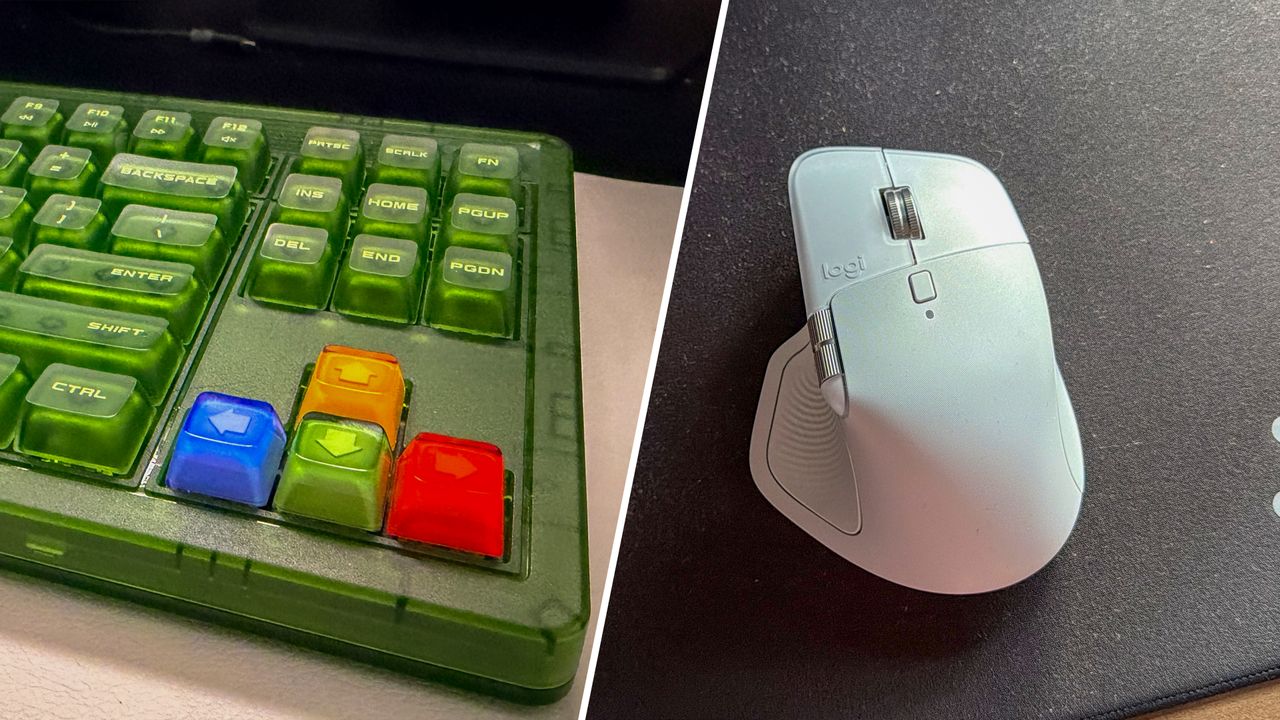
8bitdo retro 87 and Logitech MX Master 4.

2025 was a great year for keyboards and mice, and while the dust settles on a tidal wave of amazing peripherals, I wanted to point out a pair of products I fell in love with that have made their way onto my desk for this year.

The mouse and keyboard combo (unless you’re solely a laptop user) is an inherently personal thing — how do you like your clicks? Your clacks? Your scrolls?

Mine changes depending on the day, but I have found myself returning to a peculiar combo: 8BitDo’s Retro 87 Mechanical Keyboard and Logitech’s MX Master 4. It’s a bit like peanut butter and jelly, and it just works — even if the odd couple do look a bit, well, odd together.

Getting it done

I should preface this by saying I’m using these with a Mac (an M3 MacBook Air, in fact), with both connected via Bluetooth just because I tend to shake things up regularly with an ever-rotating carousel of keyboards.

I also wouldn’t use these for gaming - I have SteelSeries, Logitech, and Keychron models for those (it’s not a problem until I admit it).

For work, though, these two are ideal companions - here’s why.

A clicking clack

(Image credit: Future)

The Retro 87 mechanical keyboard, in this sumptuous Xbox theming, feels like a relic of a bygone era - not just because of the retro in its name, but it feels like the kind of thing Microsoft would’ve released for the original Xbox console.

It’s not necessarily new in 2025, with other colorways and variants, but just look at how darn cool those arrow keys look!

None of this would matter if the Retro 87 wasn’t a great keyboard in its own right, and its combination of ‘clicky’ keys, a membrane over the keys, and a volume dial that could be spotted in the current season of Stranger Things all combine for a surprisingly comfortable typing experience - even though there are no adjustable angles.

A nice touch is that the keys light up when pressed, but with a slight delay that makes it feel even more fun to just look down at the bright green keycaps.

There are even some huge programmable keys for those moments where you just need to feel like you’re hitting the buzzer at the end of the course on Gladiators, except you can have it activate just about anything instead of a firework show.

While I’m using it on Mac (and occasionally on PC), on Windows you can use the dedicated Xbox button to open the Game Bar which is a nice touch.

My only real gripe is that the included mouse (which also has a handy charging stand) is a little too small for me - but that brings us nicely to…

A new Master

(Image credit: Future / Tom's Guide)

I’ve used Logitech MX Master mice since I began working in this industry in 2019. I went from the MX Master 3 to the MX Master 3S with its quieter clicks, and would have been quite satisfied sticking with that for another few years.

Still, after several leaks, the MX Master 4 was announced earlier this year, and it’s every bit as good as I was hoping. While I feared it would push some kind of AI functionality with its new button, it remains programmable for just about anything.

When used in conjunction with the Action Wheel, which lets you customize a radial menu of shortcuts that can range from a Google Search, to window management on the Mac and just about anything else, it’s a productivity dream.

The scroll wheels are as responsive as they’ve ever been, and haptic feedback is a subtle change that’s most keenly felt (literally) when doing something like snapping to a grid in Photoshop or using the aforementioned Action Wheel.

I also appreciate that it’s much less slippery than its predecessors, with Logitech saying it took feedback on board about how easily prior models were stained and degraded over time.

Odd bedfellows

Positioning a cutting-edge productivity mouse next to a retro-themed gaming keyboard might make for an odd visual choice, but it’s impossible not to feel like it’s a combo that just works for me.

I’ll inevitably switch things up again in the new year, but go on, try it — you might just like it.

Follow Tom's Guide on Google News and add us as a preferred source to get our up-to-date news, analysis, and reviews in your feeds.

More from Tom's Guide

Sign up to read this article
Read news from 100’s of titles, curated specifically for you.
Already a member? Sign in here
Related Stories
Top stories on inkl right now
One subscription that gives you access to news from hundreds of sites
Already a member? Sign in here
Our Picks
Fourteen days free
Download the app
One app. One membership.
100+ trusted global sources.