
My Winter Car is a new indie game on Steam, and the phone is a core progression tool used in it for jobs, ordering parts, and handling key NPC interactions, and it only works through specific controls and locations.
The game is the sequel to My Summer Car, but the story doesn’t quite continue from there. Answering or placing a call at the right time is important in My Winter Car, and then holding the receiver until the conversation ends is mandatory for many missions to register properly and unlock rewards, money, or new tasks.
Having that said, here’s everything you need to know about finding a phone in My Winter Car and using it for progression.
Table of contents
How to find a phone in My Winter Car
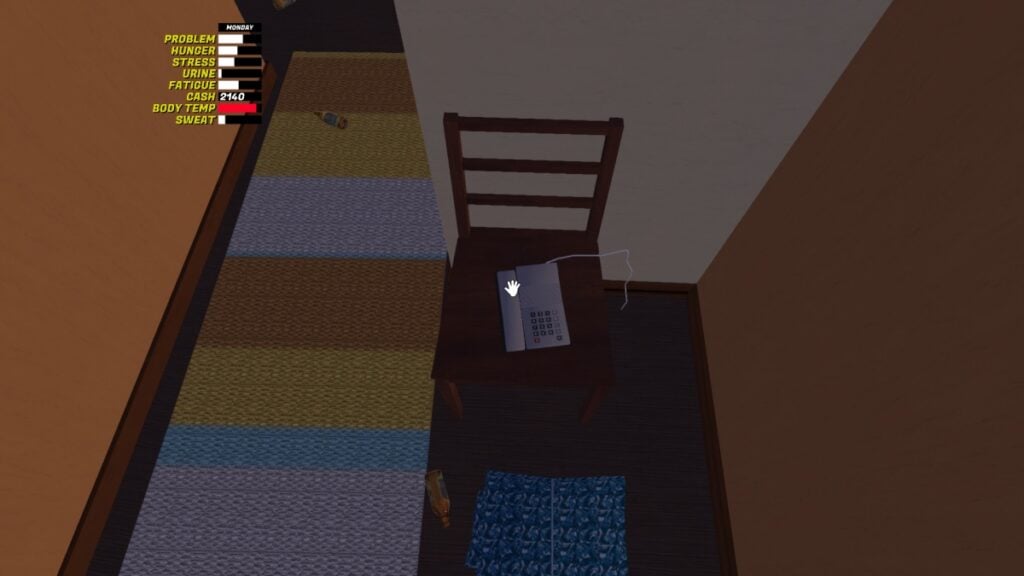
The first phone is in your starting apartment, placed next to the front door on a chair. You can use it immediately once you spot it.
Additional phones spawn only in fixed indoor locations such as city apartments, office interiors, gas stations, or other key POIs, never out in the open near your car. Phones do not move or despawn, so once you learn their locations, you can reliably return to them for jobs, parts orders, and call-based interactions.
How to use the phone in My Winter Car
You can start interacting with the phone by pressing the default left click to pick it up or answer when it is ringing or beeping for an incoming call. When the phone rings, approach and interact immediately, as delayed answers can cause the call event to fail, and you may miss job offers or world updates.

If you want to make a call, interact to lift the receiver, then use your keyboard numpad from zero to nine, to type the full number without pauses. After entering the number, wait for the beep sequence and ringing, then keep holding the phone until the NPC finishes talking to ensure the call counts toward objectives. You can find these numbers on bulletin boards, such as the gas station advert recruitment board, notes, magazines, or mission prompts.
Stay on the line until the caller hangs up. If you manually disconnect too early, missions can stop, jobs get flagged, or dialogue-driven triggers from registering correctly. If a call fails, wait for the next in-game opportunity or sleep to advance time, since some missions and jobs are tied to specific time windows and scripted phone events.
Outgoing calls are essential for advert delivery jobs, ordering car parts, and contacting special NPCs that unlock cars, upgrades, or story progress, so treat every discovered phone number as a progression tool. To avoid missing important calls for jobs like telephone missions or early car unlocks, stay near a known phone location during in‑game mornings and answer every ring you hear.