Get all your news in one place.
100’s of premium titles.
One app.
Start reading
Pro Game Guides
Pro Game Guides
Vignesh Raja

How to fix NEP D2 Cat error in Jujutsu Shenanigans – Roblox

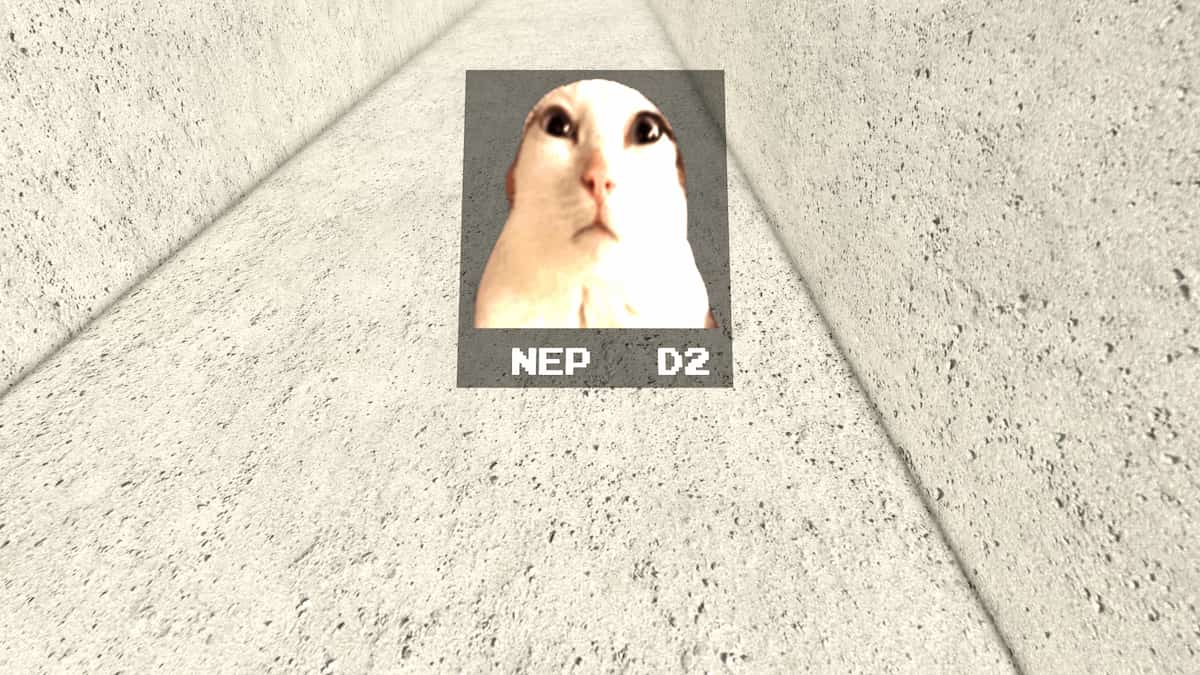
If you have been playing Jujutsu Shenanigans recently, you would have definitely once or twice stumbled upon the Cat image bug with the text NEP D2 written on top of it, with no buttons, inventories, or even the character spawning. If you are facing the same issues and are unable to play Jujutsu Shenanigans at will, here is a detailed guide.
Jujutsu Shenanigans Cat Image Bug Solutions Guide

Below is a list of reasons and solutions to fix the error and continue playing.

Laggy Server & Rejoining

You can face the error if you were lagging due to a network or internet issue while joining the server. This always happens if you see a joining server icon at the bottom of your screen for quite some time(5 to 15 seconds) after pressing the Play button. Simply close the game and join with a good connection to resolve the issue.  

Private Server Creations

Many players have reported that the issue can be resolved by playing on a private server. So, try creating one using the Create Server option in the Server section. Why does this work? Well, you won't be fighting other players for space on the server, as you will be the only player on it.

New Account Compatibility

The most common reason players encounter the Cat Image Bug is that their account is new. Jujutsu Shenanigans has a strict policy: only accounts 3 days old or older have access to the game. So, if you are using such an account, there is a very high chance that you may see the image and the NEP D2. Try logging in with your old account, or wait 3 days to access the game.

Easter Egg References and Issue

According to this Reddit Post, these cat images are part of an ongoing puzzle in Jujutsu Shenanigans, where you must collect eight different Cat images across the map, including NEP D2, Long NEP L2, and more. Either this secret quest has broken the game, or there is a secret connection between them. Nobody knows the details exactly.

Jujutsu Shenanigans NEP D2 Error FAQs

Can you fix the NEP D2 error in Jujutsu Shenanigans?

Yes, you can fix the NEP D2 error in Jujutsu Shenanigans by creating a new server, rejoining the lobby, and having a stable internet connection.

What causes the NEP D2 error in Jujutsu Shenanigans?

The main cause of the NEP D2 error is due to a long loading time between clicking the play button and connecting to an actual server.

What are the major bugs in Jujutsu Shenanigans?

The other major bugs players face in Jujutsu Shenanigans are the inventory menu not loading, characters not moving, and a frozen camera screen.

For more on Jujutsu Shenanigans, check out All Secret Moves in Jujutsu Shenanigans or 150 Jujutsu Shenanigans Kill Sound IDs – Roblox

Sign up to read this article
Read news from 100’s of titles, curated specifically for you.
Already a member? Sign in here
Related Stories
Top stories on inkl right now
One subscription that gives you access to news from hundreds of sites
Already a member? Sign in here
Our Picks
Fourteen days free
Download the app
One app. One membership.
100+ trusted global sources.