You recently purchased a gaming PC for $1,500. You ask yourself, "How long will this actually last before I need to upgrade or replace it?" as you install your first game.
It's a legitimate worry. Unlike consoles, which have set lifespans of seven to eight years, gaming PCs are a substantial investment, and their longevity is a mystery shrouded in technical jargon and Reddit debates.
Here's the straight answer: Quality gaming PCs last 5-7 years before needing major upgrades, with hardware capable of functioning for 7-10+ years with proper maintenance. However, that is only the surface. The actual lifespan is determined by your system's build quality, usage habits, and level of maintenance.
In this in-depth 2026 guide, we'll leave with a clear road map about how long do gaming PCs actually last?
Quick Answer: How Long Gaming PCs Actually Last?
Let's use specific numbers to break through the clutter:
- Five to seven years is the average functional lifespan before significant performance improvements are required.
- Hardware longevity is seven to ten years with high-quality parts and upkeep
- For AAA games, the peak performance window is three to five years at maximum settings.
- Before having trouble with new releases, budget builds take two to four years.
- High-end builds: outstanding performance for six to nine years
The crucial realization that most gamers overlook is that gaming PCs gradually become obsolete rather than abruptly dying. You're playing Cyberpunk 2077 at ultra settings one year, adjusting to high settings three years later, and thinking about upgrading your GPU by year five.
It's crucial to comprehend this degradation curve in order to strategically plan upgrades instead of buying a full replacement in a panic when your favorite new game falters.
5 Factors That Determine How Long Your Gaming PC Will Last
1. Component Quality and Brand Reputation
Not every gaming PC is made equally. A $1,500 system with high-end hardware from reputable manufacturers will last longer than a $900 budget build with generic parts.
Premium vs budget reality check:
- ASUS ROG or MSI motherboards outlast no-name brands by 3-4 years
- Corsair/EVGA power supplies have 40-50% longer lifespans than budget alternatives
- Quality components typically include 3-5 year warranties vs 1-2 years for budget options
The math is tough but straightforward. Spending an extra $200 to $300 on quality parts during your initial build extends the system's reliable performance by 2 to 3 years. That’s about $100 for each extra year of use, which is less expensive than buying a new system.
2. Cooling System Efficiency
Heat is the silent killer of PC components. Proper cooling is not a luxury; it can mean the difference between a 5-year lifespan and a 10-year lifespan.
Temperature impact on longevity:
- CPU temperatures consistently above 80°C can shorten lifespan by 30-40%. Sustained
- GPU temperatures at 90°C or higher significantly speed up silicon breakdown.
- Poor airflow leads to failures in multiple components.
Invest in proper cooling from day one. A good tower cooler ($50-80) or a 240mm AIO liquid cooler ($100-140) pays for itself by extending the life of every component. Case airflow is important too; make sure you have enough intake and exhaust fans to create positive pressure.
Target temperatures for longevity:
- CPU idle: 30-40°C | Gaming load: 60-75°C
- GPU idle: 35-45°C | Gaming load: 65-80°C

If you're consistently up from these numbers, your PC is cooking itself to an early grave.
3. Usage Patterns and Gaming Intensity
How you use your gaming PC dramatically affects its lifespan. There's a massive difference between casual and hardcore usage patterns.
Usage scenarios and expected life:
- Casual gaming (2-3 hours daily, medium settings): 6-8 years
- Moderate gaming (4-5 hours daily, high settings): 5-6 years
- Heavy gaming (6+ hours daily, ultra settings): 3-5 years
- Extreme use (streaming, overclocking, 8+ hours daily): 3-4 years
When you use your Graphics Processing Unit at power for many hours every day it gets really hot. This is worse for your computer than playing games sometimes. You do not have to be too careful with your computer because it is made for playing games.. You should know that always using it at the highest settings will make it wear out faster. Running your Graphics Processing Unit at power all the time is not good, for it.
Warning: Crypto mining is the fastest way to destroy GPU longevity. Mining operations run cards at 100% load 24/7, reducing expected lifespan from 7-8 years to 2-3 years.
4. Maintenance Frequency (Most Overlooked Factor)
This is where most gamers really lose out. They can lose two to three years of their computer lifespan. This happens when gamers do not do the things to take care of their computers. Gamers like playing games on their computers. Gamers often forget to do simple maintenance, on their computers.
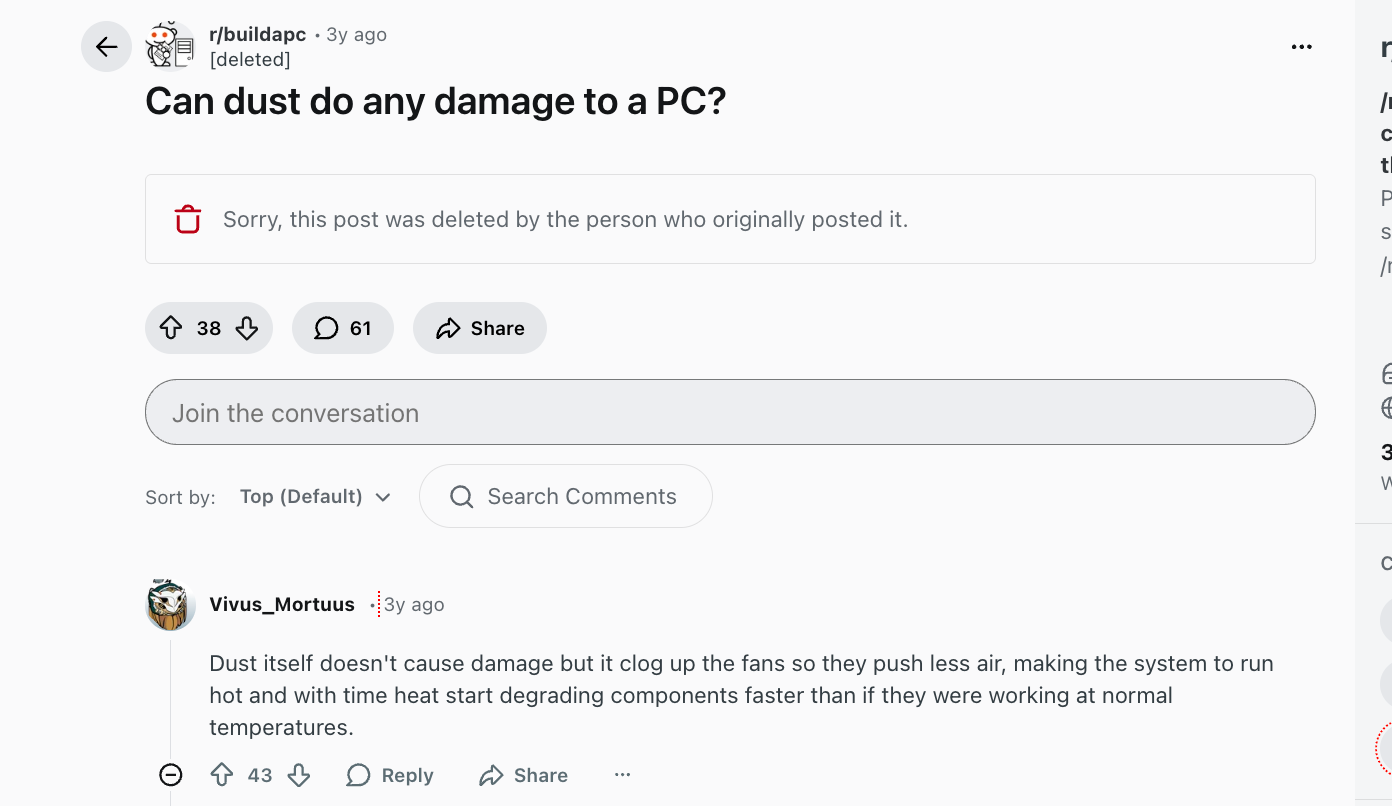
Dust accumulation alone can reduce your PC's lifespan by 30-40%. Dust acts as insulation, trapping heat and forcing fans to work harder. Within six months in a dusty environment, thermal performance degrades noticeably. This comment from Reddit describes it in detail.
Essential maintenance schedule:
Monthly (15 minutes):
- Clean exterior dust filters
- Verify all fans spinning
- Check for unusual noises
Quarterly (30-45 minutes):
- Open case, blow out dust with compressed air
- Clean fan blades
- Check cable connections
Every 2-3 years (1-2 hours):
- Replace CPU thermal paste (temps drop 10-15°C)
- Deep system cleaning
- Update BIOS if stable version available
Systems with regular maintenance last 6-8 years. Neglected PCs struggle after 3-4 years. The time investment is minimal, the lifespan extension is massive
5. Power Supply Quality (The Foundation)
Your PSU is the heart of your system. When a cheap power supply fails, it doesn't just stop working, it can take your entire PC with it.
Why PSU quality matters:
- Premium 80+ Gold/Platinum PSUs use Japanese capacitors rated for 10+ years
- Budget PSUs use Chinese capacitors that degrade within 3-5 years
- PSU failures account for 40% of catastrophic PC damage
- Cheap PSUs lack protection circuits for voltage spikes
Never compromise here: Budget 10-15% of your total build cost for a quality PSU. A $1,500 build should have a $120-150 power supply from Corsair, EVGA, Seasonic, or be quiet!. That $50 PSU from an unknown brand? It's a timebomb threatening your $500 GPU and $400 CPU.
Gaming PC Component Lifespan Breakdown
Knowing how long parts last can help you plan upgrades. Instead of replacing everything, you can just swap out what's needed, which can save you a lot of money.
CPU (Central Processing Unit): 7-10 Years
Processors are pretty tough. They don't usually break down completely. What happens is they start to slow things down as new software needs more power.
For example, an Intel i7-4790K from 2014 can still handle 1080p games in 2026 if you have a newer graphics card. That's like, 12 years! Also, the Ryzen 5 3600 from 2019 is still great for gaming seven years on.
When to upgrade your CPU:
- Consistent 100% usage during gaming
- Stuttering despite a capable GPU
- Slow multitasking performance
- Frame rate drops that GPU upgrade doesn't fix
Hold off on that CPU upgrade! Wait until your graphics card is really being held back. Most gamers jump the gun by 3-4 years, wasting cash that could've gone to a better GPU.
GPU (Graphics Card): 4-6 Years Performance | 7-10 Years Hardware
The graphics card is key for gaming. Although it might last for ten years, you'll probably see its performance drop off after four or five. That's because new games need more VRAM and processing ability.
GPU lifecycle reality:
- Years 1-3: Ultra settings at target resolution
- Years 4-5: High settings, occasional medium for demanding titles
- Years 6-7: Medium settings, some new games unplayable
- Years 8+: Retro gaming and esports only
Game-changing technology in 2026: AI upscaling (DLSS 3.5, FSR 3.1, XeSS) has revolutionized GPU longevity. These technologies render games at lower resolution then upscale intelligently, effectively adding 2-3 years of GPU relevance.
Example: An RTX 3060 with DLSS rendering at 1080p and upscaling to 1440p performs comparably to a native 1440p card from the previous generation. This wasn't possible five years ago.
VRAM requirements accelerating:
- 2020: 6GB adequate for 1080p
- 2023: 8GB minimum recommended
- 2026: 10-12GB becoming standard
- 2028 projection: 12-16GB for high settings
When buying a GPU in 2026, prioritize VRAM capacity. An 8GB card might struggle within 2-3 years, while a 12GB card extends viability to 5-6 years.
RAM (Memory): 10+ Years
RAM is exceptionally reliable. Modern DDR4 and DDR5 modules can theoretically last indefinitely with proper voltage regulation and cooling.
The truth about RAM upgrades: You're not replacing failed RAM—you're expanding capacity. The upgrade path looks like this:
- Entry builds: 8GB → 16GB (immediate necessity)
- Mid-range: 16GB → 32GB (optional, content creation benefit)
- High-end: 32GB → 64GB (professional workloads only)
For gaming in 2026, 16GB is minimum, 32GB is comfortable, 64GB is overkill unless you're running heavy content creation software alongside games.
Storage: SSDs 5-7 Years | HDDs 3-5 Years
The shift from HDDs to SSDs has dramatically improved PC longevity and user experience.
SSD advantages for longevity:
- No moving parts = nothing mechanical to fail
- Modern NVMe drives handle 600-1,000 TBW (terabytes written)
- Average user writes 10-20TB annually = 30-50+ years theoretical life
HDD failure rates:
- Year 1: <1% annual failure rate
- Year 3: 5-8% annual failure rate
- Year 5: 20%+ annual failure rate
If your gaming PC still uses an HDD as the primary drive, upgrade to an SSD immediately. The performance boost is transformative, and you're likely months away from catastrophic failure if your HDD is 4+ years old.
Storage health monitoring: Check SMART data quarterly using CrystalDiskInfo. This free tool shows drive health, temperature, and remaining lifespan before issues become critical.
Power Supply: 5-10 Years (Quality Dependent)
Quality PSUs with 80+ Gold or Platinum ratings easily last 7-10 years. Budget units fail within 3-5 years, often damaging connected components.
PSU failure warning signs:
- Random shutdowns under gaming load
- System instability or unexpected crashes
- Coil whine or unusual buzzing noises
- Burning smell from PSU area
Critical rule: Replace any PSU over 7 years old, even if seemingly functional. Capacitor degradation accelerates after year 7, and the risk of catastrophic failure increases exponentially. Spending $100 on a new PSU beats replacing a $1,500 system.
Motherboard: 7-10 Years
Motherboards typically outlast their usefulness. You'll likely upgrade for new CPU socket compatibility before the board fails.
Exception: Cheap motherboards with inadequate VRMs (voltage regulation modules) can fail prematurely when stressed by power-hungry CPUs. This is why the $60 motherboard in a $1,200 build is false economy—invest $120-180 for quality that lasts.
Conclusion
So, what are you planning to do next? Doesn't matter if you're building something new, keeping things running, or planning updates, this guide will show you the way. Just follow these tips, and your gaming PC will work great for way longer than you'd expect.
Pass this guide around to other gamers who are planning their setups or thinking about upgrades. Knowing how long PC parts really last can save everyone money by stopping early replacements and helping people pick the right hardware.
Game on, for years to come.