Get all your news in one place.
100’s of premium titles.
One app.
Start reading
TechRadar
TechRadar
Lindsay Handmer

Hands on: HP EliteBook X G2i

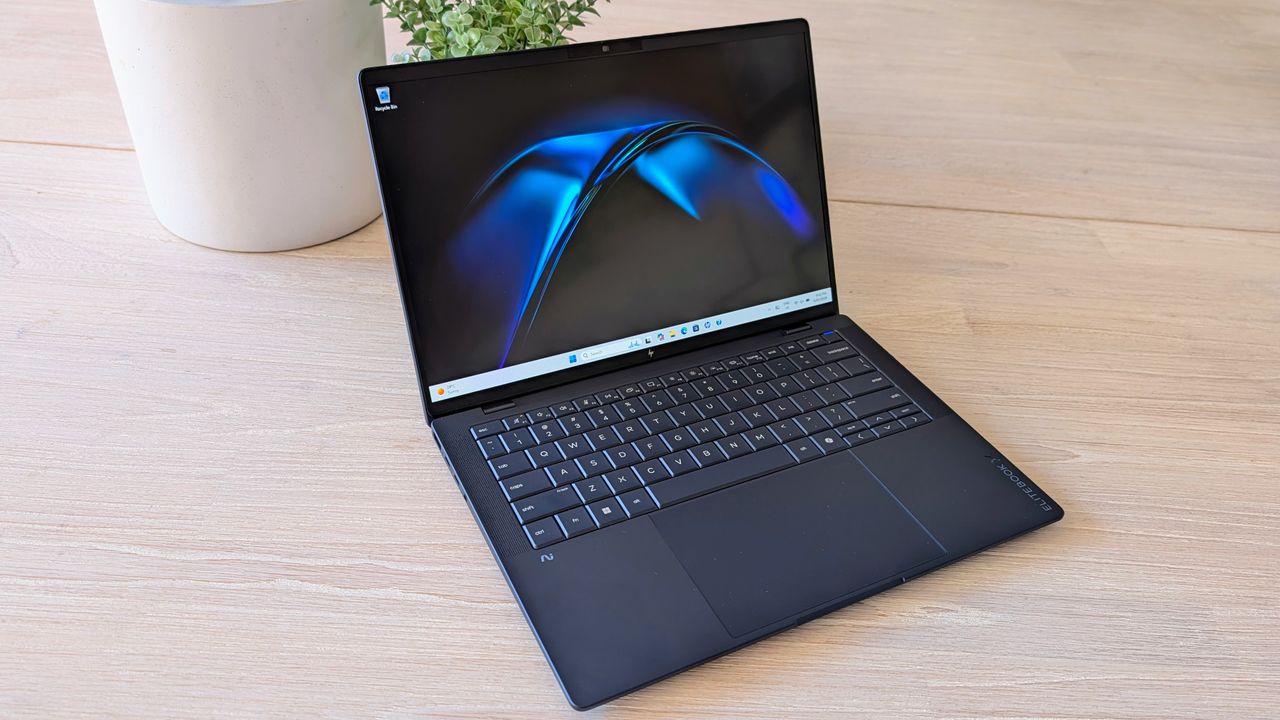
HP EliteBook X G2i laptop.

My colleagues in the USA are busy covering CES, but HP didn’t want Australia to miss out – so the company shipped me a pre-release version of the new business-focused EliteBook X G2i running the newly released Intel Core Ultra X7 358H CPU.

Sadly, one of the conditions is that I can’t regale you with benchmarks (for now), but I can give you a sneak peek at a very impressive laptop.

While HP announced multiple EliteBook X G2i variants, the one I have is special – it’s the lightweight model that weighs under 1kg. Technically, it actually measured xxxxxx (redacted) grams on my scales, but that’s close enough in my book.

The EliteBook X G2i is impressively light in hand, and despite feeling almost hollow, it’s very sturdy, and has little flex in the 14-inch shell.

(Image credit: Future)

The full spec is below, but I got hands-on with the Intel Core Ultra X7 358H equipped variant, with 32GB of RAM and a 1TB SSD. HP also announced the EliteBook X G2a with the latest CPUs from AMD, as well as the EliteBook X G2q that will use processors from Qualcomm.

HP also announced a 2-in-1 EliteBook X Flip that shares many of the same specs, but has a fold back screen. You can read more about the EliteBook X G2 Series directly from HP.

There are various display options, but I have the 14-inch 3K OLED (2880 x 1800), with a 120Hz (VRR) refresh rate, a 500 nit brightness and DCI-P3 100% color. In the non-lightweight model (only 100 grams more), you can get the same panel with (or without) a touchscreen, or a range of 1920 x 1200 OLED or IPS screens.

My favorite feature here is that the screen folds back through 180 degrees, which makes it easy to sit the laptop securely in a stand next to a monitor, and minimise the amount of desk space taken up. In use, the OLED is vibrant and bright, and the higher 3K resolution makes it easy to get the most out of the compact 14-inch screen.

USB-C connectivity is good, with dual Thunderbolt 4 on the left, and a 10Gbps port (that also supports charging and DisplayPort 2.1) on the right. You also get USB-A on the right, a Kensington lock port, and HDMI 2.1 and a 3.5mm headset jack on the left.

That’s pretty good for such a compact lightweight laptop, and my only tiny complaint is that I wish there was a little more space between the two Thunderbolt 4 USB-C ports, to make it easier to plug in both a dock cable and a fast USB drive.

The laptop will run up to four monitors, or three if you want to stick with USB-C only. You also get Intel Wi-Fi 7 BE211 (2x2) and Bluetooth 6, plus a facial recognition webcam (with privacy shutter) – though a fingerprint sensor is an optional extra.

(Image credit: Future)

HP EliteBook X G2i: Price & availability

HP has not given any pricing or an exact date for when the EliteBook X G2i and X Flip G2i will be available, but you can expect them in February 2026.

The wider EliteBook X G2 family, including the EliteBook X G2a and EliteBook X G2q, is not expected until later in the year.

(Image credit: Future)

HP EliteBook X G2i: Specs

HP EliteBook X G2i specifications (lightweight clamshell variant)

CPU

Intel Core Ultra X7 358H

GPU

Intel Arc B930

Display

14in 3K OLED (2880 x 1800), 120Hz (VRR), anti-glare, 500 nits, DCI-P3 100%

RAM

32GB LPDDR5x 8533MT/s

Storage

1TB PCIe NVMe M.2 SSD (954GB usable)

Connectivity

Wi-Fi 7, Bluetooth 6

Ports

Right: USB-C 10Gbps (USB PD, DP 2.1), USB-A 10Gbps (powered), security lock slot, optional nano-SIM. Left: 2x Thunderbolt 4 (USB PD, DP 2.1), HDMI 2.1, 3.5mm headset jack

Dimensions

312.7 x 219.9 x 9.15mm (front), 14.41mm (rear)

Weight

999g

Operating system

Windows 11 Pro

HP EliteBook X G2i: Design and build

(Image credit: Future)

The lightweight EliteBook X G2i feels very premium the moment you pick it up and while impressively light, it doesn’t feel flimsy, and the whole 14-inch shell is quite rigid. Even the hinge is nicely tuned and opens fairly effortlessly one-handed, but still holds its position once you’ve set the screen angle.

There’s also very little flex in the lid or keyboard deck, and it generally feels like a laptop that will handle being used on the go, day in and day out.

The laptop's look is understated in the way I personally love: the branding is subtle, it’s very professional looking, and the rounded edges make it nice to handle. The lightweight model only comes in “Atmospheric Blue”, but it suits the design.

It does pick up fingerprints easily, though the finish also wipes clean quite easily, so it’s quick to make it look a bit neater before an important meeting.

The trackpad is large, accurate in use and has a good solid haptic click. The keyboard matches the premium feel, and there’s very little bounce. The keys have reasonably deep travel and it’s comfortable for long typing sessions, even with larger hands. I didn’t see any annoying low-angle backlight glow bleeding out under the keys.

It’s also great to see HP putting real effort into materials, and the clamshell covers use up to 90% recycled magnesium, plus there’s recycled content used across parts like the bezel, speaker enclosure, keycaps and more.

HP EliteBook X G2i: Performance

(Image credit: Future)

Again, I can’t give any specific benchmarks at this stage, but I have run the EliteBook X G2i through the full range of TechRadar tests. While there were a few inconsistent results and teething issues (which are normal for a pre-product sample and a new CPU), overall performance is excellent.

You can read more about some of the expected numbers directly from Intel, but suffice to say, the new Core Ultra Series 3 CPUs are very impressive, and thanks to a very powerful iGPU, make Intel powered laptops more competitive against the best from AMD and Qualcomm.

The Core Ultra X7 358H in the EliteBook X G2i isn’t hugely faster than last gen CPUs like the last gen Core Ultra 7 265H in single core tasks, but multicore performance is significantly better. But it’s the Intel Arc B930 that is most impressive, and it runs rings around last gen iGPUs like the Intel Arc 140V and even Radeon 890M.

In fact, it’s good enough to compete directly with low end dedicated GPUs in creator laptops (with more limited power profiles), and will happily handle casual gaming.

(Image credit: Future)

Based on Intel’s numbers, the Core Ultra X7 358H happily bests the AMD Ryzen AI 9 HX 370 and is much closer to the higher wattage AMD Ryzen AI Max Pro 390 – though the Arc B390 iGPU still falls short of the Radeon 8050S.

In normal everyday use, the EliteBook X G2i is cool and quiet, but when pushed, it is noticeably noisy. That’s to be expected in such a thin and lightweight laptop, and in fact HP has done a great job of getting impressive sustained performance from the CPU, and the sound level is a perfectly acceptable tradeoff.

The lightweight variant of the laptop I have uses a 56Wh battery, while the normal G2i can also be equipped with a bigger 68Wh battery. While I can't share exact runtimes, battery life is very impressive, and it’s on par with (or better than) the best results from similar spec laptops using older Intel CPUs, or the best from AMD and Qualcomm. While battery life drops under sustained heavier workloads, the EliteBook X G2i is more than capable of lasting through an entire day of work.

AI performance is not a major drawcard for most people yet, but the Ultra X7 358H has a 50 TOPS NPU that will help with many workloads, and be increasingly useful as time goes on.

The EliteBook X G2i comes with a compact 65W USB-C charger, and tops up quite quickly, but we found it a little finicky and it didn’t always charge at the full rate from some 65W (or higher) chargers and power banks. Considering it uses USB PD spec for charging, these are likely just early quibbles with the laptop being more conservative about it making sure it is connected to a suitable performance charger.

HP EliteBook X G2i: Final thoughts

(Image credit: Future)

While we'll reserve final judgment until we get hands-on with a production version of the laptop, based on my time with the G2i, it's absolutely one worth putting on your shortlist for a 2026 upgrade.

Sign up to read this article
Read news from 100’s of titles, curated specifically for you.
Already a member? Sign in here
Related Stories
Top stories on inkl right now
One subscription that gives you access to news from hundreds of sites
Already a member? Sign in here
Our Picks
Fourteen days free
Download the app
One app. One membership.
100+ trusted global sources.