Get all your news in one place.
100’s of premium titles.
One app.
Start reading
Tom’s Guide
Tom’s Guide
Technology
Alex Hughes

Google's AI Mode just got a big Gemini 3 upgrade — here's what you can do now

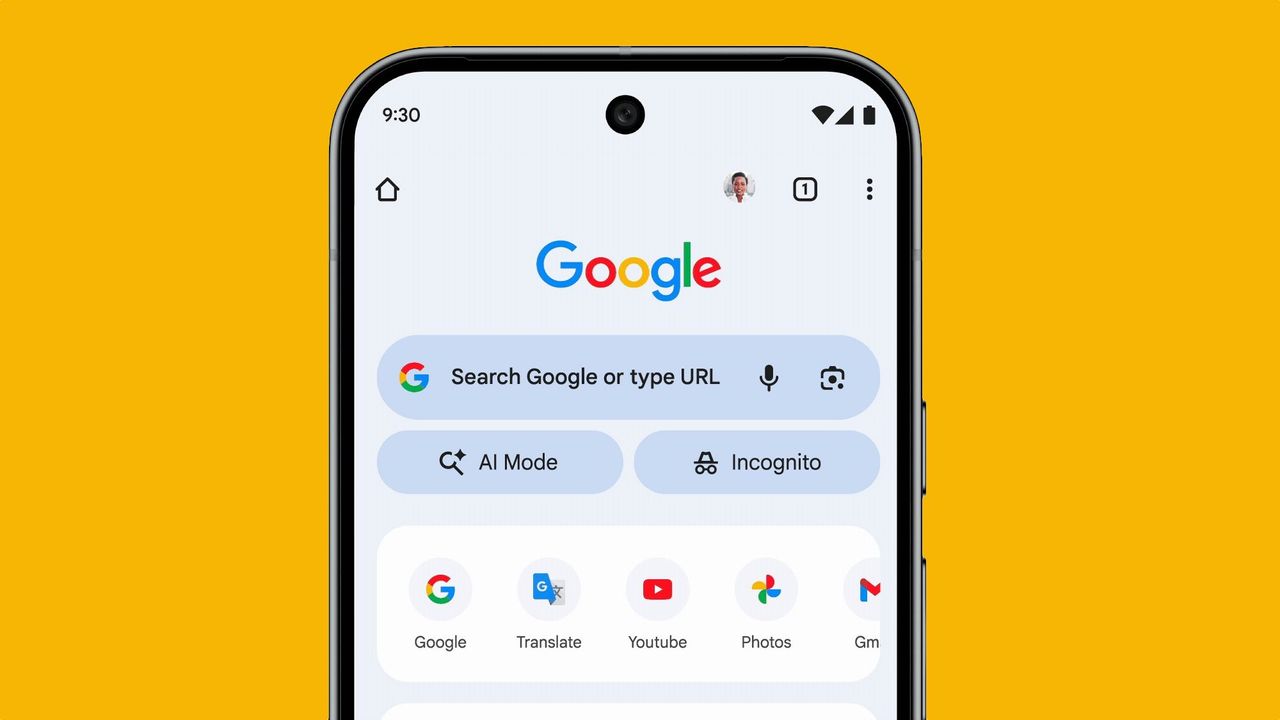
Google Search AI mode on phone.

Gemini 3 has arrived, and with it comes huge advancements for Google users. This is being seen in a variety of places, but most notably in search. Google’s AI mode, a feature built into Google Search, is now smarter and more capable thanks to the latest Gemini model.

Specifically, I'm talking about the new ‘Thinking’ mode. Your more complicated Google searches can now be tackled by a powerful AI tool, scouring the depths of the internet and carefully analyzing your request. AI mode can even code on the fly, creating interactive tools and games to help answer certain queries. So, if you’re new to the world of Google AI mode, here is how to access it and use the latest Gemini 3 upgrades.

How to use Gemini 3 in Google search

1. Sign up for Gemini

Currently, the Gemini 3 update in AI mode is only available for select users. To use it, you need to be either a Google AI Pro or Ultra subscriber. These plans don’t just include access to new AI search mode features, but also increased access to the Gemini chatbot, NotebookLM, Veo 3 and more.

You also need to be in the U.S. to access this upgrade for now.

Once you’ve upgraded your plan (or if you’re already a subscriber), simply log into your Google account on whichever platform you are using for your Google searches.

2. Open AI Mode

AI Mode is littered around Google search in a variety of areas, but the easiest way to access it is via the button on the Google search page. At the end of the search bar is a small box that says AI mode with a magnifying glass next to it.

Once you’re in this section, you can start using the tool. The best way to use it is in the same way as you would use Google. Where AI mode differs from normal Google searches is that it compiles an answer from lots of pages on Google, instead of just giving you a results page.

For example, asking “Recommend the best digital cameras under $50” will give a list of cameras with descriptions and some links of where you can buy them.

3. Access Thinking Mode

One of the most important updates that came from Gemini 3 was Thinking Mode. This can be activated by hovering over the AI mode button and selecting the dropdown.

Thinking Mode is… well, what it says. Google will take longer to process your request, pulling in more thinking power to produce a better response.

This makes it especially useful for more complicated queries. For example, if you’re trying to compare multiple products, while also finding the best prices and understanding how to use them as a beginner, that’s a lot of information for Google to handle. Thinking Mode can take longer to process this, making sure the answer is well thought out.

In the future, Google plans to roll out a feature where it will automatically pick the mode for you, selecting a speedier version for simple requests, or using Thinking mode when you want something with more detail.

4. Generating interactive tools

An extra feature of this update is the ability to create custom interactive tools in Google search. However, you can’t choose when this will happen.

If you fit the requirements listed above (In the U.S. and on an AI Pro or Ultra plan), Google will occasionally decide to offer up an interactive tool. Google has explained that this will happen when your query feels like it could be improved with the use of it.

For example:

  • A mortgage calculator when asking about buying a house
  • An interactive graph to explain the alignments of planets
  • A game that helps to explain complicated mathematical problems

Try messing around with some different queries and see if you can trigger Google into generating some.

Will this feature be available elsewhere in the future?

(Image credit: Shutterstock)

Right now, Google is trialing a lot of Gemini 3’s features for those in the US only. They are also available on the two paid plans.

However, Google has already stated that it plans on bringing AI mode changes to all plans, both free and paid, in the near future.

As for other regions of the world, there is currently no news on this. Based on previous launches from AI models in the past, Google should start to make Gemini 3 available in more regions in the next couple of months.

Follow Tom's Guide on Google News and add us as a preferred source to get our up-to-date news, analysis, and reviews in your feeds.

More from Tom's Guide

Sign up to read this article
Read news from 100’s of titles, curated specifically for you.
Already a member? Sign in here
Related Stories
Top stories on inkl right now
One subscription that gives you access to news from hundreds of sites
Already a member? Sign in here
Our Picks
Fourteen days free
Download the app
One app. One membership.
100+ trusted global sources.