Get all your news in one place.
100’s of premium titles.
One app.
Start reading
Android Central
Android Central
Technology
Brady Snyder

Google is gearing up to revive Snapseed on Android, and I couldn't be more excited

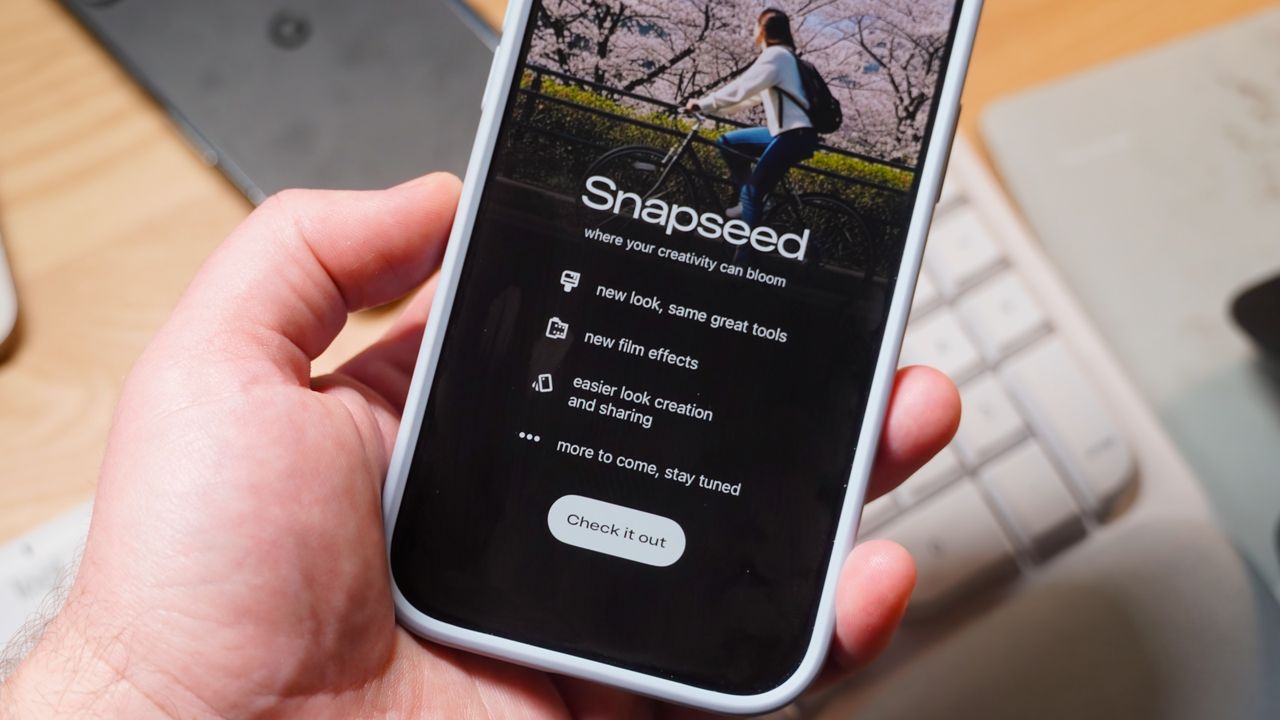
The Snapseed app for iOS on an iPhone Air.

Snapseed, the forgotten photo editor from Google that surprisingly started receiving major updates for the iOS app last year, is officially alive and well. After lying dormant without significant updates for years, Google shipped a major Snapseed 3.0 release in June 2025 with a redesigned editor and grid photo layout. Regular updates keep coming in, but only for the iOS app, with the latest one introducing a "Snapseed Camera" feature with retro film filters.

It's safe to say that Snapseed is officially back. The app is clearly getting attention at Google, with iOS updates coming at a solid pace and Android updates confirmed to be on the way. At a time when filters and nostalgic, anti-processing camera apps like Zerocam or Halide Process Zero are gaining buzz, Snapseed has the potential to be something special.

When Snapseed's latest updates start making their way to the Android app in a few months, I'll immediately start using it on my Android phones — and it seems like a perfect match for Google Pixels.

Snapseed for iOS is now a revamped photo editor

(Image credit: Brady Snyder / Android Central)

Google's update to Snapseed for iOS last year took us by surprise, and the improvements were tangible. The app gained a minimalist Google design language — somewhat opposite of Material 3 Expressive — with a refreshed iOS icon and a clean photo grid UI. After selecting a photo, you can edit it using three tabs: Looks, Faves, and Tools.

The new Faves tab holds specific tools you've added as favorites for rapid access. It replaces the former Export tab in the old UI, with the Tools tab shifting right to make way for Faves in the center. A share button is now available in the top-right corner to handle the Save to original (replaces the original image with your edits that can be reverted), Save copy (adds duplicate image with your edits that can be reverted), and Export (makes a copy with permanent changes you can't revert) options.

There are more than 25 tools available in the Snapseed editor across four categories: Adjust & Correct, Retouch & Transform, Style, and Creative.

What's interesting about Snapseed as a photo editor is that it blends professional-grade tools with easy-to-use and shareable filters. One one end, you have RAW editing support and color correction curves. On the other, there are film filters that feel like a blast from the past of social media's early days. It's accessible to all and feels easier to navigate than the Google Photos editor.

It's a fun camera with film filters, too

(Image credit: Brady Snyder / Android Central)

The newest update, version 3.11, adds the "Snapseed Camera" — a retro point-and-shoot capture tool featuring film filters inspired by authentic stocks from brands like Kodak, Fujifilm, and Polaroid. The update began rolling out last month with the interactive, skeuomorphic viewfinder (via 9to5Google).

It's somewhat difficult to access the Snapseed Camera if you don't know how to reveal it. There isn't a button in the Snapseed app that opens the Snapseed Camera. This keeps the main app a photo editor first and foremost. However, those that want to play around with the Snapseed Camera can add a Control Center toggle or change their Camera Control default camera app to Snapseed.

When you first try out the Snapseed Camera, it'll let you know that the selected film style and strength is rendered in the viewfinder in real time. The film grain, though, is rendered after the photo is taken. You can switch films, enable color themes, and control your camera flash to personalize the look of your film-esque photos. The camera functionality supports both the selfie and rear cameras.

Here's the full list of film styles available in the Snapseed Camera:

  • KP1: Inspired by Kodak Portra 400
  • KP2: Inspired by Kodak Portra 160
  • KG1: Inspired by Kodak Gold 200
  • KE1: Inspired by Kodak E200
  • FS1: Inspired by Fuji Superia 200
  • FS2: Inspired by Fuji Superia 800
  • FP1: Inspired by Fuji Pro 400h
  • AG1: Inspired by Agfa Optima 200
  • AS1: Inspired by Agfa Scala 200
  • PD1: Inspired by Polaroid 600
  • TC1: Inspired by Technicolor

More so than the photo editing features, the Snapseed Camera is where Google can really make its mark with the revamped Snapseed app.

We're living at a time when people are craving nostalgia, and things like record players and film cameras are making a comeback. Brand-new cameras like the Fuji X Half are coming out with the sole purpose of facilitating intentional photography habits and styles that resemble film. The Snapseed Camera does the exact same thing, with a fantastic interface and the hardware you already own.

Yes, Google cares about Snapseed for Android

(Image credit: Brady Snyder / Android Central)

It's easy for Android users to see Snapseed receive updates for iOS and feel left out. I've seen plenty of theories for why Google has prioritized Apple devices in the early relaunch of Snapseed, and frankly, they're all just speculation. Google started with iOS for reasons unknown, but the process of updating Snapseed for Android is currently underway.

Giles Ochs, the product manager for Snapseed, confirmed in a Reddit post last month that the team began work on updating the Android app in November 2025. "While we’re still a few months away from you all seeing updates, please stay tuned," Ochs wrote. "For all the Android users, please let us know if there is anything that you’d really like to see in the app."

Thanks, happy holidays and a note on Android from r/snapseed

So, that makes it official. While Android users will need to wait a few more months before getting the upgraded Snapseed app, they can rest easy knowing updates are coming eventually. I couldn't be more excited to try out the revamped Snapseed editor and film camera on Android phones later in 2026.

Sign up to read this article
Read news from 100’s of titles, curated specifically for you.
Already a member? Sign in here
Related Stories
Top stories on inkl right now
One subscription that gives you access to news from hundreds of sites
Already a member? Sign in here
Our Picks
Fourteen days free
Download the app
One app. One membership.
100+ trusted global sources.