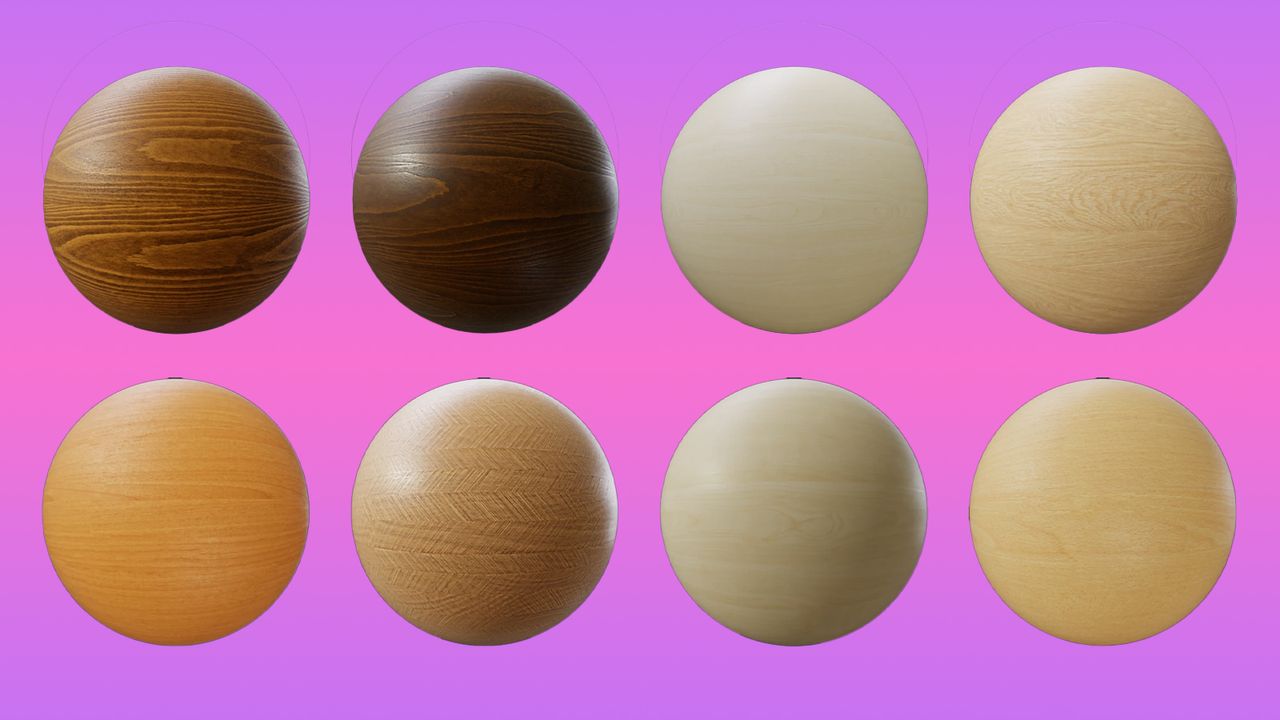
If you’re hunting for the best free textures for 3D modelling, what you really want is momentum. Creating materials from scratch is satisfying, sure, but it’s also a time sink. There are only so many hours you can spend tweaking roughness maps before you’d rather be lighting the scene or refining the hero asset.
Thankfully, the web’s packed with genuinely useful resources. Below, I’ve gathered the best free textures for 3D modelling, from worn metals and cracked concrete to wood grain, fabric, and grass. Some are full PBR sets, others are simple seamless images you can bend to your will. Whether you’re deep into a project or just building a reliable materials stash, these sites will save you time and probably your sanity.

If you're looking for inspiration for your 3D work, see our roundup of the best 3D portraits and the best 3D art in general. If you need to upgrade your kit, see our selection of the best laptops for 3D modelling.
Best free textures for 3D modelling
01. Share Textures

I love the straightforward name of this sites, which does just what it says. It's a place for 3D artists to share their textures (and 3D models). There are over 1,600 textures on the site, covering metal, wood, floor, fabric, gems and more. There and regular new additions and a blog section where you can see what's new.
02. AmbientCG

German artist Lennart Demes's AmbientCG is not only one of the largest texture libraries online, but it's also one of the best for quality, with more than 1,300 seamless PBR materials in JPG or PNG format.
Most of the textures here can be downloaded at 8K (even higher in some cases). They're all free via the CC0 Creative Commons licence, so they can be redistributed and used for any project, personal or commercial. Many materials come with SBSAR files, allowing users to tweak them in Adobe Substance 3D.
3. LotPixel

LotPixel is one of those libraries that sneaks up on you. At first glance it looks like another asset marketplace, but dig around and you’ll find a genuinely generous free section. It offers thousands of high-resolution PBR textures and 3D models covering architecture, surfaces and everyday props.
It’s best suited to environment artists, archviz designers and indie devs who need production-ready materials without burning budget. The PBR sets are clean, properly mapped and easy to drop into Blender or Unreal.
The catch? It’s not all free, and you’ll bump into premium content while browsing. But if you’re disciplined, the free subset alone is well worth bookmarking.
04. Poly Haven

Co-founded by designer Rob Tuytel, Poly Haven is another top-quality library made possible by Patreon supporters. Again, its textures are all available under CC0 for both personal and commercial use. It has a relatively small number of textures compared to the first site on our list, with just over 200, but they're all available to download at 8K and 16-bit resolution in PNG format. You can also download each texture's AO, Diffuse, Displacement, Normal and Roughness Maps for more control. The site offers libraries of HDRIs and models too.
05. Pixar One Twenty Eight

This texture library features 128 textures from the animation giant Pixar. It was created back in 1993, but it was updated in 2018 to keep it relevant for contemporary use. Containing everything from brick to animal skins, it offers some gems that you can use in your own projects.
06. 3D Textures

João Paulo's collection of free PBR textures isn't as big as some other libraries, but the textures are of great quality, and they come with the added advantage of diffuse, normal, displacement, occlusion and specularity maps. You can download them one by one, but if you buy Paulo a coffee, he'll give you a link to the folder containing all of his textures so you can grab them all together.
07. Texturer

Texturer is a creative resource for 3D artists, designers, web designers and animators, providing a comprehensive selection of high-resolution free textures. For ease of use, all textures are organised into categories and sub categories, featuring everything from brick, buildings and doors to animals, food and fabric.
08. 3DTotal

3D Total is a brilliant resource for CG artists, with training, an inspiration gallery, 3D assets and a free textures library. It hasn't been updated of late, but how much do textures change, really? The site has a whopping 16,631 free high-res royalty-free images, which you can search through by category or using the search tool provided on the site. Note: images offered here are subject to the site's Licence Agreement.
09. Texture Can

Texture Can might not have the prettiest UI, but this ad-supported site is a great resource with over 650 free PBR textures, and there are 3D models too. Textures cover a range of materials and surfaces, and there are even Christmas decorations. The blog provides tips and insights into tech and terminology.
10. Textures.com

Featuring everything from animals to X-Rays, Textures.com has a wide array of textures that you can download once you've registered for an account. You can browse by texture type or view the latest additions to the site. There's even a small selection of tutorials for you to try.
11. Arroway Textures

Arroway Textures offers a range of fantastic surfaces. This site sells individual and bundled textures, but there are some freebies, and you can download free lower-resolution samples of just about any texture they sell. The only restriction is that they can only be used for non-commercial use.
12. Occa Software

Occa Software stocks game assets of various kinds, and it also provides visual effects, audio, gameplay systems and development tools. A lot of its textures require a pro subscription, but there are some free textures in there that are worth checking out.
13. TurboSquid

Not only is TurboSquid an extensive library of pro-grade 3D models, but it also claims to offer "the world's largest collection of textures". It's certainly crammed with stuff and encourages its users to submit their own textures for sale. Simply search for what you need, then narrow down your choices by checking compatibility with 3D modelling programs like Maya.
14. Fab Store

If you're working in Unreal Engine or Unity, Epic Games' new Fab Store is a great place to shop for all kinds of assets, including 3D textures and materials. The one-stop shop replaces Sketchfab and the Unreal Engine Marketplace and is also the new home for Quixel Megascans. A lot of the packs of textures have a charge, but there are some free options available
15. 3DTextures.me

3DTextures.me is a handpicked collection of free, production-ready PBR materials you can actually use straight away. Each set typically includes the full map bundle – diffuse, normal, roughness, AO, and height – so you’re not left hunting around for missing files.
They’re built with modern rendering workflows in mind, by artists for artists, such as those of João Paulo (pictured), meaning you can drag and drop them straight into your game engine or 3D software and get on with the job. No faffing about, no extra cleanup – just solid, realistic surface detail that works.
It’s a great resource for indie devs, 3D artists, students, and small studios who need high-quality textures for commercial projects without the hassle of subscriptions or confusing licensing terms.
16. All3Dfree.net

There’s something refreshing about All3Dfree.net. No credit limits, no forced sign-ups, no paywall surprises. You click, download, and get back to work.
The library covers stone, metal, bark, fabric, flooring and more, solid, everyday surfaces you constantly need. Quality varies, but that’s part of the appeal: these are practical textures you can tweak and repurpose fast. For students, hobbyists, or anyone prototyping quickly, it’s a no-fuss archive that quietly saves time. It’s simple, useful, and surprisingly hard to beat online today.
That said, there are a lot of ads, some mascarading as texture links, so be careful to scroll down to the actual textures and 3D files you want and check before double check downloading anything.
Free textures: frequent questions
What should I consider when choosing free textures?
When choosing 3D textures and materials, consider the software you'll be working in. If you're using 3D software like C4D, Blender, 3ds Max, or SketchUp, you can use formats like JPG, PNG, and PDF. If you're working in engines like Unreal Engine and Unity, you'll need textures in the appropriate format.
Basically, a texture is just an image or photo of an imagined or real-world surface. You'll want to consider whether the image's resolution meets your needs and check the licence terms. Some free textures require attribution or may be free for non-commercial use only.
What’s the difference between seamless and non‑seamless textures?
Seamless textures tile perfectly, with no visible edges. Non‑seamless ones don’t. Use seamless for large surfaces, non‑seamless for single objects or unique shots.
Do higher‑res textures always make renders better?
Not always. Huge textures add detail, but also memory load and slower renders. Pick the resolution that fits the scene and your machine.
What texture maps should I use?
Diffuse for colour, normal for bumps, displacement for real geometry, roughness for shine. Combine them, and your materials stop looking flat and start looking real.
Can I use any texture I find online?
Check the licence. Free isn’t always free. Some need attribution, some forbid redistribution. Always read the fine print before using textures commercially.
How do I optimise textures for games?
Shrink them where you can, create mipmaps, and keep memory budgets in mind. Real‑time engines love clever optimisation as much as pretty textures.