
Get all your news in one place.
100’s of premium titles.
One app.
Start reading
MusicRadar
MusicRadar
Entertainment
Ben Rogerson

“Experienced producers might feel uneasy about the focus being put so heavily on AI and the Session Players, but it’s still an instant recommendation”: Apple Logic Pro for Mac 12 and Logic Pro for iPad 3 review

Apple Creator Studio Logic Pro.

What is it?

For Apple, the releases of the new versions of Logic Pro - 12 on the Mac and 3 on the iPad - are part of a much bigger story. For the first time, users are able to get both versions of the DAW for one payment: the only catch is that that payment is a monthly one, via a subscription to the new Apple Creator Studio.

This comprises not only the Mac and iPad versions of Logic Pro, but also the same cross-platform access to Final Cut Pro and Pixelmator Pro, along with Motion, Compressor, and MainStage (Logic’s performance-focused sibling) on the Mac. There are also some AI features and “premium content” in Keynote, Pages, and Numbers, which users of the free versions won’t get access to.

After a one-month free trial, a subscription to Apple Creator Studio costs £12.99 a month or £129 a year (£2.99 per month or £29.99 per year if you qualify for the very generous education discount).

Wisely, Apple isn’t forcing existing users of the Mac apps down the subscription only road. As usual, if you already own Logic Pro, you’ll be getting this update for free, and the one-time purchase options for Logic Pro, Final Cut Pro, Pixelmator Pro, Motion, Compressor and Mainstage remain on the Mac App Store.

The pricing for Logic Pro for iPad, though? Well, we’ll get to that.

(Image credit: Apple)

What’s new?

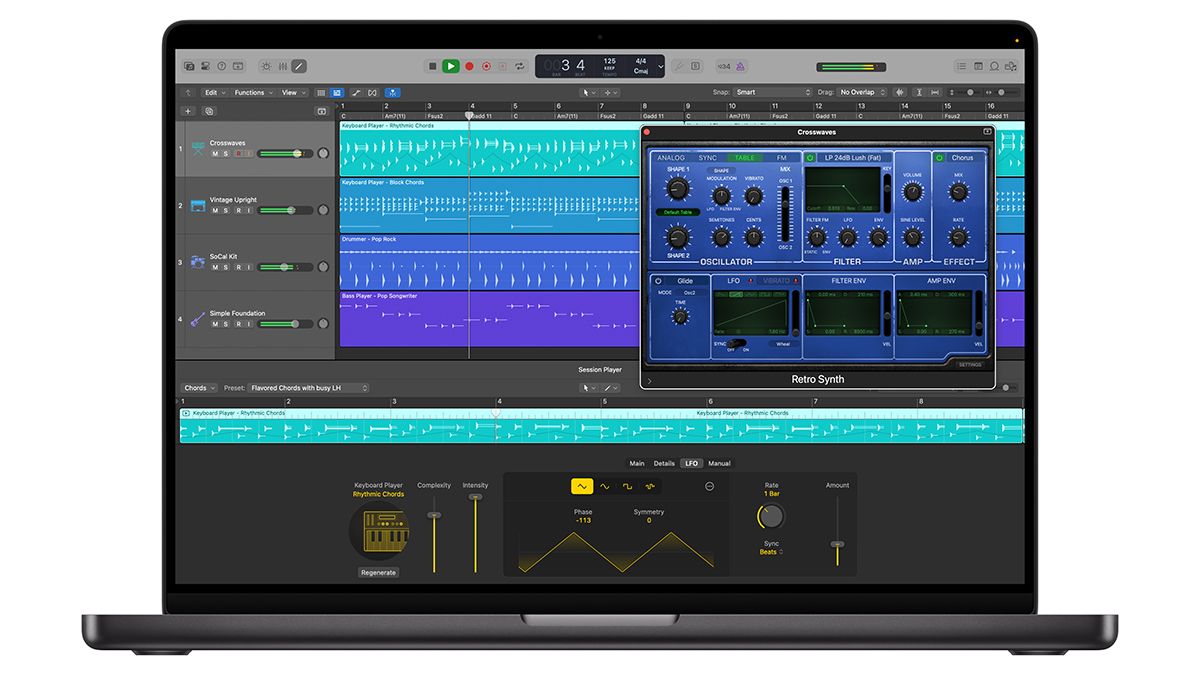
As is its habit these days, Apple is bringing the majority of the big new features in Logic Pro to both versions, starting with a couple of new Synth Session Players. These aren’t actually new plugins - they simply give you extra options in the existing Keyboard and Bass Players - but Apple says that it’s worked with real synth performers to make them as human-like as possible.

Relatedly, there’s also Chord ID, another AI feature that can analyse any audio or MIDI region for harmonic and chord information. This can then be sent to the Chord track and used to guide the Session Players.

Elsewhere, enhancements have been made to the step sequencer, and Logic Pro for Mac gets all the sound packs that, for reasons best known to Apple itself, were previously exclusive to the iPad version.

On the flip side, the iPad version gets Logic Pro for Mac’s much-loved Quick Swipe comping tool, and an exclusive in the form of Music Understanding. This enables you to search for a loop in the Sound Browser using descriptive ‘human language’. Once you’ve found a sound that’s suitable, you can make use of the Browser’s new machine learning capabilities to find similar content.

(Image credit: Apple)

Performance

In use, it quickly becomes apparent that, while these new versions of Logic might be full number updates, they don’t represent a massive departure from what came before. For context, it took almost 11 years of updates to get from Logic Pro X to Logic Pro 11 (between 2013 and 2024) with plenty of significant point release updates in between. In contrast, it feels like paint has barely dried on Logic Pro 11, which was released less than 21 months ago.

In fact, it feels like the main reason the 12 and 3 suffixes are being added is the launch of the Creator Studio bundle. This isn’t too much of a problem, of course - as we’ve already mentioned, existing users will be getting the update for free - but it is worth tempering your expectations.

Which isn’t to say that the feature additions aren’t useful or impressive. Yes, the Synth Player(s) definitely feel like extensions of what we’ve already seen, but they’re great fun to work with, mainly because they don’t feel like ‘work’ at all, funnily enough. They bring with them some new tone-shaping options - LFOs and envelopes, for example - and the fact that you can send their outputs to any instrument plugin or your hardware synths adds to their creative allure.

(Image credit: Apple)

For us, though, the big addition is Chord ID, which takes all the Session Players (other than the Drummer, of course) to another level. In our review of Logic Pro for Mac 11 and Logic Pro for iPad 2, we noted that the biggest limitation when using them was that they weren’t capable of responding to parts that you’d already recorded, but now they can.

It’s not a totally brainless process - you still need to drag a region to the Chord Track so that it can be analysed and the chords displayed - but it’s quick, easy, and usually very effective. Yes, Chord ID sometimes gets a chord wrong - particularly when you’re giving it complex voicings to deal with - but these can be edited, and you’re usually left with a good starting point for the Session Players to work from. Said players don’t always get it right first time - just like plenty of real bandmates we’ve worked with - but, with a little persuasion/tweaking you can usually get them to perform how you want them to.

The counter-argument is that if you need to spend time honing your Session Player parts then it might just have been quicker to record them in the first place, but that isn’t an option for everyone - say it quietly, but they ‘play’ a lot more realistically than a lot humans - and for songwriters in particular they’re a godsend. We’d love to see a guitarist added, too, followed by horn and string sections.

(Image credit: Apple)

Serious producers, of course, might never go near the Session Players, so shiny new toys do they have to open? There are some tasteful step sequencer tweaks, for a start: you can now assign note rows to chord degrees rather than fixed notes; randomisation can be applied to the overall pattern or individual rows; there’s more granular note repeat control; and new playback modes that add some welcome unpredictability.

Elsewhere, iPad users are going to love the Quick Swipe comping - inherited from the Mac version, this makes total sense on a touchscreen. Choosing the best parts from different takes can now be done simply by touching and swiping, making vocal comping while on the move a breeze. It’s also a great use for your Apple Pencil, if you have one.

Music Understanding, meanwhile, may well make you discover parts of the Logic Pro sound library that you wouldn’t otherwise have reached. The browser didn’t always respond agreeably to our ‘human language’ prompts, but anything that speeds up the loop searching process is welcome, and the ‘find similar loop’ option gives you another way to drill down into Logic Pro’s vast collection of samples.

(Image credit: Apple)

Verdict

As full version updates go, Logic Pro for Mac 12 and Logic Pro for iPad 2 are solid rather than spectacular, but in terms of value for money, the one time-purchase on the Mac - just shy of $/£200 - remains an absolute bargain. If you’re a new user who also wants to immerse themselves in Apple’s other creative apps, we wouldn’t discount the Creator Studio bundle, either, as it gives you an awful lot for a relatively low monthly or annual fee. If you’re eligible to take advantage of the educational pricing then it’s pretty much a no-brainer.

Where it gets slightly more complicated is on the iPad side. This was already a subscription-only app, but only cost $/£5 a month or $50 for a year. Those who are currently on that subscription can stay on it, but for new users, the only option now is to get the Apple Creator Studio subscription, which is significantly more expensive.

This might sting a bit if you’re someone who’s already paid for Logic Pro on the Mac (thus giving you access to future updates anyway) but wants to get the iPad version as well (projects can be shared between the two of them, don’t forget). The only way to do this is to subscribe to Apple Creator Studio, which might feel like you’re paying again for Logic Pro for Mac.

Obviously, the number of people in this position will be limited, but we’d still like to see an option to buy Logic Pro for iPad outright, and a universal one-time purchase option that includes both versions would also be welcome

That fact remains, though, that whichever platform you use Logic Pro on, it’s still a pleasure to make music with. Experienced producers might feel uneasy about the focus being put so heavily on AI and the Session Players, which are more likely to appeal to newbies, but if you’re an Apple user who wants a classic one-stop music production package, it’s still an instant recommendation.

Alternatives

Specifications

Apple Logic Pro for Mac 12

Price

$200 / £200 / €230 (one-time purchase)

$/£12.99 per month or $/£129 per year (as part of Apple Creator Studio)

System requirements

Requires macOS 15.6 or later

Requires a Mac with Apple silicon

Requires 6GB available storage space for minimum install or up to 75GB storage space for full Sound Library installation

Contact

Apple

Apple Logic Pro for iPad 3

Price

$/£12.99 per month or $/£129 per year (as part of Apple Creator Studio)

System requirements

Requires an iPad with Apple A12 Bionic chip or later and iPadOS 26 or later. Some features require an iPad with Apple M1 chip or later

Requires 987MB available storage space for minimum install or up to 31GB storage space for full Sound Library installation.

Contact

Apple

Sign up to read this article
Read news from 100’s of titles, curated specifically for you.
Already a member? Sign in here
Related Stories
Top stories on inkl right now
One subscription that gives you access to news from hundreds of sites
Already a member? Sign in here
Our Picks
Fourteen days free
Download the app
One app. One membership.
100+ trusted global sources.