
Get all your news in one place.
100's of premium titles.
One app.
Start reading
GamesRadar
GamesRadar
Technology
Alex Berry

Elgato's new Wave 3 Mk2 combines the best parts of dynamic and condenser microphones into one excellent package

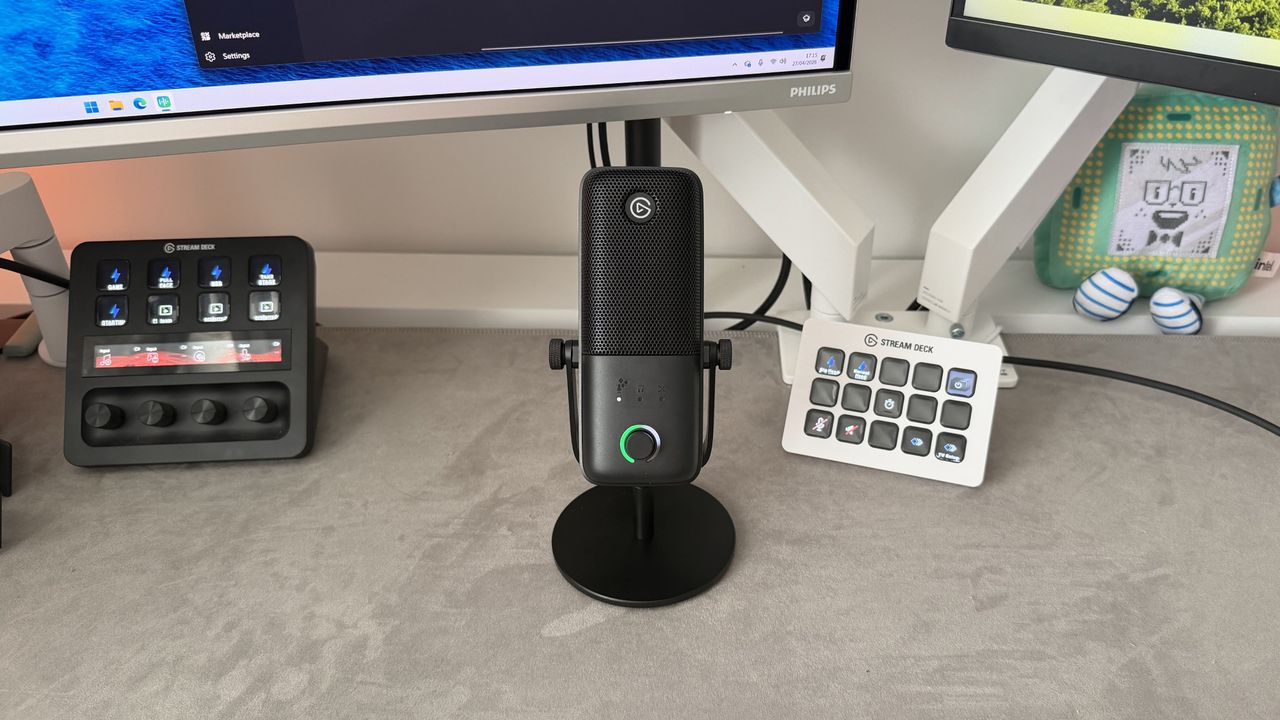
An Elgato Wave 3 Mk2 microphone next to two Stream Decks.

It’s been the best part of six years since Elgato made its microphone debut with the original Wave:3, and quite a lot has changed in the meantime. The market is now completely stacked, and every brand seemingly has its own microphone for streaming and gaming. It’s no longer just a hardware fight; advancements in software, AI processing, and companion apps are just as important as base physical specs. And perhaps most welcome for aspiring creators, the budget you need for studio-quality audio at home is going down, not up.

The headline details of the Wave:3 MK.2 haven’t changed much. It’s still a USB-powered condenser microphone, it still includes a stand, and it’s still pitched as being a stress-free path to great audio for streamers and podcasters. Launching at $169.99/£159.99, it’s still a similar price too, which does leave it exposed to being undercut in such a competitive market. What’s new is an upgraded processor with onboard effects that take the load off your CPU, an improved anti-clipping solution, and the ability to store your settings on-device and take them with you between machines.

We were fans of the original Elgato Wave 3, but with so many great choices in the list of best microphones for streaming and gaming, there’s a real need for these peripherals to make themselves heard. Elgato’s solution for the Wave:3 MK.2 isn’t to reinvent the hardware; it’s to expand and improve the other bits that support it instead.

Design

(Image credit: Future / Alex Berry)

Elgato hasn’t exactly gone back to the drawing board with the design of the Wave:3 MK.2; this will be a very familiar-looking microphone to anyone who’s seen the original. Not that it needed to mix things up for the sake of it mind you, the original was a rather fetching thing, and the design language still holds up well on the sequel. Rocking an almost retro charm, the flat-pill-shaped main mic body is supported in a u-mount that either screws onto the included stand or a mic arm.

There are no fun color options available at launch, just a classic black. That black is perfectly sleek and pleasant, but it’s also a bit of a disappointing step down from the original’s choice of seven. Admittedly, these were added to the range over time, and I’d both like and expect to see Elgato do the same again here, but surely we could have launched with a crisp white one too? Build quality is excellent, and while I’d have preferred to see the use of metal extend beyond just the top half and wrap the entire mic body, the plastic that’s used instead both feels and looks fine. The Wave:3 MK.2 has grown slightly in all directions; the body is around 1.5cm higher and 2cm wider than the original, but it’s still a compact choice, and unless you put it side by side with the original, I’m not sure you’d actually notice it’s any bigger.

Rocking an almost retro charm, the flat-pill-shaped main mic body is supported in a u-mount that either screws onto the included stand or a mic arm.

The most obvious change to the Wave:3 MK.2’s design is how things are laid out on the front. The three indicator dots for which level you’re adjusting remain, though they’re now joined by a fourth option in the form of some sparkles over the microphone icon. The row of dots below them is gone, and instead, Elgato has wrapped that information around the dial. This smooth LED ring relays what your gain is set to, how loud your current input is as you talk, and turns a punchy red when you’re muted. It’s a neat system that works well, though I found the white splodge that shows your gain level to be a little too large, blocking too much of the VU meter’s movement. Around the back is the USB-C connection for your device, alongside a 3.5mm headphone jack for real-time monitoring (which now includes your post-processing effects so you can hear exactly how you sound to your viewers), and the touch-sensitive mute button remains on top.

Features

(Image credit: Future / Alex Berry)

The outside of the Wave:3 MK.2 may be very similar to its predecessor, but through its partnership with LEWITT Audio, Elgato has made a raft of intriguing changes to what’s going on under the hood. The condenser capsule has shrunk slightly from 17mm to 16mm and changed to a supercardioid pickup pattern, while the 96 kHz sample rate has been dropped entirely. Technically, losing the 96 kHz sample rate option is a downgrade from what the Wave:3 MK.1 is capable of, but the vast majority of creators won’t have seen the benefits over 48 kHz anyway. Dynamic range has climbed from 95dB to 110dB and Max SPL from 120 dB to 130 dB, meaning the MK.2 can capture a wider spread between your quietest and loudest moments, and handle louder bursts of sound before distorting.

Having spent a couple of weeks testing the Wave:3 MK.2, I think Elgato has created a "dynamenser" microphone; a word I’ve just made up, but its marketing team is welcome to license from me.

The more impactful change is actually on the software side. Through the new Wave FX Processor, the Elgato Wave:3 MK.2 now runs five DSP effects simultaneously and onboard the mic itself. Rather than relying on processing power from your PC, a low-cut filter, expander, compressor, four-band EQ, and something Elgato calls Voice Tune all happen natively. Clipguard also moves to version 2.0 and has been reworked into a multi-stage system, which aims to make clipping virtually impossible. There are now no excuses for getting your levels wrong either, with a new Auto Gain Wizard that analyzes your voice to dial in optimal gain levels automatically. You can launch this via the revamped Elgato Wave Link app, or by long-pressing the dial on the microphone itself.

Being a condenser microphone, you’re given a little extra flexibility with placement, but you will start to lose quality when you start going off-axis. Elgato recommends being 10-20cm away from the Wave:3 MK.2 for best placement, though I was comfortably able to keep it out of view of my facecam and sounded the same at nearer 30cm. It wasn’t until I was 50cm+ away that I really noticed a drop off, as long as I was still lined up and front on. Moving side to side does have a more immediately noticeable effect, thinning out the sound and losing a lot of character at the same time.

Performance

(Image credit: Future / Alex Berry)

Between streaming on Twitch, podcasting, and reviewing creator tech, I’ve worked with more than my fair share of microphones. Jumping between options, the choice between a dynamic or condenser microphone has always felt like it came with a list of various pros and cons. Dynamic microphones might sound richer but often lack some natural detail and character. Condenser microphones are crisp with detail but tend to sound roomy and want to broadcast every little noise. Having spent a couple of weeks testing the Wave:3 MK.2, I think Elgato has created a "dynamenser" microphone; a word I’ve just made up, but its marketing team is welcome to license from me.

The Elgato Wave:3 MK.2 feels like it read the pro column of both a dynamic and a condenser microphone, took those bits, and then largely ignored the cons column. It’s wonderfully good. My voice sounded warm and full, like it would with a dynamic mic, but without the overly gooey rounding off. I didn’t sound over-produced either; there was a natural sharpness as I spoke that made my stream sound like you were simply sitting across the table from me in a quiet room. Hopefully in a comfortable chair, preferably with a cheeseboard. But I’m getting off track.

Part of why I’m so impressed by the Wave:3 MK.2 is that it made me sound like me, just a digital version. So often I test microphones, and while I can’t argue with the raw quality they produce, the end characteristics are dictated by the mic itself and not the person speaking into it. They’re tuned in a fixed way and try to process everyone’s unique voice in that same, fixed way. You’ll be hard-pressed to find a bad-sounding mic from a major brand in 2026, but it can be equally difficult to find a microphone that makes you sound like you.

(Image credit: Future / Alex Berry)

Through a heap of toggle toggling, I narrowed down where most of the credit goes, and it’s two features in particular: Voice Tune and Voice Focus. Voice Tune is part of the new onboard Wave FX Processor DSP line-up, and from what I can gather, it’s essentially audio salt. The right amount of salt enhances the flavour hitting your taste buds, and the right amount of Voice Tune enhances the vocal tones hitting your audience's ears. Much like being heavy-handed with the salt shaker, I didn’t find ramping this all the way up was an improvement, and ended up with it set almost exactly halfway in the strength slider.

the Wave:3 MK.2 is an all-round improvement on the original and one of the better mics I’ve tested.

Then there’s Voice Focus, Elgato’s AI-powered isolation effect, which does more than filter out background noise. I found it gave everything a helpful lift and was one of the key effects for removing the roominess you get from a condenser capsule. It’s worth noting that Voice Focus runs on your desktop or laptop device rather than onboard like the other effects, but it didn’t seem particularly taxing on my PC.

There are a couple of things I’m not quite as fond of with the Elgato Wave:3 MK.2, primarily that touch-sensitive mute button on the top. It’s incredibly sensitive, and on more than one occasion, I managed to mute myself mid-stream by reaching past the mic to my camera or simply adjusting its position. The LED ring on the front of the body makes it clear enough when you’re muted, so I didn’t end up with half a stream of silence, but it’s still annoying. I also found that Voice Focus was often a little too eager to filter noises out, but didn’t always catch what I wanted it to. Having recorded a podcast with the MK.2 I noticed multiple instances where quick comments or laughter were trimmed off and were only half audible. Meanwhile, it was only adequate at filtering out noise from my mechanical keyboard and controller.

Should you buy the Elgato Wave:3 MK.2?

(Image credit: Future / Alex Berry)

It’s going to come as no surprise that I’m happy to recommend you invest in Elgato’s latest effort. Whether you’re new to creating content and want a great mic to get you started or you’re looking for a step up in production value from a budget offering, the Wave:3 MK.2 is an all-round improvement on the original and one of the better mics I’ve tested. Where the Elgato Wave:3 MK.2 sits in the wider microphone picture, however, is an interesting conundrum that almost entirely comes down to price.

It’s by no means an expensive microphone competing with the likes of the Shure MV7+, but it’s not fighting hard in the budget trenches either. I swapped out the excellent Maono PD200W from my setup to test the MK.2, and I won’t be swapping back in a hurry. Though if I were budget-conscious, I wouldn’t be looking to suddenly sell the cheaper PD200W for the MK.2, either. As good as the Wave:3 MK.2 sounds and as easy as it is to get set up with, I’m not fully convinced it sounds 30% better in a value-based head-to-head than the RRP gap between them suggests, particularly if you’re willing to dive into some software processing and EQ options yourself. That said, if you’re looking for maximum quality with a minimum of effort, the Elgato Wave:3 MK.2 is probably your best bet right now.

How we tested the Elgato Wave 3 Mk.2

I added the Elgato Wave:3 MK.2 to my content creation setup and used it for a couple of weeks across all my recording tasks. This included livestreaming on Twitch, recording podcasts, general voice call chat, and the dedicated testing you listened to earlier. Along with actually using it as my daily driver, I conducted a range of specific tests and made test recordings with and without each DSP effect applied. Primarily, it was tested on an Elgato Wave Mic Arm Pro, along with some testing sitting on the included fixed stand.

For more on our testing methods, take a look at the full-length GamesRadar+ Hardware Policy.

Still deciding what gear you need? Check out the best gear for streaming, the best capture cards, and the best streaming mixers.

Sign up to read this article
Read news from 100's of titles, curated specifically for you.
Already a member? Sign in here
Related Stories
Top stories on inkl right now
One subscription that gives you access to news from hundreds of sites
Already a member? Sign in here
Our Picks
Fourteen days free
Download the app
One app. One membership.
100+ trusted global sources.