Get all your news in one place.
100's of premium titles.
One app.
Start reading
Digital Camera World
Adam Juniper

DJI Avata 360 review: 8K, FPV, and 360° – the new ultimate drone for creators?

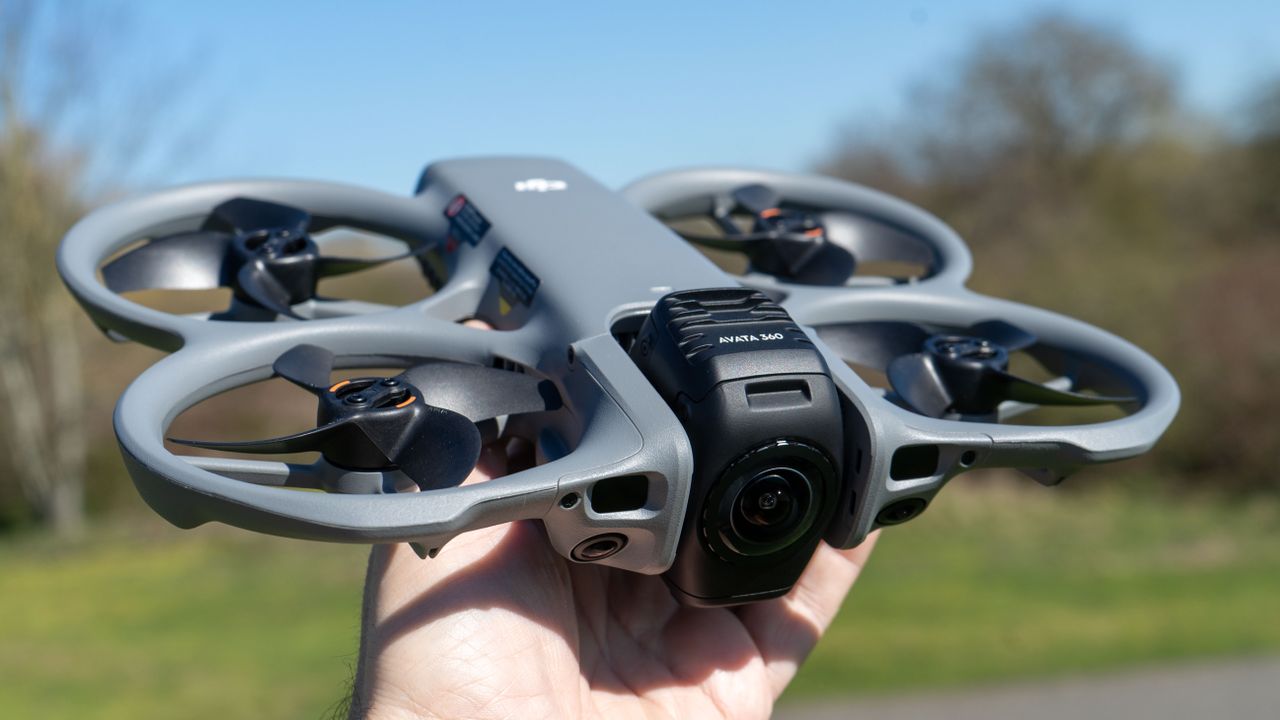
DJI Avata 360 drone.

DJI, the largest and most successful consumer drone company, is not often second to any sphere, but Insta360’s drone arm Antigravity got its ‘A1’ 360-degree drone out late in 2025. The two drones, however, are very different.


While the A1 is all about folding, the Avata 360 is bigger, heavier, and seems to be built with creators in mind. It has a frame – and a name – inherited from DJI’s series of FPV drones (which require goggles to fly), but that is only an option here; pilots can choose to navigate with a ‘traditional’ stick controller and enjoy the advantages of post-flight video manipulation.

That offers a cost-saving as well as a creativity alternative, but despite a lower cost of entry, DJI has not skimped on specs – this drone has an 8K video system, collision sensors, and is capable of some pretty nifty speeds. Is this the new king of 360-degree drones? I tested it, and this is what I thought...

Price

At launch, the DJI Avata 360 can be picked up in a number of different bundles, all of which help make it surprisingly accessible and good value – especially if you’ve already got some experience with DJI.

The drone alone is £409 / AU$799 (about $550).

With the most basic remote controller, the DJI RC2, the drone is £639 / AU$1159 (about $855)

The Fly More Combo pushes that to £829 / AU$1619 (about $1110), and there is a version of the combo with the DJI RC2 or one with the motion (wand) controller.

Specs

Video

8K / 60fps (360)
4K 60fps (single lens)

Stills resolution

120MP

Image sensors

1/1.1-inch

Speed

18 m/s / 40mph

Storage

42GB + MicroSD

Range

20Km / 10Km in CE (O4+ system)

Weight

455g / 1 pound

Size

246 x 199 x 55.5mm

Battery Life

23 mins max

(Image credit: Future)

Build and handling

On unboxing, the first thing that I noticed was that the Avata 360 is a surprisingly big drone. That’s partly because, given the “cinewhoop” styling (guards around the propellors) the natural comparison is the popular, cheap, and VERY small DJI Neo as much as it is the Avata 2, but this is bigger than both of those drones.

Near the ground, one lens of the camera faces forward. (Image credit: Future)

DJI has opted for a rotating camera mechanism, so, when on the ground the drone, has a front-facing camera (one of the two 4K fish-eye cameras that make up the 360-degree camera). Once aloft, the entire block on which it sits rotates 90 degrees, so one lens points down and the other points upward, together functioning as an 8K 360-degree camera.

This rotation is essential as otherwise the delicate lens would need to rest on the ground during take-off and landing, and is arguably a more elegant solution than the A1’s landing legs.

There is also the option to fly with one camera facing forward and the block will then act as a 1-axis gimbal to stabilize the video.

(Image credit: Future)

Both of these cameras have a 1/1.1-inch image sensor (DJI is calling them ‘1-inch equivalent’) with a 200˚ field of view (specs which might be very familiar if you’ve seen DJI’s land-based Osmo 360 action camera.

The front of the drone also has two collision sensors that are part of an omnidirectional collision sensing system.

(Image credit: Future)

The control mechanism will be familiar to anyone who has already used a DJI drone, since it uses the RS2 or the floating joystick/wand-like ‘Motion Controller’, which I find makes FPV a joy.

Refined over time, the DJI control system displays a live view on the screen or in the goggles, with data like the remaining batteries and other essentials displayed graphically.

(Image credit: Future)

There is a slight change, though. Where in the past you might have seen a 1x 2x 4x ‘stepped’ zoom, there is instead a FOV option which even lets you explore a ‘small world’ view, such is the capability of a 360-camera. The dials can also be used to do this smoothly, but the result is the same (I let my junior ‘reviewer’s assistant’ try this and he found it a bit strange, but enjoyable).

Flying the drone with goggles and the Motion Controller. (Image credit: Future)
The in flight view (Image credit: Future)

Software

(Image credit: Future)

The real difference between shooting in 360 using a traditional camera is the export process, since most of the time you’ll need to share the video or photo as a traditional ‘flat’ image.

DJI provide a tool called DJI Studio for Mac or PC, which can be downloaded and handles this task – it looks a lot like a video editor and adding keyframes is not too difficult.

To be absolutely fair, though, it it perfectly possible to edit an entire project – and apply effects and music – withe the DJI Studio, and there are plenty. It is only really the export feature not matching the OS that I found strange. (Image credit: Future)

Personally, I found it a bit clunky compared to Final Cut Pro, my editor of choice, but to some extent, this is a matter of getting used to it. The app does feature a good implementation of after-the-fact subject tracking, so you can do a fly-by at speed, then later make it seem like the camera followed the person as you flew by (DJI liken this to having a second camera operator on the DJI Inspire 3 cinematography drone).

Performance

For my first flight, I opted to stick to the standard RC-2. (In the UK, where I was testing the drone, it’s legally required to have a ‘spotter’ with you to use goggles, so feel free to read ‘opted’ and ‘had no friends’ however you choose there)

I was impressed with the drone’s speed and manouverability given that the build is a little bit bigger, and a little less dense, than the Avata 2.

At first I was a little nervous about flying the drone near obstacles, but the cinewhoop design meant I was able to bump it into trees with reasonable confidence that the drone would survive. The lenses are another matter, but DJI has thought of that too, and they are replaceable.

The drone hovering. (Image credit: Future)

The drone's battery life seems pretty good by old-school FPV standards (though might trouble some videographers, used to drones with over 30 minutes. Thrash it around for a bit of drama, though, and the nominal '23 mins' will drop a lot faster (as is always the case). Nonetheless I think the balance is about right; I didn't feel unduly restrained by the battery.

Sample Images

The 'small world' effect is easily achieved with 360 including the Avata 360 (Image credit: Future)
The full 360 field, reduced from a 56MB original image from the camera to one that can fit on this system still shows a good deal of detail. The low light is handled well. (Image credit: Future)
Taken earlier in the day, a similar 120 megapixel image from the drone. (Image credit: Future)
A crop from the above image shows the level of detail in a still at distance. (Image credit: Future)

Sample Video

You'll see some stitching issues when the drone gets close to trees, but for the most part the video is of impressive quality. It is edited entirely within DJI Studio, in a bit of a hurry I have to admit.

If you're unaware of the term, stitching refers to the joining of the two half-world images that go to making the drones spherical world view from the two separate cameras – the cameras do vibrate a little, so the stitching line appears when objects are close. This seems to have been well-managed with this device, but not perfectly.

Overall verdict

Thanks to the various leaks and spoilers, it’s been easy to anticipate the form a DJI 360-degree drone might take, but even without them, this is exactly the right approach for the established market leader. It caters to its broad creative base.

The fact is confident in its weight and size suggest that DJI knew all along that high-quality visuals – the content – mattered more in the design of the Avata 360 than hitting legal thresholds for certain consumers.

The result is a more obviously professional-friendly drone that is perhaps the YouTuber or TikToker’s perfect upgrade from the DJI Neo, with the capability to dramatically change the tone of aerial shots, and get more work done in less time.

It’s not perfect. 8K is adequate, but as a long-time reviewer of 360-degree cameras and (more recently) drones, I can’t help but hope that more detail comes. It’s the best any consumer device offers now, looking very good thanks to those big sensors, and surprisingly reasonably priced. If portability and hobby flying are your goals, perhaps look back at the A1, but otherwise, this is a very tempting proposition.

Features

★★★★★

With a single and dual camera mode, and so many options to experiment – even during flight – this feels a very feature-rich drone. The absolute winner for me, though, is the versatility of control options.

Design

★★★★

The camera block represents an excellent design concept, and the frame so well designed I felt entirely comfortable landing in my hand. Without coming in under the 250g threshold, perhaps possibilities remain for DJI’s 360 drones.

Performance

★★★★

I’ve no complaints about the drone itself, fast and responsive in flight, with impressive live view as far as I was able to fly even among obstacles like trees. The video, even in evening light, was good. DJI Studio, the post-processing tool, seems in need of some refinement, but it produced an eye-catching video.

Value

★★★★

This rises to the top of the value ranks in the fledgling 360 category on launch simply by virtue of offering a non-FPV variant. Even 8K 360 can’t replace traditional drone cameras, the quality is not enough, but for fast-moving effects and eye-catching ‘impossible’ visuals, this is impressive.

Alternatives

How I test drones

I am a drone expert, with years of experience flying drones – when I started you more or less had to build them yourself, though the consumer era was just beginning. I have operated drones commercially for TV, as well as for pleasure, and I also take a 'young apprentice' with me where I can to get the view of the youthful generation, as I did with the Avata 360. In other words the one thing I've learned over the years – and the thing I put into practice is this: you need to experience the drone in real-world conditions yourself. So that's what I do. As you'll see from the pictures, I flew the Avata 360 with different controllers in different lighting conditions.

Sign up to read this article
Read news from 100's of titles, curated specifically for you.
Already a member? Sign in here
Related Stories
Top stories on inkl right now
One subscription that gives you access to news from hundreds of sites
Already a member? Sign in here
Our Picks
Fourteen days free
Download the app
One app. One membership.
100+ trusted global sources.