Get all your news in one place.
100's of premium titles.
One app.
Start reading
Tom’s Guide
Tom’s Guide
Technology
Peter Wolinski

Corsair Vanguard Pro 96 review: A good keyboard, but is it worth the ‘big brand’ premium?

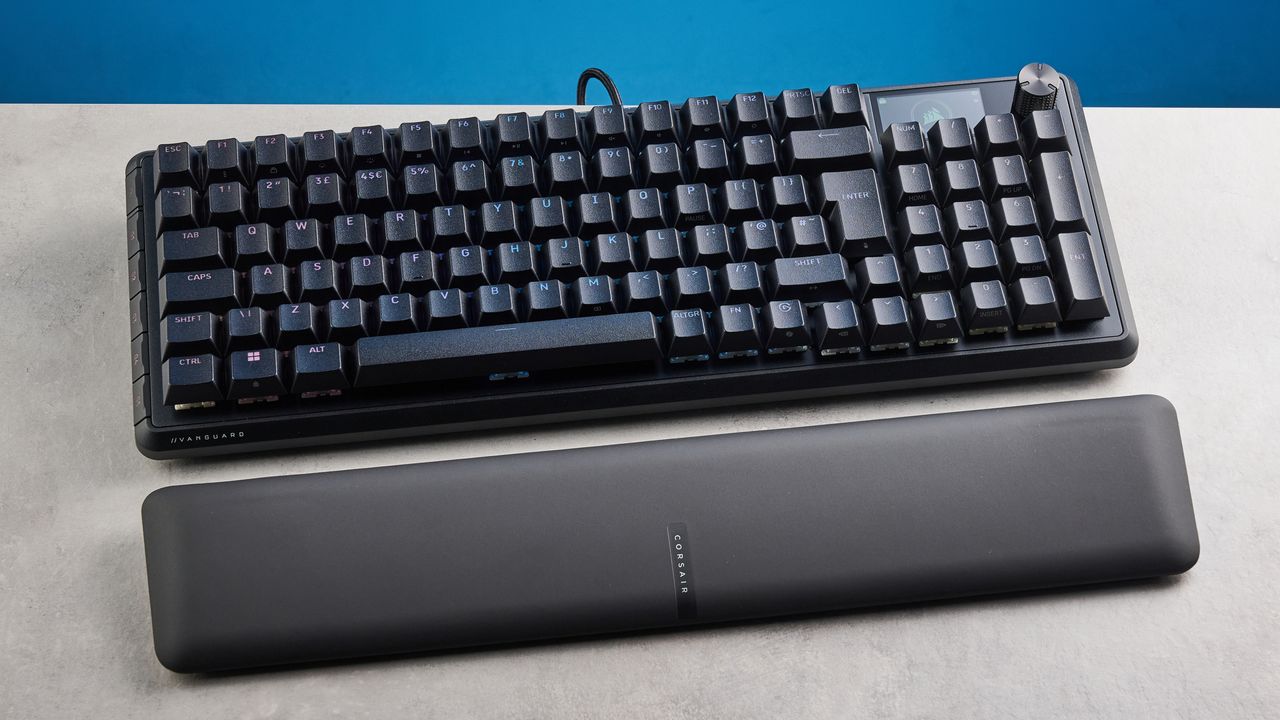
The Corsair Vanguard Pro 96 in black, on a stone surface.

The Corsair Vanguard Pro 96 is a premium gaming keyboard from legendary gaming hardware manufacturer Corsair. It boasts a roster of today’s must-have gaming features — the two most notable being magnetic switches (and all their associated goodies, like adjustable actuation and Rapid Trigger) and 8K polling.

The Vanguard Pro has a number of virtues. It has the aforementioned gaming features under its belt, plus an LED screen for on-the-fly adjustments, custom assignable game buttons and easy-to-use companion software. It types nicely for a gaming board, is built fairly well, and comes with a magnetically attaching wrist rest.

There are some major frustrations, though. For all the potential the LED screen has, it’s cumbersome and frustrating in practice. It isn’t particularly pretty, and I can’t see much justification for the whopping $220, save the big-brand name (which usually doesn’t count for much in the keyboard world).

So, is it one of the best gaming keyboards you can buy? Find out in my full Corsair Vanguard Pro 96 review.

Corsair Vanguard Pro 96 review: Cheat sheet

  • What is it? A 96% Hall Effect gaming keyboard from industry giant, Corsair
  • Who is it for? Gamers who want a traditional-looking gaming deck with modern features
  • What does it cost? $229 / £209
  • What's good? It offers a decent amount of gaming performance and customization, and comes with a premium wrist rest
  • What's not? You can get more features for similar or less money, and the onboard controls are frustrating

Corsair Vanguard Pro 96 review: Specs

Price

$229 / £209

Switches

Corsair MGX Hyperdrive V2 Hall Effect

Keycaps

PBT

Construction

Aluminum

Layout

96%

Operating system

Windows, macOS Linux

Backlighting

Per-key RGB and Mix RGB

Polling rate

8,000Hz

Connectivity

Wired

Measurements

15.28 x 5.55 x 1.69 inches

Weight

2.41lbs

Colors

Black

Corsair Vanguard Pro 96 review: The ups

The Corsair Vanguard Pro 96 has some attractive features, including its magnetic gaming features, typing experience and thoughtful design elements.

Gaming performance

(Image credit: Future)
Tom's Guide reviews gaming platform

The most important thing any gaming deck needs to do is perform well in-game, especially at $229. Thankfully, there’s a rather juicy roster of gaming features on the Corsair Vanguard Pro 96. Most of this boils down to the switches. The Vanguard Pro 96 uses Corsair’s MGX Hyperdrive Hall Effect magnetic switches, allowing a wide array of handy features, including adjustable actuation (down to 0.1mm), dual actuations per keypress, Rapid Trigger and Last Key Prioritization SOCD (A.K.A ‘Snap Tap.’

Adjustable actuation

Like other magnetic boards, including the Keychron Q6 HE 8K ($239) and the Lemokey L5 HE ($220), the Vanguard’s actuation can be reduced to just 0.1mm. At 0.1mm, you can input commands extremely fast as the switches will actuate with just a tiny movement, for highly responsive gameplay (at the risk of accidental inputs).

Here, I'm adjusting the actuation of the Vanguard Pro 96's WASD keys down to 0.3mm on the Corsair Web Hub browser app. (Image credit: Corsair / Future)

Traditional mechanical switches often take up to (or over) 2.5mm before actuating — you have to press the key much further to trigger your input, making them feel much less responsive.

You can only adjust down to 0.6mm on the board itself, with 0.1mm available via the Corsair Web Hub web app. I dialed global actuation down to 0.6mm for Counter-Strike 2, lowering the WASD keys to 0.3mm for ultra responsive movement while keeping the risk of accidentally knocking other keys comparatively low (versus 0.1mm).

You can also assign dual actuation zones for the switches, meaning a single keypress can perform two actions at different points of the keypress (setting half a press to walk, a full press to run, for instance).

Rapid trigger and LKP

Here, I'm setting up LKP ('Flash Tap' / 'Snap Tap') on the A and D keys using the Corsair Web Hub browser app. (Image credit: Corsair / Future)

Interestingly, there are two Rapid Trigger modes. Typical Rapid Trigger allows you to consistently re-trigger the same key without needing to recycle the switch fully back to its reset point (as you would have to do with mechanical switches). We see this on almost all magnetic keyboards these days, including the Vanguard Pro. However, it also features a continuous mode to keep the trigger actuating repeatedly until the key is released — kinda like holding down a key when typing to get aaaaaaaaa load of lettersssssssssss.

There’s also Last Key Prioritization, A.K.A ‘Snap Tap,’ which facilitates easy counter strafing in games with inertia-mechanic-based accuracy penalties — like Counter-Strike 2 and Valorant. It works, although it’ll get you kicked immediately from CS2.

Poll rate

Here, I'm adjusting the Vanguard Pro 96's poll rate using the Corsair Web Hub browser app. (Image credit: Corsair / Future)

The Vanguard Pro 96 polls at up to 8,000Hz, to minimize input lag as much as possible. In reality, you’d be hard pressed noticing input lag from a 1,000Hz board, and even harder pressed to tell the difference between one of 1K and 8K.

8K can become a strain on system resources, but thankfully you can adjust the Vanguard Pro’s polling between 125-8,000Hz. I just left mine at 1,000Hz and didn’t notice any input lag whatsoever.

For comparison, the SteelSeries Apex Pro ($199) polls at 1,000Hz, while the Keychron Q6 HE 8K and the Wooting 80HE ($199) poll at 8K.

Custom game buttons

(Image credit: Future)

The Vanguard Pro 96 features five custom buttons down its left-hand side, allowing you to assign your most frequently-used binds and functions. You can also assign custom macros or keystrokes.

I actually found it quicker to stretch my left pinky to the fourth button than I did moving my third finger down to hit Z in Hell Let Loose, which instantly throws you prone. It’s super important to be able to hit this quickly in game, so I appreciated having the shortcut.

For even more custom game buttons, check out the NuPhy Field75 HE ($169), which has eight in total over its left and lower edges. I find the Field75 HE’s lower row particularly useful and easy to tap, as my thumb is nearby most of the time.

Decent customization options

The Vanguard Pro 96 is hot swappable, which isn’t a given with gaming brands (Corsair, Razer, etc.) as it has become with custom brands (Keychron, NuPhy etc).

Here, I'm changing the RGB lighting layers on the Corsair Vanguard Pro 96, using the Corsair Web Hub browser app. (Image credit: Corsair / Future)

To be fair, with magnetic boards, hot-swap is of questionable benefit at the moment. Magnetic switches are highly software reliant, meaning you can’t switch to just any brand of magnetic switches right now — it’s an industry-wide limitation. But hey, having hot-swap at your disposal might come in handy down the line if things open up a little.

More important for a magnetic board is the level of software customization at your fingertips, and any companion software’s ease of use. May the gaming gods be praised: I didn’t have to use Corsair’s clunky iCue app with the Vanguard Pro, as all tweaks can be done via Corsair’s Wub Hub browser app.

The Corsair Web Hub offers lots of scope for customization, from lighting through to poll rate, actuation distance and other magnetic features. It also lets you flash firmware, which was a necessity for me, as my board was janky as hell out of the box (more on this later). It’s easy to use and doesn’t require you to install any applications.

Admittedly, the Corsair app isn’t as slick as Keychron’s Launcher or NuPhy’s nuphy.io, but hey, it does the job.

Pleasant typing

(Image credit: Future)

The Corsair Vanguard Pro 96 is fairly pleasant to type on. It uses OEM profile keycaps, like the Wooting 80HE and SteelSeries Apex Pro. These are better suited to gaming than serious typing, thanks to their medium-high profile, fairly small top surface area and lack of any real ergonomic rake to the profile to make hitting outer keys easier.

That said, they’re fine gaming-skewed all-rounders, which is why you’ll see them equipped on many gaming boards. I had no issue putting in a super fast time while maintaining above average accuracy.

Keyboard

Words per minute

Typing accuracy

Corsair Vanguard Pro 96 (2.6mm actuation)

105

96.34%

Wooting 80HE (2.6mm actuation)

95

86.81%

Lemokey L5 HE (2.6mm actuation)

104

86.96%

Keychron Q16 HE 8K (2.6mm actuation)

99

91.64%

NuPhy Air60 HE (2.6mm actuation)

101

87.72%

NuPhy Air60 HE (2.6mm actuation)

101

87.72%

Keychron K2 HE (2.6mm actuation)

106

93.97%

Epomaker HE75 Mag (2.6mm actuation)

99

91.51%

Pete's rolling averages (all keyboards)

94.9

88.19%

If you’re going to be typing lots, I would recommend an 8K magnetic keyboard with productivity-oriented keycaps. The NuPhy Field75 HE uses Cherry profile keycaps which are arguably the ultimate all-rounders for gaming and typing. I type a lot, so prefer a productivity-oriented keycap profile, like the Keychron’s ergonomic OSA profile, found on the Q6 HE 8K.

The MGX Hyperdrive switches are nice-enough to use, too. The moderately heavy spring tops out at 55g actuation force when the switches are set to their maximum actuation height. This results in a slightly firm, elasticky feel, which I quite like. Just like the magnetic switches found in productivity-biased boards like the Keychron K2 HE ($129), the MGX Hyperdrive switches use a dual-rail design, making them feel stable in use. And, as is expected with switches these days, they come pre-lubricated for smooth operation. Nothing groundbreaking, but nothing to complain about, either.

(Image credit: Future)

Corsair doesn’t specify the Vanguard Pro 96’s mount type, but it’s extremely firm, so likely either a top, plate or tray mount. As such, the Vanguard Pro 96 is less springy and comfortable than a gasket mounted productivity board like the Keychron Q1 Pro. This makes sense in a gaming board with ultra-sharp 0.1mm actuation, though, where it’s best to minimize as much unnecessary movement as possible for the most responsive and accurate inputs.

Thoughtful design

The Vanguard Pro 96 is, as the name suggests, a 96% full size board, meaning it packs the functionality of a 100% full-size deck — i.e. it retains the Num pad — while shrinking the overall profile slightly by chopping a few navigation keys and bringing everything closer together. It’s still a large board, though. In game, I like my keyboard placed far out to the left, which was very tricky with the Vanguard Pro 96. That’s why I prefer 60-65% boards for gaming, like the NuPhy Air60 HE ($139) and Keychron Q16 HE 8K ($229), or 75% decks like the Keychron K2 HE.

(Image credit: Future)

If you can’t live without a Num pad — perhaps you regularly work on spreadsheets — a 96% is about as much compromise between functionality and space as you’re gonna get. The Vanguard Pro 96 is slightly more compact than other 96% boards like the Redragon K686 Pro SE, although there’s not much in it.

The Vanguard Pro 96 comes with a spongy wrist rest that attaches magnetically to the bottom edge of the board, so they both stay together. This relieves pressure on your wrists and prevents your arms rubbing against desk edges. The board’s USB-C port is inlaid into the base of the board, with cutouts running to the edges of the case, allowing you to channel the cable towards your PC — I love this, as it helps further minimize desk footprint.

Corsair Vanguard Pro 96 review: The downs

For all its virtues, the Corsair Vanguard Pro 96 has some disappointing flaws given its high price, including frustrating controls and a bland design. You can get more for your money elsewhere, too.

Frustrating controls

(Image credit: Future)

Despite all its potential — with the LED display and companion web-app — the Vanguard Pro 96 is super frustrating to control. The screen is extremely unintuitive: despite me having switch actuation set up as a sub-menu, I simply couldn’t navigate to it on the display. Eventually, I set it up as the only sub-menu (given everything else I could control via the Fn row anyway), where it was, by default, easy to access.

The board seems often at odds with the companion software, though. In testing, for example, the web app showed 0.6mm actuation, while the board itself showed 1.0mm.

My keyboard was also incredibly janky out of the box, triggering duplicate inputs and sometimes missing them altogether. I flashed the keyboard’s firmware via the web app, and these problems disappeared, but it’s disappointing to see them in the first place from a brand as big (and expensive) as Corsair.

Bland "gamer" aesthetic

(Image credit: Future)

Obviously this is a subjective take, as beauty lies in the eyes of the beholder. But I find the Vanguard Pro 96’s design so boring. Stock “gamer” styling, with the raised switches/keycaps, blacked-out everything, OEM caps etc., etc.

If you’re a 14-year-old with a full unicorn-puke-RGB gaming rig and run-of-the-mill “gamer” style peripherals, I’m sure it’ll fit right in on your desk. If you’d like something a little more adult, check out the Keychron Q6 HE 8K or Wooting 80HE. And if you’d like something a little more fun and colorful, check out the NuPhy Field75 HE or Air60 HE.

More for your money elsewhere

All those boards I just mentioned above bring me to my final criticism of the Vanguard Pro 96: you can get so much more for similar or less money with rivals. This isn’t a bad keyboard, but it’s nothing special. It isn’t doing anything new, and it looks bland. Why spend nearly $230 on it?

(Image credit: Future)

You’ll get more performance and gaming features from the Wooting 80HE and Keychron Q6 HE 8K — think more magnetic features, like quad actuation zones and customizable SOCD resolutions, to name but two — both of which cost a similar amount of money as the Vanguard Pro. The Wooting obviously lacks a Num pad, but the Q6 has you covered there, if you can accept a full 100% layout. Not only do they both offer more features than the Corsair, they’re better built, better looking, and nicer to type on. They both justify a circa-$200 price tag much more easily than the Vanguard Pro 96.

If it’s just features you’re after and you don’t care about layout, you can pick up a Hall Effect board for under $60, like the Epomaker HE68 ($59). All this begs the question: why would you drop $229 on the Vanguard Pro 96?

Corsair Vanguard Pro 96 review: Verdict

I think I pretty well summed this up already in the paragraph above, but I’ll rehash it here for good measure in case anyone has skipped right here. The Corsair Vanguard Pro 96 isn’t a bad board, but it does nothing new, and nothing particularly well.

It packs a decent array of gaming features, high(ish) levels of customization and bundles some thoughtful design features. It’s alright to type on, too. And sure, those things are all well and good.

But this keyboard is simply way overpriced. You can get much more for the same money, and get similar performance for cheaper. So why is the Vanguard Pro 96 priced at $229? It’s the Corsair name, of course, which in the keyboard market holds much more prestige than it deserves.

Sign up to read this article
Read news from 100's of titles, curated specifically for you.
Already a member? Sign in here
Related Stories
Top stories on inkl right now
One subscription that gives you access to news from hundreds of sites
Already a member? Sign in here
Our Picks
Fourteen days free
Download the app
One app. One membership.
100+ trusted global sources.