Lately, I’ve been perfecting my photo editing skills by tweaking all the snapshots I capture when I test-drive the best electric cars around. The process usually takes me somewhere between 8 to 15 minutes to finalize an edit — tolerable for a single photo, but hardly sustainable when you have a batch of 40 to knock out.
That’s why I want to see how AI performs and if it can help speed up the process, allowing me to shave time from my workday to focus on other tasks. I’ve previously leaned on AI to remove unwanted subjects, but this time I want to see how it can actually improve the overall look of photos I've captured.

For this test, I’m pitting my photo editing skills against Google Gemini on my phone to see exactly what it can deliver — and ultimately prove to myself if it can be consistent and reliable. Here’s what I found.
AI vs. human: What you need to know

In performing this test, I’ve come to realize that AI photo editing can become an art form of its own — one that involves sending several prompts before getting the exact look I’m after. That’s why I’ll show you the original, unaltered image I captured of each vehicle, followed by the versions Google Gemini edited.
If you browse through some of the photos I’ve edited on Instagram, you’ll see exactly the look I’m after. For this test, I’m asking Google Gemini to edit my photo with the following prompt below, so you can see the range of its performance. I’ll be especially critical about what Gemini can truly do to match my manual process.
- Prompt 1: Edit this photo so that the car is properly exposed, but everything else is darkened and slightly blurred out.
Of course, I'll also show you additional photo edits made with Google Gemini by taking the original image and editing them with the following two prompts below. I want to illustrate how effective the AI can be to perform these actions quickly.
- Prompt 2: Edit this photo so that the car pops from the background.
- Prompt 3: Make this look like a bright daylight scene with rich natural color and balanced exposure.
Chevrolet Corevette

Interestingly, Google Gemini applied a vignette around the Corvette to emphasize the car, but it wasn't entirely accurate to my request. Additionally, it morphed the truck parked on the right into a red one. But for the most part, I think Gemini did a decent job with the edit, even if the AI decided to make unwelcome changes to the scene.

With the second prompt, Google Gemini failed to understand my request — curiously transforming the Chevrolet Corvette into a Porsche 911 Targa. Prompt 3 fared much better, adjusting the entire shot to look far more pleasing and balanced, though it did noticeably alter the driver’s face.
Hyundai Santa Cruz

Not only did Google Gemini apply a vignetting effect that darkened the corners of the Hyundai Santa Cruz, it also altered the angle and threw in a person into the driver's seat. While it still looks compelling, I only wish it had added more saturation to the car’s paint, as the color currently competes a bit too much with the blue sky.

The original shot of the Santa Cruz is so low-contrast that it looks completely dull and devoid of color, but Google Gemini made it much more pleasing with Prompt 2, adding contrast to the scene so that the pickup’s details are better emphasized.
With Prompt 3, however, it took the same image it produced with Prompt 1 — like shifting the angle of the shot and the driver inside the vehicle. It still looks incredible, but these weren’t specific I requests I asked for.
Volvo EX30

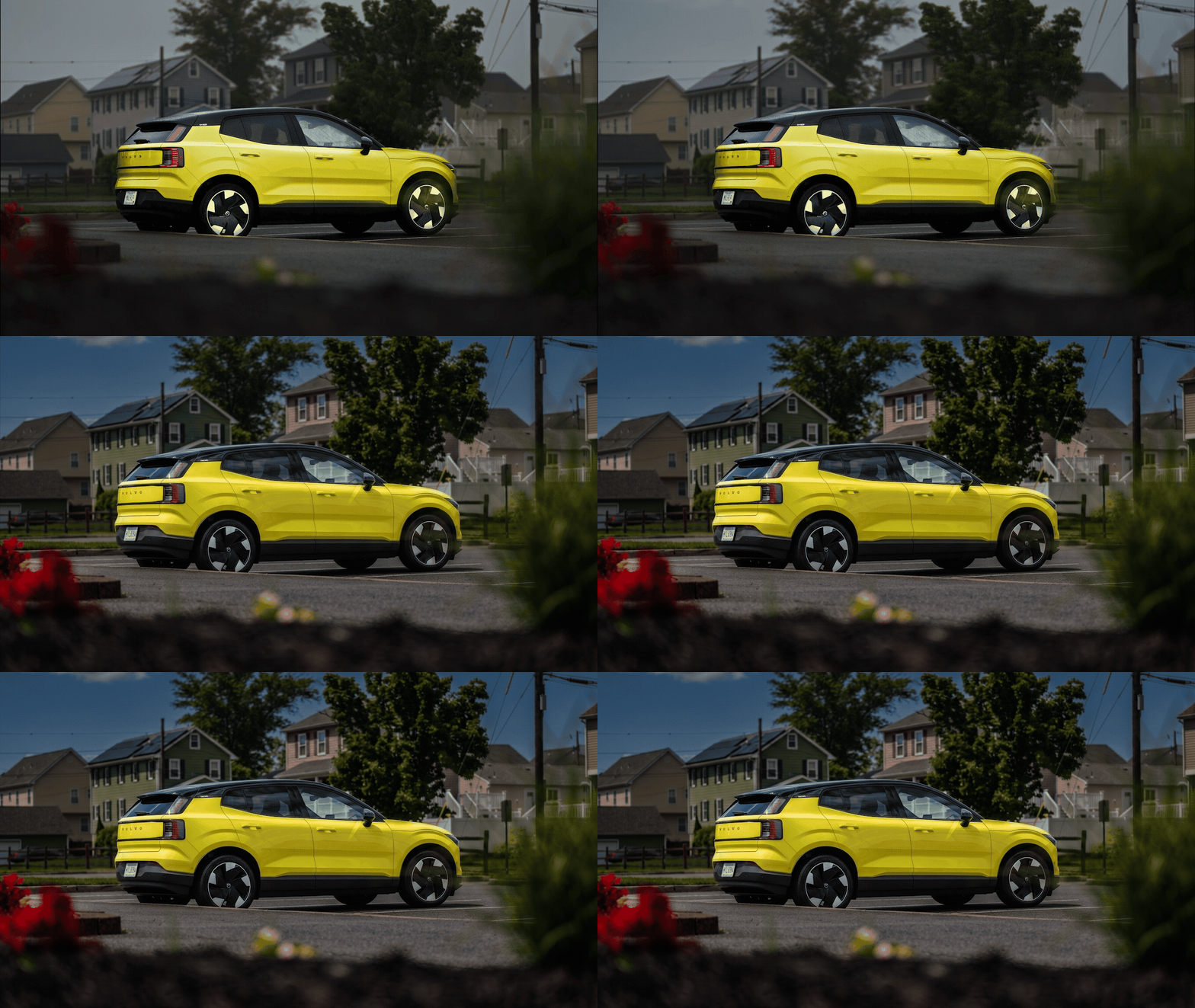
Unlike the previous two examples, Google Gemini nailed it with the Volvo EX30. It moved away from the vignetting effect, instead dropping the exposure everywhere except for the SUV in the center. In fact, it holds up well against my own manual edit — and it’s a result I’d actually use.

Much like the Santa Cruz, the unedited photo I captured of the EX30 looks a bit dull, primarily due to low contrast and washed-out colors. Impressively, Google Gemini really makes the car pop by brightening and saturating it with Prompt 2.
I also like how Prompt 3 transformed the rainy day of the actual shoot into a completely sunny one. However, the heavy saturation applied to the entire scene makes the photo look a bit too computer-generated for my taste.
Lexus RX 450h+

Oddly enough, Gemini reverted to a vignetting effect for this edited shot of the Lexus RX 450h+. Compared to my manual edit, it’s fascinating to see Gemini made the windshield more transparent while being more aggressive with the contrast. Much like with the EX30, Gemini’s edit matches my aesthetic, and it’s a result I wouldn’t mind using.

I’ll be frank: the Lexus RX 450h+ shot was the toughest for me to edit because the black hood and roof were overexposed — and the cloudy day only made the original image look flat. Yet, Google Gemini did an excellent job of cleaning it up with Prompt 2. I really like the sharpening it applied to the car, as well as the added color and contrast.
Prompt 3 was equally impressive with its transformation to a sunny, daytime setting. The lines along the hood became more prominent because the AI effectively deepened the shadows in that area.
Mercedes-Benz CLA 250+

I made one final adjustment for Prompt 1 by asking Gemini to add a sun flare to the grille to give the Mercedes-Benz CLA 250+ a more dramatic feel. It worked out quite well — effectively darkening the background as requested — and it holds its own compared to my manual edit.

While the original looks decent on its own, Google Gemini cleaned it up nicely with Prompt 2, ensuring the car’s hood draws the most attention.
Prompt 3 further elevated the image by adding clouds into the daytime scene, complete with reflections around the grille and headlights that make the transformation look surprisingly believable.
Bottom Line

I’ve never really leaned on AI to edit my photos before, mainly because it was fairly limited — reserving it mostly for removing unwanted subjects. But times have changed, and Google Gemini proves it’s a reliable photo editor that can handle complex lighting and exposure tasks in a fraction of the time.
While Gemini can occasionally miss the mark — swapping car models or manifesting mysterious drivers — its ability to transform a flat, low-contrast image into one that looks professionally edited is undeniably impressive. It’s a massive time-saver, though the workflow still requires me to manually upload each photo rather than processing them as a batch.
Will I stop editing my own photos? Not entirely. There’s still a level of precision and control I prefer to maintain. However, for a quick turnaround, Gemini has proven it can certainly keep up.