
Get all your news in one place.
100’s of premium titles.
One app.
Start reading
Pro Game Guides
Pro Game Guides
Dipan Saha

Build a Zoo Exchange Event Guide – Trader Location, Rewards and more

Build a Zoo has a new Update called Exchange Event, which is part of the ongoing Halloween celebrations in Roblox. Update 33 brings new additions, the most notable of which is the ability to trade in your pets, accessible via a special zone. More on the exchange event guide here.

Where to Find the Trader in Build a Zoo’s Halloween Updates

Trader location in Build a Zoo
Image by Pro Game Guides

Build a Zoo recently added in the Trader NPC to the game with its Halloween update. However, the Trader is not unlocked from the get go for all players. To unlock the trading function, you should have the Epic Conveyor unlocked first. Getting here will take a bit of time, so be patient and keep farming money (1.6 million).

To speed up the farming process, buy land, add new Pets, and purchase Eggs from the money you make in the game.  Once the Epic Conveyor is unlocked, you can head to the left side of the Conveyor to find the trading center unlocked. If you’re lost, refer to the screenshot above for a more precise location.

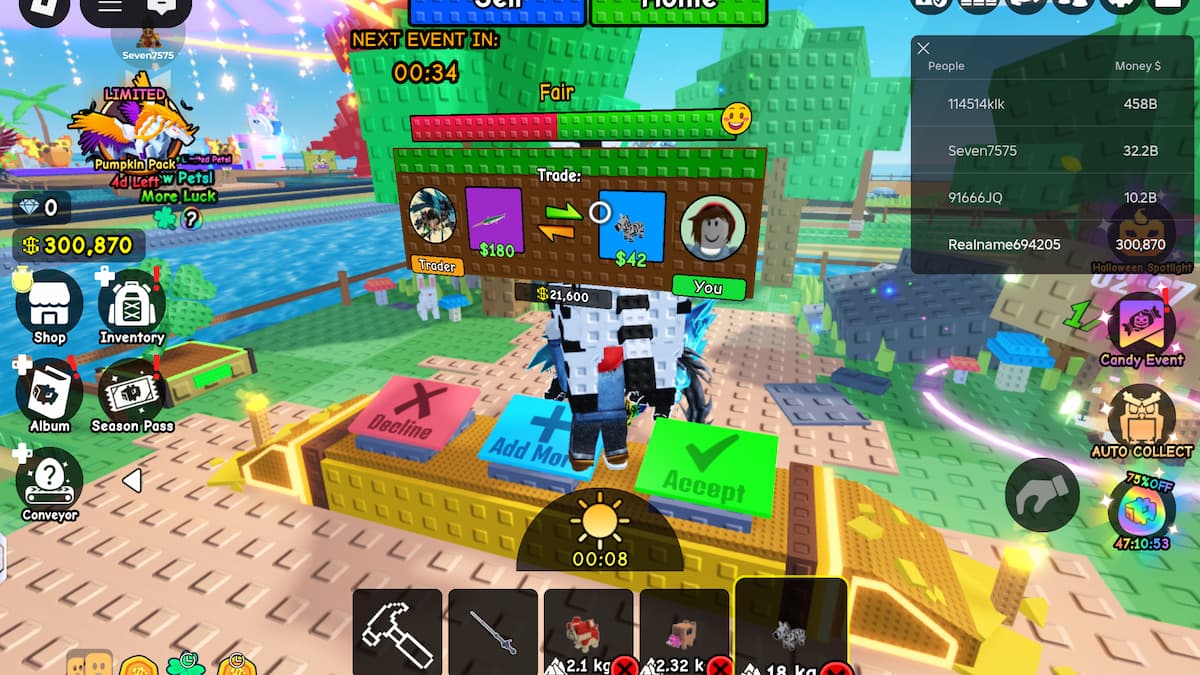
How to Trade Pets in Build a Zoo

Trading in Build a Zoo
Image by Pro Game Guides

Trading Pets is a very simple affair:

  • Head on over to your plot.
  • Equip the Hammer from your Inventory (check the bottom row of the UI).
  • Walk over to the Pet you wish to trade, and hit the Recall button. 
  • Head over to the Trader booth.
  • Equip a Pet from your Inventory. To do so, look at the bottom row beside the Hammer. Click on a Pet to equip it.
  • A Trader NPC should automatically approach you with an offer.
  • Press the green Accept button to confirm the trade.

If you wish to cancel the trade, press the red Decline button instead. With your new Pet in hand, you can now head over to your plot and place the animal, and begin farming coins immediately, without having to wait for an Egg to hatch.

This process also completely bypasses the RNG involved in acquiring new animals, making it a quick and easy way to grab new Pets.

Tips and Tricks for Trading Pets in Build a Zoo

For starters, don’t go blindly exchanging every Pet you own. Look at the exchanged Pet’s value against your own, and then (assuming that it's a fair trade), go ahead with the exchange. There are plenty of good deals during the event, so keep an eye out for those (and simultaneously avoid other Traders who try to low-ball you).

Another thing to avoid is being overly conservative throughout the trading process. Don’t be shy to trade some of your more exotic animals for something that offers far greater value. The more exotic a Pet is, the more money it can generate. Traded Pets do not have a hatching time, so this method is faster than buying Eggs directly. That being said, you should always trade away low-value Pets first.

Build a Zoo Exchange Event Guide FAQs

How to get more Pets in Build a Zoo?

You’ll have to farm money to buy more Pets in Build a Zoo. To do so, spend it on Pet Eggs, and interact with Pets to earn more money. You can also sell Pets to get some money back.

How to earn money faster in Build a Zoo

Once you place Pets on your farm, you’ll have to manually walk to them to grab the money they accumulate. There is an option to auto-farm, but it requires Robux.

When does the Trader appear in Build a Zoo?

The Trader shop appears as soon as you unlock the Epic Conveyor. If you don’t see the trading message pop up, try switching to another Pet or wait for a while.

For more on Build a Zoo, check out Complete Build a Zoo Beginner’s Guide – Tips & Strategies on Pro Game Guides.


Sign up to read this article
Read news from 100’s of titles, curated specifically for you.
Already a member? Sign in here
Related Stories
Top stories on inkl right now
One subscription that gives you access to news from hundreds of sites
Already a member? Sign in here
Our Picks
Fourteen days free
Download the app
One app. One membership.
100+ trusted global sources.