Get all your news in one place.
100’s of premium titles.
One app.
Start reading
Digital Camera World
Peter Travers

Blue skies aren’t always good news for landscape photographers –but I’ve got this classic quick fix

Converting blue sky landscapes to monochrome.

When we’re not getting much sunshine at this time of year, it may seem ridiculous to say blue skies on sunny days are a problem for landscape photography. Sometimes, however, these scenes with clear blue skies can look a bit bland and need a boost.

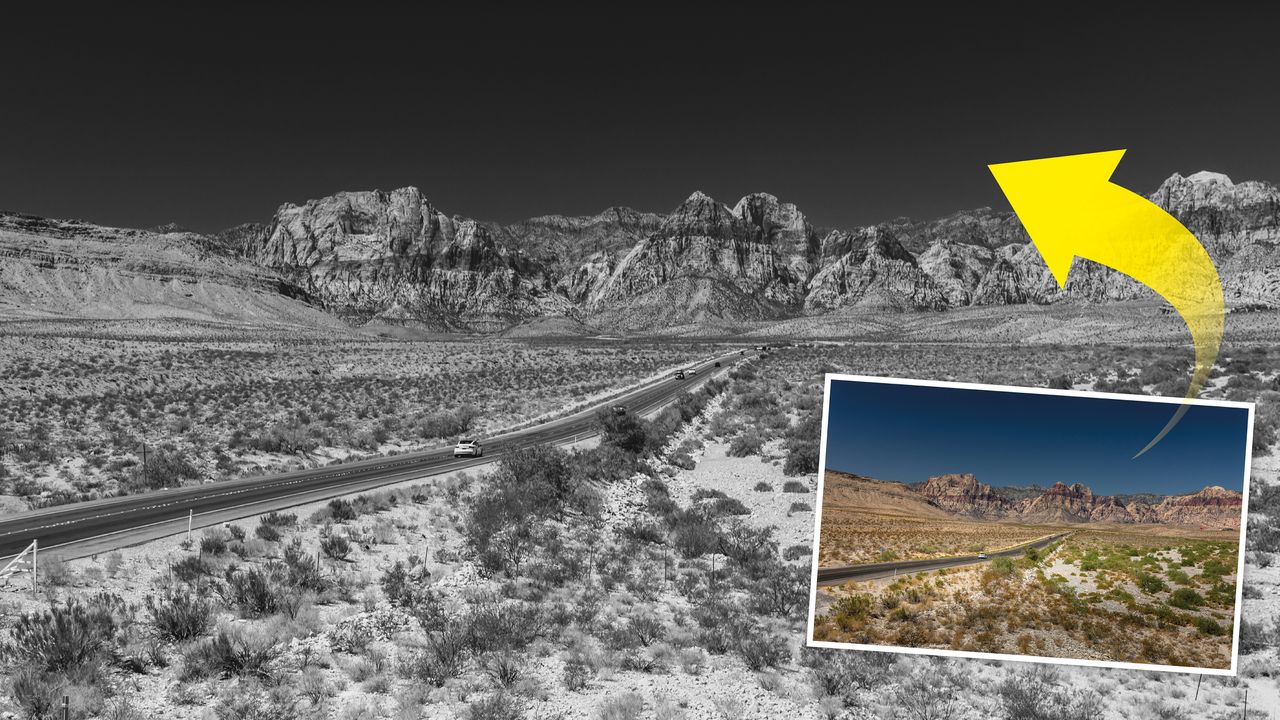
I’d used a polarizing filter for these shots of Red Rock Canyon near Las Vegas, so the skies became this incredible deep blue. While I’m happy with vibrant results, and the Red Rock mountains have a richer quality in shot, these sorts of color landscapes are also perfect for a black-and-white conversion. 

Skies become dark black and imposing, and the contrasting mountain textures jump out of the image. Now, with all color removed, the eye is drawn to the most interesting parts, and the shapes and sharp areas of a scene. For instance, in this Red Rock Canyon shot, the eye isn't distracted by the green shrubbery in the desert or the flashes of color from the cars on the road.

(Image credit: Peter Travers)

With a few clicks when editing your photographs, you can create black-and-white images with a much more timeless feel. Ansel Adams, eat your heart out!

When creating black-and-white photos, I always shoot in RAW and full colour. That way you have the color image if you want it, and can make a high-quality mono image from it on your computer.

It’s always best to make your black-and-white conversions in your RAW editing software to retain detail and avoid nasty pixelation – otherwise you can rapidly lose image quality if you make a strong black-and-white conversion of your color JPG in the Photoshop workspace.

(Image credit: Peter Travers)

A classic amateur error is to use the High Contrast Red Filter in the Black and White adjustment box in Photoshop – unnaturally dark skies can quickly become blocky and patchy!

I use Adobe Camera RAW and once I’ve made general edits to exposure, contrast, highlights and shadows (and added a gradient to the sky to darken it), I find that the mono preset profiles are a great place to get inspiration and work from.

My finished monochrome image of Red Rock Canyon, Nevada (Image credit: Peter Travers)
Another image where blue skies look better in black and white – this was taken in San Bernardino valley in California (Image credit: Peter Travers)

You might also like…

Want to get your black-and-whites in-camera? Take a look at the best cameras for black-and-white photography. Not a fan of Photoshop? Check out the best Photoshop alternatives.

Sign up to read this article
Read news from 100’s of titles, curated specifically for you.
Already a member? Sign in here
Related Stories
Top stories on inkl right now
One subscription that gives you access to news from hundreds of sites
Already a member? Sign in here
Our Picks
Fourteen days free
Download the app
One app. One membership.
100+ trusted global sources.