One character in 619.
That is the whole error count from a badly photographed clipping we ran through rewind.ai's OCR. The wrong character was a digit. The clipping said 14 November. The text said 24 November. A second run gave the same wrong digit. No bracket, no question mark, nothing to say the tool was unsure. Ten days moved inside a paragraph that looked perfect.
So the first finding is a rule: check dates and numbers against the original before you paste. How much checking does the rest need? On our four images, very little.
What we fed it
A reader who clips and quotes has small, constant OCR jobs. A paragraph to quote exactly. A printout shot in bad light. A lunch receipt. A table from an annual report. We built one image for each, so we knew the correct text in advance.
The clean page is a fourteen-line news clipping in Georgia, old-style figures, dollar signs and dates included: 619 characters. The bad photo is the same text ruined on purpose. Grey paper, faded ink, a tilt, blur, noise, then shrunk and saved as a heavily compressed JPEG. The receipt is an eighteen-line till slip with prices, a discount, VAT, a total, a masked card and an auth code: 352 characters. The dense table runs seven columns by thirteen rows, ruled, with signed percentages and a bold total row: 521 characters.
Scoring was plain: character edits needed to turn the output back into the original, divided by the reference length. Case and punctuation count. A line-aware score keeps the line breaks, so it catches reflowed text or a table read column by column. We also counted the original's numbers that came back exact.
Four images, all English, all printed type, all made by us. That is what these figures cover.
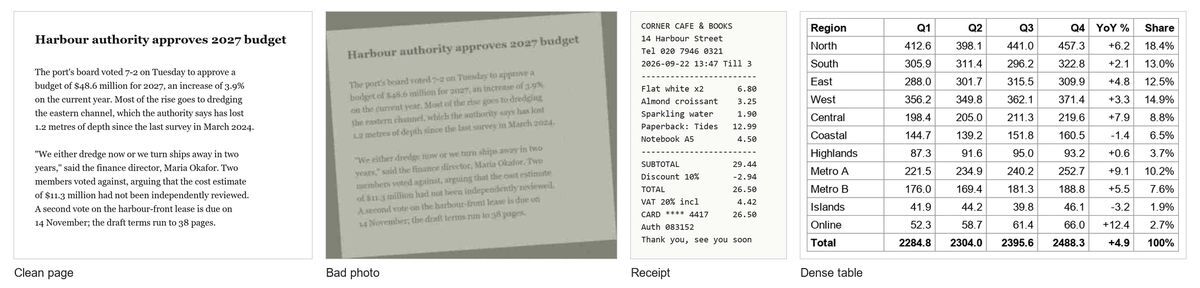
The four images we made and uploaded, shown at the same height. The bad photo is the clean page, tilted, greyed and blurred.
The scores
Document Language stayed on Auto-detect, the default, and each file went in through the page's own upload control. The page lists PNG, JPG and WEBP. No PDF. We scored the text the service returned and checked by eye that the page displayed it.
| Image | Run | Wrong characters (CER) | Line-aware CER | Numbers exact |
|---|---|---|---|---|
| Clean page | 3 | 0 of 619 (0.0%) | 0.0% | 10/10 |
| Bad photo | 1 | 2 of 619 (0.32%) | 0.32% | 9/10 |
| Bad photo | 2 | 1 of 619 (0.16%) | 1.62% | 9/10 |
| Receipt, as returned | 1 | 16 of 352 (4.55%) | 4.55% | 23/23 |
| Receipt, as returned | 2 | 22 of 352 (6.25%) | 6.25% | 23/23 |
| Receipt, dashed rules removed | 1 and 2 | 0 of 302 (0.0%) | 0.0% | 23/23 |
| Dense table | 2 | 0 of 521 (0.0%) | 0.0% | 76/76 |
Both receipt rows are the same output. Every one of its errors is an extra hyphen in a separator line, which is why the third receipt row reads zero.
Run numbers skip because we kept failures. Our own script stalled twice. One run without an account was refused because the shared anonymous pool held 74 tokens, below the 750 needed to start. None of that is the tool's fault.
Image by image
The clean page came back with nothing wrong. Zero edits in 619 characters, old-style figures included.
The dense table: nothing wrong either. All 76 numbers, row by row, tab-separated, so it pastes into a spreadsheet as columns. One cosmetic wrinkle. On screen, "Highlands" is long enough to push its row one tab stop right. The text itself scored zero edits.
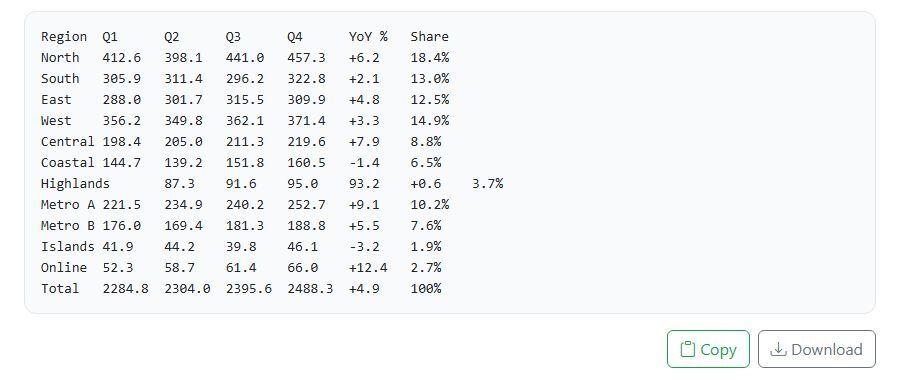
The table as the tool displayed it, one region per line. The Highlands row sits one tab stop to the right of the others.
The receipt looks worse in the table than it is. Its 4.55% and 6.25% come from the two dashed separator lines and nothing else. Each rule on the original has 24 dashes. The first run returned 32 per rule, the second 35. Every item, price, the discount, VAT, the total, the card digits and the auth code came back exact, 23 of 23 numbers. Strip the rules from both texts and the error rate is 0.0%. For an expenses claim, dashes do not matter. The total does.
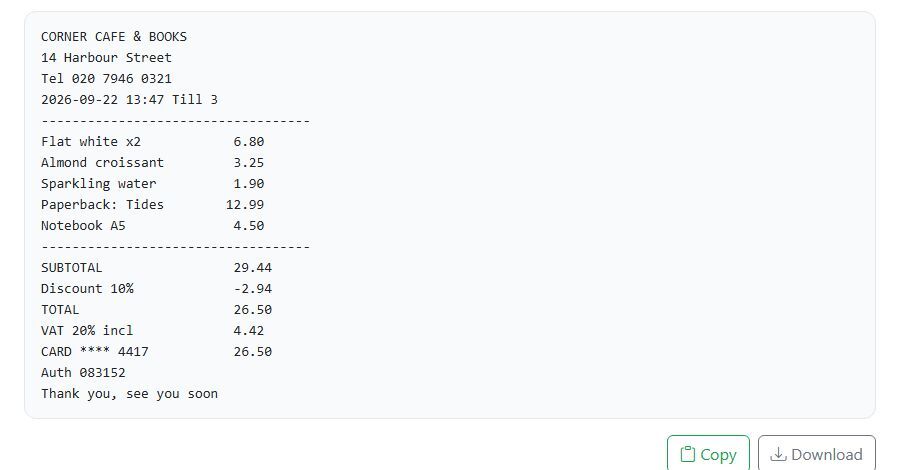
The second receipt run as the page showed it. The prices, totals, card digits and auth code are all there, and both dashed rules run wider than the text below them.
Then the bad photo, where everything wrong on this test lives.
Both runs turned 14 November into 24 November, and neither marked it as uncertain. Every other figure came back right: the budget, the percentage, the vote, the depth, both years, the second sum, the page count. That is what makes the miss dangerous. You see nine correct numbers and trust the tenth. On the first run a full stop after a date also became a comma. On the second, the tool rejoined the fourteen printed lines into paragraphs, so the line-aware score jumps to 1.62% against a flat 0.16%. The words are all there. For pasting a quotation, that is harmless, arguably better.
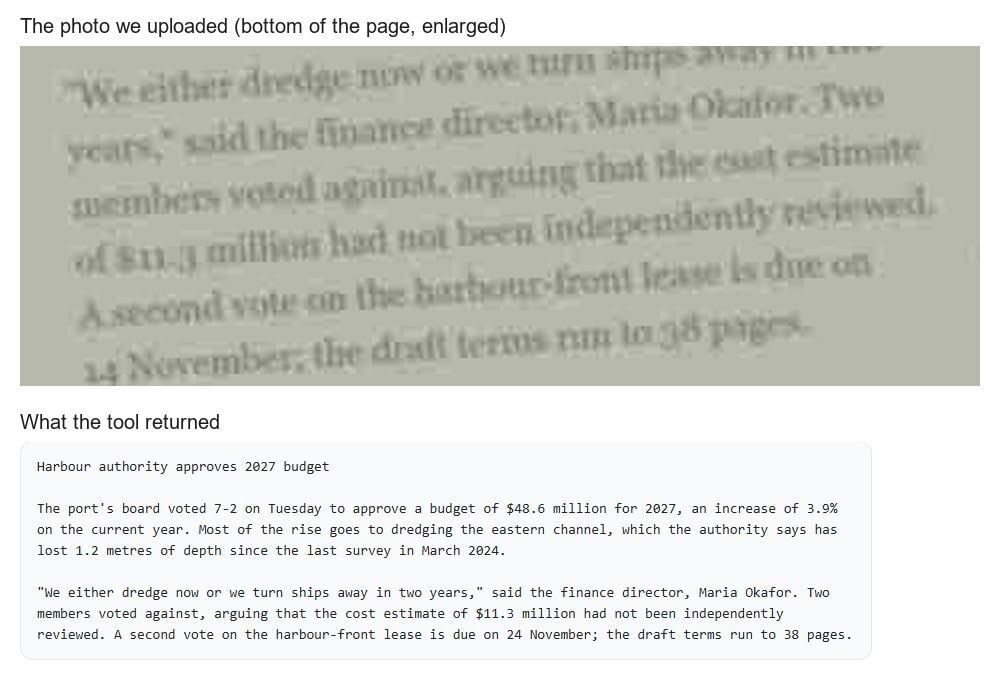
Top, the bottom of the photo we uploaded, enlarged; its last line starts 14 November. Bottom, the tool's text for the clipping, which says the vote is due on 24 November and runs the printed lines together.
Would we use it for these four jobs? Yes. Receipts and tables we would paste without a second look. Any quotation from a poor photo we would read against the source once, dates first.
If you want to try it, start on rewind.ai's hub for free ai without login: it is the front door to the site's free tools, from chat to PDF tools, and the OCR page is one click from it.
Where the bigger tools win
We uploaded nothing to Google Cloud Vision or LlamaParse. What follows comes from their own pages, so it compares scope, not accuracy. On scope, both beat the tool we tested, by a distance.
Google Cloud Vision takes PDF and TIFF files up to 2,000 pages, through Cloud Storage, and single images up to 20 MB. Its docs list 61 fully supported languages; its marketing page says 200+, with 50 handwritten. It reads handwriting. The first 1,000 units a month are free with a billing-enabled Google Cloud account. After that, Text or Document Text Detection costs $1.50 per 1,000 units.
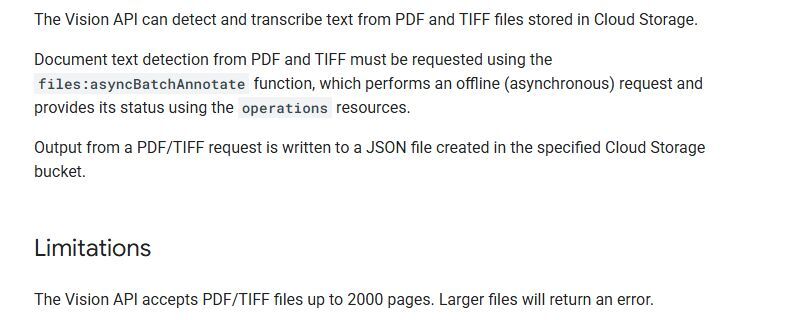
Google's own documentation for PDF and TIFF text detection, under the heading Limitations.
LlamaParse takes PDF, Office files and spreadsheets, "130+ formats" by its pricing page, and returns Markdown, JSON or XLSX. It reads handwriting and checkboxes. Its pricing page says 80+ languages; its product page says 100+. Sign up and you get 10K credits a month. After that, 1,000 credits cost $1.25, or the Starter plan is $50 a month.
rewind.ai's image OCR takes images only, and its language menu holds 10 entries plus auto-detect. PDF and handwriting are separate tools on the same site, both untested by us. For a scanned report running to hundreds of pages, use one of the two rivals.
What free holds
Here is where the tool loses.
Measured in rewind.ai's own tokens, our six clicks cost 2,038 to 9,280 each, median 4,610. The same image does not cost the same twice: the receipt took 2,038, then 3,135; the bad photo 4,207, then 5,013. All of that sits far above the per-image estimate printed beside the button.
An anonymous visitor's pool is 2,500 tokens a day, and 5 of our 6 clicks cost more than that. Without an account, on a fresh day's pool, our receipt came back complete, all 23 numbers right, and that one scan used almost the whole day's allowance. A free account raises the pool to 5,000 tokens a day, plus 10,000 once at signup. At the higher cost we saw for each image, 5,000 tokens covers 1 receipt a day and none of the other three. The smallest paid pack is $5 for 200K tokens.
So treat this as a tool for the occasional scan, which is what a clipping reader has. Google's 1,000 free units sit behind a billing-enabled account and LlamaParse's 10K credits behind a signup, but each is a stated monthly quantity. rewind.ai's edge is that the first scan of the day works without either.
Check the dates before you paste: ours came back as 24 November, twice, and the original said 14.