Get all your news in one place.
100’s of premium titles.
One app.
Start reading
Windows Central
Windows Central
Technology
Zachary Boddy

ASUS’ ROG Falcata might be the most underrated gaming keyboard of the year — and it's an ergo split design

Image of the ASUS ROG Falcata wireless gaming keyboard.

The last ASUS keyboard I reviewed cost a whopping $300, and — as much as I liked the keyboard itself — it was tough to recommend to most people. Now, I'm back with an even more expensive keyboard from ASUS. Is history repeating itself?

This is the ASUS ROG Falcata, and it's one of the most interesting keyboards I've ever had on my desk, thanks to the uncommon split design and absolutely ridiculous specs. ASUS is also asking $420 for the Falcata, making this one of the priciest peripherals I've ever tested.

I'd be lying if I said the Falcata hasn't won me over, though. Almost no one will actually go out and buy this wireless gaming keyboard for themself, but there will undoubtedly be those drawn to this fascinating form factor and insane performance. The ROG Falcata is unlike any other keyboard I've reviewed, for better or worse.

This review was made possible thanks to a review sample provided by ASUS. ASUS had no input nor saw the contents of this review prior to publication.

My first split keyboard experience

There's a lot included in the box, including an alan wrench just for connecting the wrist rests. (Image credit: Windows Central | Zachary Boddy)
Yeah, it's quite the process to fully set up this keyboard. (Image credit: Windows Central | Zachary Boddy)
I don't like these feet, so I just left the ROG Falcata flat. (Image credit: Windows Central | Zachary Boddy)
The Falcata definitely has a very ROG-esque design. (Image credit: Windows Central | Zachary Boddy)
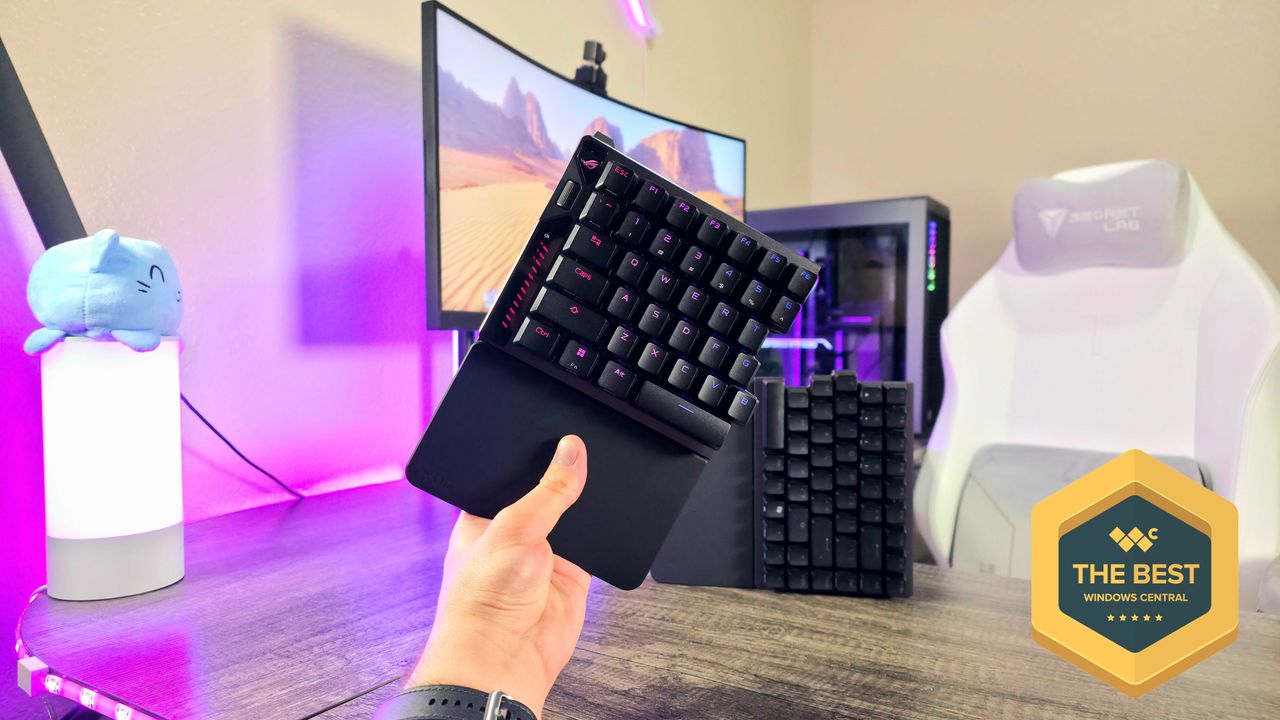
When the two halves are together, the Falcata is basically just a normal 75% keyboard. (Image credit: Windows Central | Zachary Boddy)
It's meant to be split, though, and that makes it unlike anything else. (Image credit: Windows Central | Zachary Boddy)

Split keyboards aren't a novel concept, being an alternative approach to the ergonomic keyboards that plenty of people swear by. The idea is to be able to position each half of the keyboard to line up with how your hands naturally rest, making typing and gaming more comfortable over long periods of time.

ASUS ROG Falcata

• Switches: ASUS ROG HFX V2 Magnetic, 0.1-3.5mm adjustable actuation, split 75% design, double-shot PBT keycaps, four-layer sound dampening
• Connectivity: Wireless via ASUS ROG SpeedNova 2.4GHz & Bluetooth 5, wired via USB Type-C
• Features: Left-side mode, per-key RGB lighting, multi-function wheel & button, detachable wrist rests, rapid trigger & snap tap modes, ASUS Gear Link software support, up to 8,000Hz polling rate
• Weight: 968g (2.13lbs) w/o wrist rests

Honestly, it does take some time to get used to an ergonomic keyboard, let alone a split keyboard — but the benefits are real. The ROG Falcata honestly does feel more natural to use than more traditional keyboards, but this ASUS board takes things a lot further than even other split keyboards.

For one, all the Falcata's most important components are on the left side of the board, so you can only use that for gaming (giving you the WASD keys and important shortcuts) for a significantly more compact setup. When you need both halves, a simple USB-C cable connects them; it's a slightly awkward design, but it works well.

Most ergonomic and split keyboards are also productivity-focused, and even the premium offerings tend to heavily compromise on performance. The ROG Falcata takes things to extremes with truly phenomenal gaming and typing performance, as well as a list of features too long to fully break down.

Hall Effect magnetic switches with adjustable actuation and advanced customization? Check. Support for an industry-leading 8,000Hz polling rate in both wired and wireless modes? Check. Bluetooth support for true multi-device connectivity? Check. Beautiful per-key RGB lighting and intuitive, multi-function, customizable shortcuts? Check. Detachable silicon wrist rests? Check.

On paper and in person, the ASUS ROG Falcata checks every single box for an ultra-premium wireless gaming keyboard. It's clear ASUS also put a lot of thought into how to make this split, 75% layout make sense.

Brilliant, but far too expensive for most

Typing and gaming on the ROG Falcata honestly feels awesome. (Image credit: Windows Central | Zachary Boddy)

The ROG Falcata sold me on the appeal of a split gaming keyboard, but this keyboard has to nail everything to come close to justifying its price tag. I already mentioned the impeccable performance, but the simple feel of typing is just as brilliant.

The ASUS ROG Falcata's magnetic switches are responsive and precise, and the four-layer sound dampening helps deliver warm, gentle, and pleasant typing acoustics up there with the absolute best keyboards I've used. ASUS deserves some praise for that, at the very least.

Build quality is top-notch, and there's plenty of accessories included in the box to add further value, too. No part of the ROG Falcata made me think "this is simply not good enough for such a luxury product."

That doesn't mean there aren't some oddities. The silicon wrist rests are attached to bulky metal plates that you actually need to screw into the bottom of the keyboard (so they're not easily removed), and there's no built-in kickstand to adjust the angle or height — you instead have to attach these odd, spherical feet that come in the box. It just feels more awkward than it probably needed to be.

Overall, though, there's little to complain about. Battery life is impressive for a high-performance, RGB-lit wireless keyboard, and ASUS Gear Link is a fairly intuitive and responsive web-based app for diving into the Falcata's extensive list of software options and features. The multi-function wheel and button are also excellent, once you learn what each mode does.

I still never forgot that the ROG Falcata retails for $420, though.

ROG Falcata review: My final thoughts

I like this keyboard way more than I thought I would, even if most people absolutely don't need to drop over $400 on it. (Image credit: Windows Central | Zachary Boddy)

✅You should buy this if ...

  • You want an ergonomic keyboard with serious gaming performance.
  • You see value in being able to just use the left side of your keyboard.
  • You want a truly luxurious, feature-packed gaming keyboard.

❌You should not buy this if ...

  • You understandably have no interest in spending so much on a keyboard.
  • You're not interested in an ergonomic, split keyboard design.

When I reviewed the ASUS ROG Azoth X, I also criticized its high $300 price tag and the various oddities that came along with it, but that was a "normal" keyboard. The ROG Falcata is nearly 50% more expensive, but it offers something basically no other keyboard around does.

It's not just one of the most premium keyboards I've ever used in terms of features, performance, and typing experience — it's also one of the most versatile, thanks to the unique split keyboard design we don't often see cross over into the PC gaming world.

The ASUS ROG Falcata is honestly amazing, but there's a catch — most people simply don't want or need this, especially when it costs so much. It's absolutely a hyper-niche keyboard with plenty of its own bizarre characteristics, but I'm genuinely so happy that it exists. If you know this could be the keyboard for you, the ASUS ROG Falcata can be yours for $419.99 at BestBuy.com.

Follow Windows Central on Google News to keep our latest news, insights, and features at the top of your feeds!

Sign up to read this article
Read news from 100’s of titles, curated specifically for you.
Already a member? Sign in here
Related Stories
Top stories on inkl right now
One subscription that gives you access to news from hundreds of sites
Already a member? Sign in here
Our Picks
Fourteen days free
Download the app
One app. One membership.
100+ trusted global sources.