Built around a 360-camera, the Antigravity A1 is the most exciting new drone for a long time, but that doesn't mean I don't have to review it seriously like any other. In fact there are more questions about it than any other because we all know, now, more or less what to expect from other drone designs.
Other than simple toys, there are three concepts that most drone users are already familiar with:

- Standard camera drones: by far and away the most popular, a remotely controlled camera at the front and a monitor (often taking the form of your phone) attached to a remote control
- FPV drone: First-Person View drones let you 'sit in the cockpit' by wearing goggles and look through the camera at the front, making it easy to fly amazing stunts and a whole genre of into and out of building videos.
- Follow-me drones: Using AI, the drone doesn't need a remote controller at all but follows the subject with its camera or sensors and takes action videos like an angel on the shoulders.
The Antigravity A1 takes elements of all of these and introduces an entirely new technology: 360-cameras. We've already seen the best 360 cameras growing in popularity in the action camera space because there is no need to 'frame' the shot until later, and that makes a ton of space for drone pilots – especially, of course – with high speed flying like FPV.
Essentially, those are the elements we've got. The question is, do they actually work together? It's asking a lot...

Antigravity A1: Pricing
At launch, in December 2025, the Antigravity A1 is being sold in three bundles. The cheapest of these is the 'Standard Bundle' at $1,599 / £1219, which includes the A1 Drone, the Grip controller, the Vision goggles, a battery for the goggles, and a battery for the drone.
There isn't an easy comparison as to whether this is good value because there is no comparable product, but you could say that a 1-battery DJI Avata 2 bundle – which also has goggles and a similar style of controller – but no 'world first' 360 camera is around three-quarters of the price.
On the other hand, you could see the A1 as affording the opportunity to shoot video as one person but control the camera separately (later) – a new way of achieving results a bit like DJI's $15,000 Inspire 3. I'll look at both these theories as we go, but my overall feeling is that, in essence, the pricing represents good value for someone who understands what they are buying.
The other bundles are Explorer Bundle (3 batteries) $1,899 and Infinity Bundle $1,999.
Antigravity A1: Specs
Video resolution |
8K 30fps |
Take-off weight |
249g |
Stills |
7680x3840 / 10496x5248 |
Sensor size |
1/1.28-inch x1 |
Collision sensors |
Yes |
Goggles resolution |
2560x2560 displays |
Antigravity A1: Build & Handling
Unboxing and exploring the Antigravity A1 was one of the more exciting experiences for me as a drone expert for a long time, even though I'd been out to a press event several months ago and seen a pre-production model. It's great to see a technology has made it through the pitfalls of development and exists in real, complete, usable form.
I was immediately struck by the quality and professionalism of everything in the boxes. This is right up there with the biggest name in the industry – yeah, we know who Antigravity need to go up against – and that isn't something I've seen a lot. No expense has been spared and that means every step of the process is a joy.

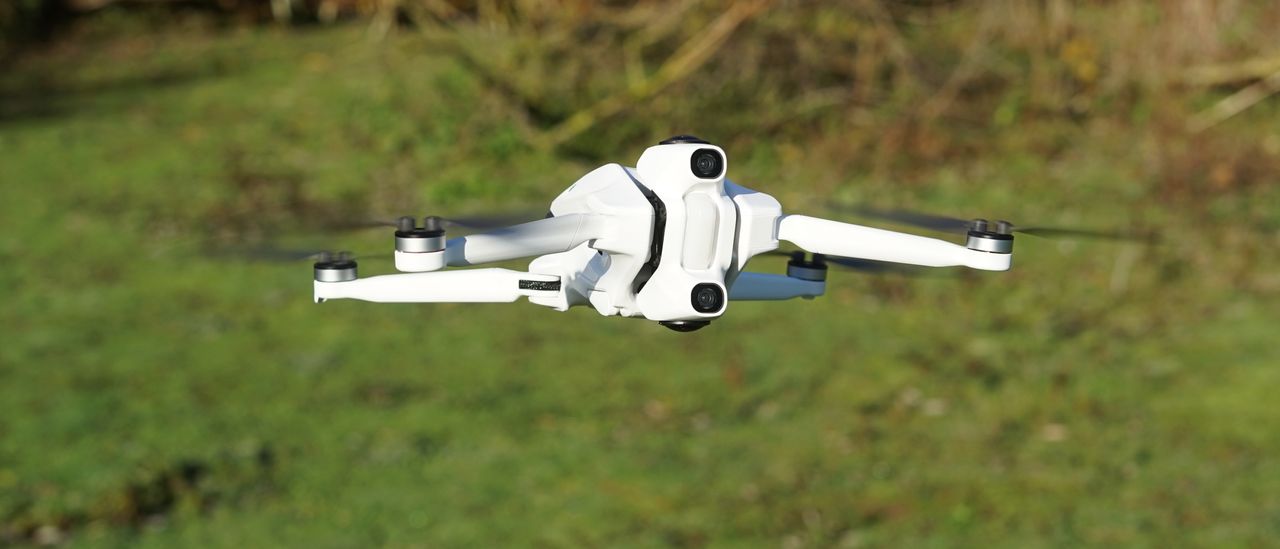
The Antigravity A1 itself does feel light, of course. Because it's meant to. It's a sub 250g drone. It's made of similar scratchy plastic to other drones in the weight class. But folding the legs out still introduces you to positive design choices: the legs can be folded out in any order without bumping into each other. A simple design thing, you'd thing, but a lot of other firms have not managed it.
Admittedly, the A1 solves it because it needs to introduce a new element – landing legs – that do introduce an additional complexity, but they are handled broadly automatically and give the drone a joyously insectile look.

At the front there is no camera gimbal. Instead the 360-degree camera system is made up of two lenses – one facing up and one down – mounted on a dampened element. At the very front are two optical collision sensors (this drone will go to a lot of effort not to let you crash it!)
I strongly advise a landing mat, by the way.
The Grip controller may look a little intimidating at first, with an extensive array of buttons, but the software makes it easy to get to grips with (sorry). The textured design helps too.

On the underside, you'll see the drone is well equipped with landing sensors.


An essential aspect of the Antigravity A1 experience is the goggles. These use motion sensors so that you can look around and see the entire world from the drone's perspective. This is achieved without you needing to give it a second thought thanks to the 360 camera technology and the near-invisible stitching, something which Antigravity adopted from sponsor Insta360. That, of course, is no bad thing since that company has been top of our best 360 camera guide for a long while!
I found that my view through the goggle's Micro-OLED dual 1-inch displays was good, and I was able to adjust them without the built-in adjustments need for the extra lens adapters that were supplied for me to review with. The tutorials made the process very straightforward.
Charging everything was all easy too, with one exception. I tried plugging the goggles in with a USB-C to USB-C cable at first and couldn't work out why the wouldn't come on. As it turns out, a USB-C to barrel cable takes the power from the special battery, which is worn like a necklace.
Antigravity A1: Experience
I made this quick video showing my experience with the drone...
Antigravity A1: Performance
When you get on location, it'll take you a few moments to get things together, but everything has been considered by Antigravity. The battery for the goggles is worn on a neck strap, so the goggles seem to have a low weight. Each of the devices is powered up with a short press then long press approach and I found that they all connected seamlessly (and I didn't actually need to get my phone app involved which cheered me up – standing in fields updating software is never fun!)


Antigravity A1: Camera Performance

The output is produced via your phone or computer app and, if you're not planning on experiencing it using something capable of viewing the 360 experience, you need to use these tools to produce traditional video or stills. These essentially allow you to play the whole spherical view and crop onto any part of it – in any shape (you can get 16:9 or 9:16 video, or 1:1 video come to that, just as easily, from the same shot.
The limitation is that the entire field of view recorded in video is 8K at 30fps (or 5.6K at 60fps) so if you only want, say, proportionally a quarter of that view you'll be getting the equivalent of a Full HD amount of resolution.
The software will fix things a bit, but there are limits, of course.

Ultimately, in terms of quality, the output is best when the view is either of a subject relatively near the drone, or seen relatively wide – broadly at the equivalent of a 30mm EFL lens or wider, I'd say, like most camera drones that don't boast telephoto cameras.
That's fair enough – and also true of FPV drones (or the best action cameras) which all seem to have very wide-angle lenses. Zooming in is tempting, but is always digitally zooming, so reducing the data you are working from, so the sharpness of the video is at risk.
In terms of flight performance, I found the drone relatively snappy, and the Grip controller very natural to use, especially in its default mode.
The ready availability of tutorials and tips helped, as did the layout. My only slight gripe was that I didn't feel very comfortable flying much over 300m (900ft) from myself before the radio range was reaching its limits. Admittedly, I was testing in the UK, near an urban area, with evidence of a morning mist, so there would be more interference than ideal circumstances, but I couldn't leave that unmentioned.
Antigravity A1: Editing
Be prepared to spend a bit of time getting this right, and the results will please you. The same is true with any 360-camera.


Where things could be a little better in the editor is with tracking of relatively distant objects, like the train. There isn't really the AI to handle it passing behind the small bridge. The AI is much better when it stays nearer people or things, which is likely something from the heritage (Insta360's physical cameras are usually held on a pole of a few feet at most).

Antigravity A1: Overall Verdict
This is not only a good drone, but an impressively successful fusion of two technologies, and one which makes me think "this is something I could use" – not always the case when someone brings a new idea to the market.
There are, essentially, two compromises that you need to consider in exchange for the A1, but, personally, I think they're both more or less worth it. The drone isn't as screaming fast as you might hope for from a heavier FPV drone because keeping under the 250g limit has issues when it comes to physics. The other is resolution; a total of 8K seems to be the limit for consumer 360 cameras at the moment.
That is a challenge, especially if stills photography is important to you, but if you're looking to create video – especially attention-grabbing stings and the like – this device feels like it is unleashing a whole new set of possibilities.
I enjoy the Grip controller. I was taken aback by how few issues I discovered with the design – my only real complaint is that the batteries for the drone and the goggles can't be interchangeable. There are, no doubt, good reasons.
|
Features ★★★★★ |
From the FPV, waypoint missions and feature-packed goggles, it's hard to dispute the brilliance of this flexible system |
|
Design ★★★★★ |
Clever design keeps weight down while feeling premium and stylish – hard to identify complaints. |
|
Performance ★★★★ |
Flight is good, with only range, speed and (though it's not really fair) resolution being slight quibbles. |
|
Value ★★★★ |
If you understand what you're buying, you'll appreciate the value. Some may not have a need (but all will appreciate the sheer joy). |
Antigravity A1: Alternatives
How I test drones
I've had a lot of experience with drones before joining Digital Camera World – I was an enthusiast building drones when it was just a hobby world, and I even wrote books on the subject to help others adopt the hobby which became bestsellers.
I later became a professional drone operator, taking on commercial jobs. I even ran a business offering 'drone experiences' (which meant, among other things, teaching drunk business people to fly drones in safety cages!)
These days I've taken the most recent UK professional exams and I still help others fly – including my son, who has also become quite a drone enthusiast. That means I get a very broad perspective on using drones – not just from an experienced photographer and videographer with clients in mind, but from younger operators.
I test drones by taking them out into the real world and flying them and trying them, working through the features and taking advantage of my knowledge.