Get all your news in one place.
100’s of premium titles.
One app.
Start reading
Creative Bloq
Creative Bloq
Technology
Joe Foley

Adobe After Effects finally levels up with its biggest update in years

Adobe Premiere.

To coincide with the Sundance Film Festival, Adobe's rolling out a bunch of upgrades in the stable releases of Creative Cloud's Premiere and After Effects. The latter was due some love to keep it up there with the best video editing software and motion graphics tools, and this massive update might be just what it needed.

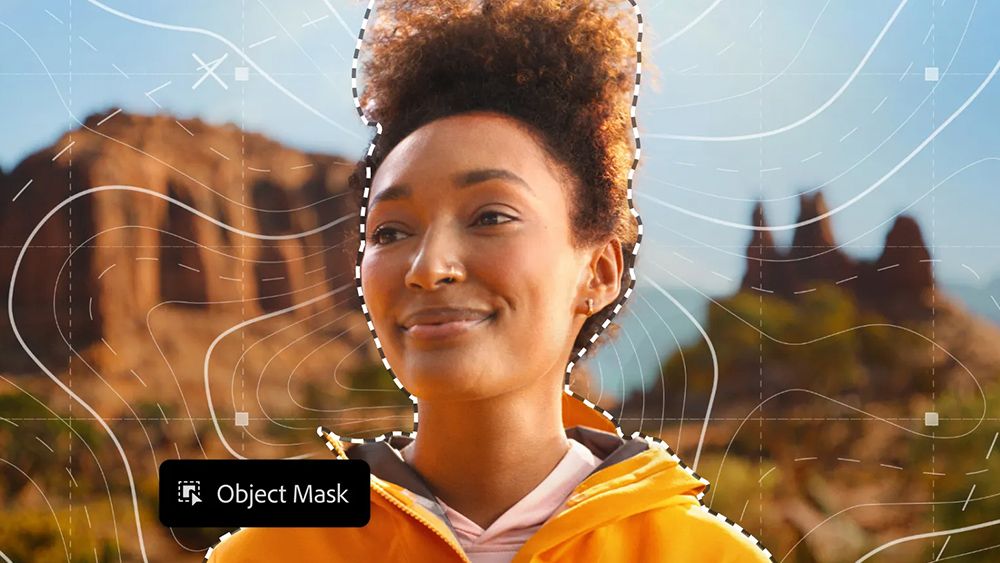
Adobe's putting most of the focus on Premiere (previously Premiere Pro). The video editing app now has a one-click AI-powered Object Masking tool like DaVinci Resolve’s Magic Mask for AI rotoscoping. There are also improved shape masks, Firefly Boards to Premiere integration and an updated Frame.io panel for collaboration.

But more interesting for animation and 3D work are the updates to After Effects. The app now has improved vector workflows, native 3D parametric meshes and a massive upgrade for motion typography.

First up, there's finally support for SVGs in After Effects. Why this took so long, I don't know, but You can now import SVG files as native shape layers and use them to animate with full vector fidelity.

Gradients and transparencies are preserved, so colour transitions can be keyframed and gradient motion animated. Gradient scale and rotation properties give more creative control for fills and strokes. Everything remains editable without having to go go through Illustrator, offering a huge time-saving upgrade for logo, icon and UI animations.

Finally, SVGs in After Effects! (Image credit: Adobe)

Also arriving from the beta release of After Effects is the ability to create parametric meshes directly in the program. You can build and customise cubes, spheres, cylinders, cones, toris and planes and combine shapes to craft stylised graphics or photorealistic set pieces

New Spot and Parallel shadows can be used to enhance the realism and dynamics of scenes. The addition allows faster experimentation and hints at an exciting future for native 3D design in After Effects.

Parametric meshes unlock new options for 3D design in After Effects. (Image credit: Adobe After Effects)

After Effects users can also now access and apply Substance 3D materials to native meshes and imported models to add depth and realism. This means you can drop textures like metal and concrete directly onto 3D objects in After Effects.

There are thousands of materials available via Substance Community Assets, including over 1,300 free materials, and materials are dynamic and customisable with offset, rotation and repeat controls.

There are over 1,300 free Substance 3D materials (Image credit: Adobe After Effects)

The big upgrade for motion typography in After Effects is the ability to animate every axis a variable font exposes using the Text Animator system,with keyframes, expressions. You can have up to eight axes per layer and adjust the weight, width, slant, wiggle and any designer-defined font axes in the Properties Panel, and drive them through the Essential Graphics panel.

(Image credit: Adobe After Effects)

Finally, there's the new Unmult effect, which quickly composites footage with solid black or white backgrounds by removing pixels based on brightness thresholds. This allows complex clips that contain fire and smoke to be keyed more easily.

See below for current Creative Cloud pricing, and check out our roundups of After Effects tutorials if you're getting started in the software. To take advantage of new AI features in your software, you might want to have one of the best laptops for video editing.

Sign up to read this article
Read news from 100’s of titles, curated specifically for you.
Already a member? Sign in here
Related Stories
Top stories on inkl right now
One subscription that gives you access to news from hundreds of sites
Already a member? Sign in here
Our Picks
Fourteen days free
Download the app
One app. One membership.
100+ trusted global sources.